Skip to Content

Shazam Gains Support for Split View on iPad

by

Apple today updated its Shazam app with Split View support for the iPad, allowing the Shazam app to be used alongside another app in a multitasking view.
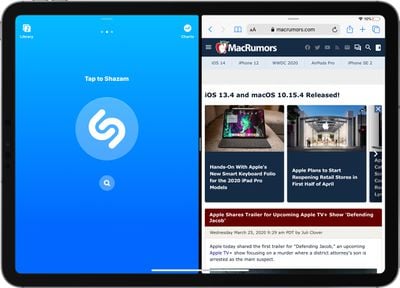
shazamsplitview
Using Shazam in Split View can be done by dragging the app to the left or right edge of an already open app to enter the Split View mode.

Today's Shazam update also allows users to delete Shazams by swiping on them in the list view that's available in the Library section of the app.

Shazam for iOS has been owned by Apple since 2018, and Apple has made multiple improvements to the app in that time, including making it free to download and use.

Shazam is available on iPhone and ‌iPad‌, plus its functionality is built into Siri and powers the feature that lets ‌Siri‌ identify songs that are playing when asked.

Tag: Shazam

Top Rated Comments

78 months ago
That's worthy of an article?

App owned by Apple. Took two years to make compatible with iOS 9!
Score: 7 Votes (Like | Disagree)
Rudy69 Avatar
78 months ago
I hate how apps have to explicitly support it. It should ‘just work’
Score: 5 Votes (Like | Disagree)
78 months ago

What a ridiculous way to waste half your screen, especially when you can just ask Siri
Siri takes over the entire screen...
Score: 3 Votes (Like | Disagree)
78 months ago
What a ridiculous way to waste half your screen, especially when you can just ask Siri
Score: 2 Votes (Like | Disagree)
k3ith Avatar
78 months ago
Shouldn't this article be asking why it took apple so long to add split view to an app they own, rather than just copy and pasting their press release?
Score: 2 Votes (Like | Disagree)
78 months ago

What a ridiculous way to waste half your screen, especially when you can just ask Siri
Presumably the POINT of this exercise is not to launch Shazam and catch a song, it's when you want to go through your Shazam's and do something about each song you have noted in the past. Decide whether to buy it, look up if you have it in your library already, etc.
Ie you want to compare the Shazam list against some other app in the second window.

PLEASE think before these knee-jerk criticisms. Nihilist know-nothing cynicism is fine in teenagers, it's a lot less attractive in adults.
Score: 1 Votes (Like | Disagree)

Popular Stories

Multicolored Low Cost A18 Pro MacBook Feature

Apple Accidentally Leaks 'MacBook Neo'

Tuesday March 3, 2026 7:00 am PST by
Apple appears to have prematurely revealed the name of its rumored lower-cost MacBook model, which is expected to be announced this Wednesday. A regulatory document for a "MacBook Neo" (Model A3404) has appeared on Apple's website. Unfortunately, there are no further details or images available yet. While the PDF file does not contain the "MacBook Neo" name, it briefly appeared in a link...
imac video apple feature

Apple Unveils Two New Products

Monday March 2, 2026 7:49 am PST by
Apple today introduced two new devices, including the iPhone 17e and an updated iPad Air. iPhone 17e features the same overall design as the iPhone 16e, but it gains Apple's A19 chip, MagSafe for magnetic wireless charging and magnetic accessories, Apple's second-generation C1X modem for faster 5G, and a doubled 256GB of base storage. In the U.S., the iPhone 17e starts at $599, just like the ...
Apple iPhone 17e feature

Apple Announces iPhone 17e With A19 Chip, MagSafe, and More

Monday March 2, 2026 6:07 am PST by
Apple today announced the iPhone 17e, featuring the A19 chip, MagSafe connectivity, faster charging, and more. The iPhone 17e contains the A19 chip introduced in iPhone 17. It features a 6-core GPU and a 4-core GPU. Apple pointed out that this makes it up to 2x faster than the iPhone 11. The new 16-core Neural Engine is optimized for large generative models. The iPhone 17e also contains...