Skip to Content

Apple Adding Swipe Keyboard Named QuickPath to iPhone and iPad

by

Apple today at WWDC 2019 announced that iPhones and iPads are getting a native swipe-based keyboard named QuickPath.
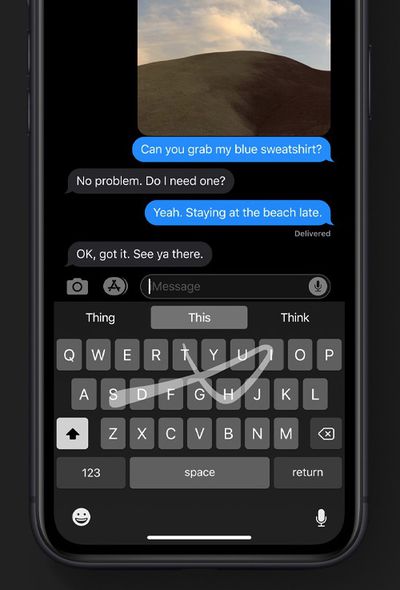
quickpath swipe keyboard iphone
The new QuickPath keyboard enables allows you to swipe your finger from one letter to the next to type without removing your finger from the keyboard to enter a word, allowing for easier one-handed typing. Apple's website confirms that the keyboard is available in both iOS 13 and iPadOS.

"Simply swipe from one letter to the next without lifting your finger to enter a word," says Apple. "On‑device machine learning recognizes the path you draw and converts it for you, making one‑handed typing a breeze."

At launch, QuickPath supports English, Simplified Chinese, Spanish, German, French, Italian, and Portuguese keyboards.

Swipe-based keyboards have been available on the iPhone and iPad since iOS 8 added support for third-party keyboards from the App Store, such as SwiftKey, but this is the first native solution to come from Apple.


Top Rated Comments

techfreak23 Avatar
88 months ago
I want hand written recognition keyboard on iPad and iPhone, for English.

Sadly hard to replicate text selection feature. That one is in particular super handy.
That will be the biggest loss in my opinion by getting rid of 3D Touch. They have the trackpad mode if you long press on the space bar, but it doesn’t allow you to select text... Also, Haptic Touch is trash compared to 3D Touch.
[doublepost=1559592424][/doublepost]
They are mostly replacing those with long press essentially (for example, tapping and holding the space bar already does the same kind of thing even in iOS 12 as 3D Touch does for cursor movement).
That “trackpad” by holding the space bar just allows you to scroll through text, but it doesn’t let you select text like 3D Touch does. Long press won’t work for text selection and having to use two fingers to select text would be terrible on the phone. I don’t see how they will replicate that functionality if they take out 3D Touch. If they had a solution for that, they would have demoed it today... That’s a huge loss to those of us that use 3D Touch heavily on the keyboard...
Score: 1 Votes (Like | Disagree)
scrapesleon Avatar
88 months ago
Sign in with Apple the best thing right now
Score: 1 Votes (Like | Disagree)

Popular Stories

imac video apple feature

Apple Unveils Seven New Products

Friday March 6, 2026 11:48 am PST by
Apple this week unveiled seven products, including an iPhone 17e, an iPad Air with the M4 chip, updated MacBook Air and MacBook Pro models, a new Studio Display, a higher-end Studio Display XDR, and an all-new MacBook Neo that starts at just $599. iPhone 17e features the same overall design as the iPhone 16e, but it gains Apple's A19 chip, MagSafe for magnetic wireless charging and magnetic...
Apple MacBook Pro M4 hero

Apple Planning 'MacBook Ultra' With Touchscreen and Higher Price

Sunday March 8, 2026 8:05 am PDT by
Apple is planning to launch an all-new "MacBook Ultra" model this year, featuring an OLED display, touchscreen, and a higher price point, Bloomberg's Mark Gurman reports. Gurman revealed the information in his latest "Power On" newsletter. While Apple has been widely expected to launch new M6-series MacBook Pro models with OLED displays, touchscreen functionality, and a new, thinner design...
MacBook Neo Feature Pastel 1

First MacBook Neo Benchmarks Are In: Here's How It Compares to the M1 MacBook Air

Thursday March 5, 2026 4:07 pm PST by
Benchmarks for the new MacBook Neo surfaced today, and unsurprisingly, CPU performance is almost identical to the iPhone 16 Pro. The MacBook Neo uses the same 6-core A18 Pro chip that was first introduced in the iPhone 16 Pro, but it has one fewer GPU core. The MacBook Neo earned a single-core score of 3461 and a multi-core score of 8668, along with a Metal score of 31286. Here's how the...