GarageBand for Mac Updated With New Drummers, Loops, Sound Effects and Free Artist Lessons - MacRumors
Skip to Content

GarageBand for Mac Updated With New Drummers, Loops, Sound Effects and Free Artist Lessons

by

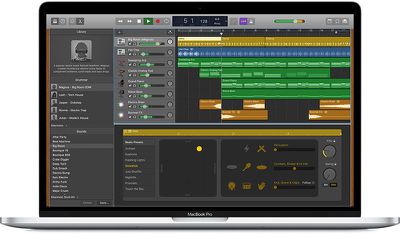
Apple today updated its GarageBand music creation software for Mac to version 10.3, introducing new loops, sound effects, drummers, and more, all for free.

There are two new Drummers that offer Roots and Jazz-influenced brush styles, along with 1,000 new electronic and urban loops that cover genres like Reggaeton, Future Bass, and Chill Rap.
garagebandformac
Apple says that it has added more than 400 animal, machine, and voice sound effects that can be worked into music creations, and there are also free downloadable Artist Lessons.

The new Artist Lessons are designed to teach users how to play hit songs on piano and guitar, and are taught by the artists that made the songs famous.

This is the first major update to GarageBand for Mac in a year. The last update, 10.2, was introduced in June 2017 and brought new Drummers along with support for the Touch Bar on the MacBook Pro.

Since April 2017, the GarageBand apps for both iOS and Mac have been available to download for free. You can get the new version of GarageBand for Mac from the Mac App Store. [Direct Link]


Top Rated Comments

jayducharme Avatar
105 months ago
I got the FCPX update, but the GB update still isn't showing up. I agree that GB is from a legacy time when Apple was giving people a stronger reason to switch to Mac. But I'm glad it's still included and I know a few people who have purchased their first Mac specifically because of GB.
Score: 5 Votes (Like | Disagree)
105 months ago
GarageBand 10.3 is unusable. It's introduced a serious bug.

GarageBand 10.3.0 has broken support for third-party AU virtual instruments. First it puts up an error message saying that you have to choose to reduce macOS security in your System Preferences to use a certain third-party AU plugin.

Then after you do that, it gives you an error message saying "Audio Unit plug-in can't be used. The Audio Unit could not be loaded for your project, and may need to be updated. Contact the manufacturer for an updated version or further assistance."

I have had this problem with 64-bit, up-to-date plugins that work just fine with no problem in MainStage 3.3.2 and other apps that use Audio Units. So the problem is with GarageBand 10.3.0.

I had no choice but to revert to GarageBand 10.2 from a backup so that I can keep working with my AU instruments.
Score: 3 Votes (Like | Disagree)
105 months ago
Ah... the 1GB+ app that I've removed a long time ago. I quite enjoy not having to update it to :p
The app you chose to install in the first place. What a pointless comment. :rolleyes:

Leave this thread for people who appreciate Apple giving us great software updates.
Score: 3 Votes (Like | Disagree)
PBG4 Dude Avatar
105 months ago
I’m surprised (but glad) Apple haven’t dropped GarageBand, it seems very much a legacy of what Apple was about 10 years ago, not where it seems to be going now.
GarageBand is almost like a reskinned version of Logic Pro X to make it easier to use. As long as LPX is updated, I expect GB to stick around.

It is a great piece of software if you want no hassle multitrack recording.
Score: 3 Votes (Like | Disagree)
NightFox Avatar
105 months ago
I’m surprised (but glad) Apple haven’t dropped GarageBand, it seems very much a legacy of what Apple was about 10 years ago, not where it seems to be going now.
Score: 3 Votes (Like | Disagree)
aliensporebomb Avatar
105 months ago
GarageBand 10.3 is unusable. It's introduced a serious bug.

GarageBand 10.3.0 has broken support for third-party AU virtual instruments. First it puts up an error message saying that you have to choose to reduce macOS security in your System Preferences to use a certain third-party AU plugin.

Then after you do that, it gives you an error message saying "Audio Unit plug-in can't be used. The Audio Unit could not be loaded for your project, and may need to be updated. Contact the manufacturer for an updated version or further assistance."

I have had this problem with 64-bit, up-to-date plugins that work just fine with no problem in MainStage 3.3.2 and other apps that use Audio Units. So the problem is with GarageBand 10.3.0.

I had no choice but to revert to GarageBand 10.2 from a backup so that I can keep working with my AU instruments.
That's a serious issue. And it's also why I keep an old version of Garageband as backup prior to the user interface overhaul.

I updated my machine this morning prior to going to the day gig, I'll have to check this out. I have a lot of virtual instruments.
Score: 2 Votes (Like | Disagree)

Popular Stories

iphone 16 teal

'Siri AI' Lawsuit Update: Apple to Pay Owners of These iPhone Models

Thursday July 9, 2026 7:08 am PDT by
In May, Apple agreed to pay $250 million to settle a U.S. class action lawsuit over Siri AI's delayed launch, and eligible iPhone users could receive up to a $95 payout. This week, the California court overseeing the case held a hearing regarding preliminary approval of the settlement, but the judge has not yet issued a ruling. It will likely be at least a few more months before eligible...
Apple TV Thumb 3

Everything Coming in the 2026 Apple TV 4K

Wednesday July 8, 2026 4:51 pm PDT by
The Apple TV 4K hasn't been updated since 2022, and it's due for a refresh. An update is planned for 2026, but Apple is likely going to wait to launch it after Siri AI launches in iOS 27. Design Apple TV design updates don't happen often, and that's not changing. The next Apple TV is going to have the same squircle shape as the current model, and it'll continue to be made from a black...
apple wallet drivers license feature iPhone 15 pro

Apple Says iPhone Driver's Licenses Will Expand to These 6 U.S. States

Thursday July 9, 2026 7:29 am PDT by
In select U.S. states, residents can add their driver's license or state ID to the Apple Wallet app on the iPhone and Apple Watch, and then use it to display proof of identity or age at select airports and businesses, and in select apps. To set up the feature, open the Wallet app on the iPhone and tap on the plus sign in the top-right corner. Next, tap on Driver's License and ID Cards,...