

Office for Mac 16 Gains Real-Time Collaborative Editing and Other New Features - MacRumors
Skip to Content

Office for Mac 16 Gains Real-Time Collaborative Editing and Other New Features

by

Office for Mac today received a major update, with Microsoft updating the software to version 16 and introducing new features for Word, Excel, PowerPoint, and Outlook.

In Word, Excel, and PowerPoint, Microsoft is introducing real-time collaborative editing, allowing multiple people to work on the same document at the same time. In Word and PowerPoint, flag icons will let you know what others are working on and what's been changed.

Changes to documents, worksheets, and presentations stored in the cloud will be saved automatically, and updates will be synced in seconds. A version history will let you roll back to earlier versions of a document if necessary.
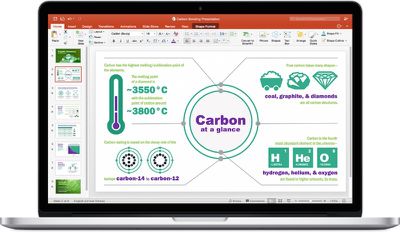
Office 2016 Mac
Quick access to sites and groups has also been included, with presentations, documents, and worksheets stored in the frequently used sites and groups section in the Open menu.

In addition to collaborative editing, Excel is gaining new chart types, additional functions, improved support for PivotTable charts, and multi-threaded calculation for faster formula updating when values are changed.

PowerPoint includes a QuickStarter function that lets you create an outline complete with suggested talking points and designs, while a new Trim Media tool will let you quickly edit audio and video clips. The mouse can also be used as a laser pointer in Slide Show for highlighting slide content.

Outlook, Microsoft's email app, is gaining a new feature that will let you archive or delete emails with a swipe across the touchpad, and support for Google Calendar and Contacts has been added.

Along with these feature changes, version 16 of Office 2016 for Mac includes an overhaul of the underlying code for Office, PowerPoint, and Excel, introducing more common code between platforms to ensure better feature parity.

Full details on what's new in Office for Mac can be found in the release notes shared on Microsoft's Office 2016 for Mac support site.


Top Rated Comments

109 months ago
...but do these changes include multi-CPU/multi-threaded processing? Because taking 45 minutes to calculate some of my Excel documents is absurd, especially when I have other CPUs sitting there idle.

EDIT: YAY!! It does!!! "Multi-threaded calculation Formulas are updated faster when values are changed, because Excel uses multiple processing threads."

EDIT2: Well... I just did a test. It's now using 2 threads, which is obviously better than 1, but still not using the whole of my MacBook Pro's potential.

Attachment Image
Score: 11 Votes (Like | Disagree)
Avieshek Avatar
109 months ago
iWork is collecting dusts.. and spider webs
Score: 5 Votes (Like | Disagree)
109 months ago
Most Mac software from Apple is doing that unfortunately.
I guess you missed the huge update Final Cut Pro and the other pro video apps just got, plus the other iWork updates from 2017. :rolleyes:
Score: 3 Votes (Like | Disagree)
T'hain Esh Kelch Avatar
109 months ago
iWork is collecting dusts.. and spider webs
Most Mac software from Apple is doing that unfortunately.
Score: 3 Votes (Like | Disagree)
the_color_orange Avatar
109 months ago
Office 2016 is powerful. I use it for almost everything. I feel bad that iWork hasn’t received any love. Looks like Apple gave up with their productivity applications.
Score: 3 Votes (Like | Disagree)
109 months ago
Along with these feature changes, version 16 of Office 2016 for Mac includes an overhaul of the underlying code ('https://www.jamf.com/blog/office-for-mac-turns-suite-16/') for Office, PowerPoint, and Excel, introducing more common code between platforms to ensure better feature parity.
Doesn't seem like it, since Outlook for Mac is still very crippled and missing many features found in the Windows version. Makes it difficult to work in mixed platform company without asking Windows users to restrict their use of those features. Good luck making that happen :p
Score: 2 Votes (Like | Disagree)

Popular Stories

macOS 27 on MacBook Pro

Apple Says macOS 27 Won't Be Compatible With These Macs

Wednesday June 3, 2026 8:29 am PDT by
During WWDC 2025, Apple revealed that macOS 26 Tahoe would be the final major macOS version for Intel-based Macs. macOS 27 will be compatible with Apple silicon Macs only, meaning that you will need a Mac with an M-series chip or a MacBook Neo with an A18 Pro chip in order to install the software update. Apple will unveil macOS 27 during its WWDC 2026 keynote this Monday, June 8, and the...


MacBook Neo on Yellow Feature

MacBook Neo is So Popular That Apple Reportedly Doubled Production

Wednesday June 3, 2026 9:24 am PDT by
On an earnings call in late April, Apple's CEO Tim Cook said that customer response to the MacBook Neo was "off the charts," and the popularity of the laptop has reportedly led the company to significantly boost production. Apple supply chain analyst Ming-Chi Kuo this week said he believes that MacBook Neo shipments to Apple were doubled from an initial target of 5 million units to 10...
iphone 18 pro blue%402x

iPhone 18 Pro: Dark Cherry, Light Blue, and Dark Gray Chassis Leaked [Update]

Thursday June 4, 2026 5:18 am PDT by
Update: Since publication, new information has come to light suggesting the images have been AI-manipulated and are not in fact iPhone 18 Pro chassis parts. The original article follows. The color options Apple is reportedly planning for the upcoming iPhone 18 Pro and ‌iPhone 18 Pro‌ Max have appeared online today in the form of images of chassis parts of unknown authenticity....








































