CES 2018: Matias Announces Wired Aluminum Mac Keyboard With RGB Backlighting - MacRumors
Skip to Content

CES 2018: Matias Announces Wired Aluminum Mac Keyboard With RGB Backlighting

by

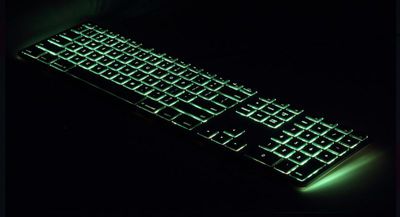
At CES on Tuesday, third-party accessory maker Matias announced an RGB-backlit wired aluminum keyboard for Mac. Inspired by Apple's own, now defunct wired keyboard, Matias' silver and space grey versions look almost identical, except for the addition of a "color dial" on the back and a dedicated key on the layout that allow users to incrementally shift the backlighting through the color spectrum.
4
Citing a Harvard sleep study, Matias notes that too much blue-light exposure at night is known to negatively impact melatonin levels, which can shift the body's natural time clock — leading to poor sleep and various other health issues. However, the existence of the rotary color dial on its latest keyboard means users can dial back the blue component of white light when they're working late into the evening.

The RGB keyboard features Apple-style function keys to let users control screen brightness, volume, iTunes, and so on, and also includes a built-in USB 2.0 port underneath on the right hand side, for connecting a wired mouse or wireless dongle.

The keyboards cost $99 each and will be available in a wide range of international layouts (US, EU, and Asian). They can be pre-ordered now from the Matias website, with free shipping to the U.S. and Canada, for delivery in late February.

Top Rated Comments

114 months ago
I’m glad to see this. I just wish Apple would come out with a backlit keyboard. It’s odd to me that they haven’t.
It was clearly more important to reduce the key travel and decrease the typing angle - as demanded by absolutely nobody at all.

Not even clear why wireless is a must-have on a desktop keyboard, either... solve the problem with backlights sucking power, and it is jolly useful to have a couple of extra USB-A ports on the desk, esp. with an iMac where all the ports are tucked around the back.

Matias notes that too much blue-light exposure at night is known to negatively impact melatonin levels, which can shift the body's natural time clock
...quite possibly a "thing" in the case of that ultra-bright 27" rectangle that you're staring intently at, but methinks that if your keyboard backlight is disturbing your sleep then you're holding it wrong...
Score: 5 Votes (Like | Disagree)
114 months ago
Likely to capitalize on scale by sharing parts and processes between desktop and mobile versions
Because they want a uniform typing experience across all their products.
I could almost understand that, but it's not the same part - its a sort of half-way house between the old-style (excellent) key switch and the (horrible) new MBP keyswitch. Its not bad - and I stuck with it for several weeks before deciding it was just less comfortable and somehow more error-prone that the old keyboard, and switching back. Some people seem to like it (but then I know people who liked the hockey puck mouse and Windows Vista :-) ) but several others here have found the same as me: it feels OK at first but becomes uncomfortable after extended use (I think it is a combination of the angle and reduced "springy-ness"). However, I don't recall anybody complaining about the old keyboard unless they were die-hard full-travel people...

A classic case of "It ain't broke: don't fix it!"

Fortunately, it's a very easy problem to solve on the iMac
True.

Unfortunately, the old Aluminium wired keyboard was a really, really good example of how to make an acceptable short-travel keyboard. Fortunately, I have a couple of spares...
Score: 2 Votes (Like | Disagree)
Phil in ocala Avatar
114 months ago
I'd really like to get one of these - but after reading the latest reviews of some of their other keyboards (wireless w/keypad and illuminated wireless w/keypad) on Amazon, I'm not going to risk a pre-order. Seems like they have a lot of quality issues lately.
&&&&&&&&&&&&&&&&&&&&&&&&&&&&&&
Chinese Quality
Score: 1 Votes (Like | Disagree)
114 months ago
I was under the impression that the new MacBook Pro "second gen" butterfly keyboard was about the same as the Magic Keyboard I have. Is that not true?
I've only tried the butterfly keyboards in a shop, but my brief impression was certainly that the 2nd gen in the MBP was better than the 1st gen in the rMB - similar travel but somehow better "feel", but it certainly isn't the same as the Magic - which is still a scissor mechanism.

The travel on the "magic" is somewhere between the "butterfly" and the "classic" key - but it ain't Goldilocks.
Score: 1 Votes (Like | Disagree)
114 months ago
Yeah that's part of the paradox of Apple, I guess. They made the iMac keyboard more like the laptop keyboard, but why? I get that they want to reduce the size and weight of a laptop to make it as portable as possible (even though I may not prefer the newer keyboard), but why do this with the iMac? And if you really want to make the iMac keyboard like the laptop keyboard, why not make it backlit? Why not add TouchID?
Because they want a uniform typing experience across all their products. Apple is huge on consistency whenever possible. That's a good thing when it works because Apple hardware and UI conforms to certain design conventions and is more familiar as soon as you start using it.

In this case, though, it's just a "lowest common denominator". If the iMac had a wonderful keyboard with tactile response and decent key travel, people would start wondering why they put a trash keyboard in the MacBook just to save a millimeter on the thickness of the device. So everybody gets the same ****y butterfly-switch keyboard that feels like you're hammering your fingers on a piece of hard metal.

Fortunately, it's a very easy problem to solve on the iMac -- just plug in [nice keyboard of your choice] and never look back. On the laptop side... well, let's just say I'm still rocking a MacBook Air because it has somewhat real-er of a keyboard.
Score: 1 Votes (Like | Disagree)
ThisBougieLife Avatar
114 months ago
It was clearly more important to reduce the key travel and decrease the typing angle - as demanded by absolutely nobody at all.
Yeah that's part of the paradox of Apple, I guess. They made the iMac keyboard more like the laptop keyboard, but why? I get that they want to reduce the size and weight of a laptop to make it as portable as possible (even though I may not prefer the newer keyboard), but why do this with the iMac? And if you really want to make the iMac keyboard like the laptop keyboard, why not make it backlit? Why not add TouchID?
Score: 1 Votes (Like | Disagree)

Popular Stories

Apple TV 4K HomeView HomePod Mini tweaked

New Apple TV 4K, HomeView, and HomePod Mini: 16 Details Just Leaked

Sunday October 11, 2026 12:56 pm PDT by
Just two days before Apple's "Welcome home" experience in New York, Bloomberg's Mark Gurman has leaked several details about the new products set to be unveiled, including an all-new smart home hub, a HomePod mini 2, and a new Apple TV 4K. Here is an all-in-one summary of the details shared by Gurman:Apple's home hub with a touch-enabled display will be named HomeView, seemingly confirming a ...
Apple HomeView lineup feature1

Apple Announces 'HomeView' Smart Home Hub

Tuesday October 13, 2026 6:00 am PDT by
Apple today announced the "HomeView," an all-new kind of smart home hub featuring a 7-inch Liquid Retina display and Siri AI. Apple's senior vice president of Worldwide Marketing Greg Joswiak said: Apple HomeView is designed to be shared by everyone in the home yet feel completely personal to each user. It recognizes your face to shift from a household screen to your own experience,...
Apple TV 4K 4th Generation feature4

New Apple TV 4K Announced With A19 Chip, Updated Siri Remote, More

Tuesday October 13, 2026 6:08 am PDT by
Apple today announced the fourth-generation Apple TV 4K, with key features including an A19 chip, Siri AI support, an updated Siri Remote that has Find My support with Precision Finding, built in far-field microphones, support for surround sound with four HomePods in front and rear pairs, and more. The A19 chip in the new Apple TV 4K delivers up to 50% faster CPU performance and up to twice...
Latest Stories
10 HomeView Features You Might Have Missed
39 minutes ago
Apple Becomes Second Company to Close Above $5 Trillion
1 hour ago
Which Apple Home Devices Get Siri AI, and When
2 hours ago
Apple's Long-Delayed HomeView Was Already Being Tested in 2024
3 hours ago
Apple Intelligence Coming to China in December With iOS 27.3
3 hours ago
Apple Invites App Updated With Two New Features
3 hours ago
OpenAI Says Ex-Employee Showed Its Device Plans to Apple
5 hours ago
Discover the Best Cases and Screen Protectors for Your New iPhone Duo
5 hours ago
Apple Store Near Los Angeles Closed Due to 'Events Beyond Our Control'
7 hours ago
No, HomePod Mini 1 Won't Support Siri AI as CNET Reported
7 hours ago
iPhone Duo Compromises: Everything You Have to Give Up
8 hours ago
Apple HomeView Has These 15 Apps, Some CarPlay Apps and Widgets Also Supported
8 hours ago
iPhone Duo: Apple Charging $49 for New Cover Layer, $229 for Battery
8 hours ago
iPhone Duo: Skipping AppleCare+ Could Be $1,499 Mistake
8 hours ago
Ready for HomeView? Don't Miss These Smart Home Accessory Deals
9 hours ago
Apple Says HomePod 2 Also Works as Default Speaker With Select Macs
9 hours ago
HomePod Mini 2: All the New Features
10 hours ago
WhatsApp Now Lets Anyone Join Calls, No Account Needed
10 hours ago
AppleCare+ Launched 15 Years Ago Today
10 hours ago
Apple Reportedly Planning Large iPhone 18 Production Run
10 hours ago
Apple Says These Products Are Now Obsolete
10 hours ago
First Pre-Order Discounts Now Available for HomeView
5 hours ago
Apple Launched iPhone 4S With Siri 15 Years Ago Today
11 hours ago
Apple HomeView Includes Temperature and Humidity Sensors
11 hours ago
HomePod Mini vs. HomePod Mini 2 Buyer's Guide: All Differences Compared
11 hours ago
Apple Watch Sleep Apnea Notifications Launch in China
13 hours ago
HomeView's Faces Include Snoopy, Photos, and Interactive Artwork
13 hours ago
Apple's HomeView Repair Fees Revealed
23 hours ago
Everything Apple Still Has Coming in October
1 day ago
Welcome Home: Everything Apple Announced on October 13
1 day ago