

Fix for iOS Autocorrect Bug Reportedly Arrived in Latest Developer Beta, Coming to Public Beta This Week
For well over a week, many iOS 11 users have been noting a strange autocorrect bug plaguing their devices, which autocorrects the letter "i" to the uppercase letter "A" and a question mark symbol. Apple has issued a support document to help anyone facing the problem figure out a temporary workaround, but The Wall Street Journal recently reported that the bug has been fixed in the second iOS 11.2 developer beta released yesterday.
A few MacRumors forum members also mentioned a fix appearing in the second developer beta of iOS 11.2, although none seem to have yet confirmed the fix is implemented, likely because they never faced the bug in the first place. In The Wall Street Journal's report, an Apple spokesperson confirmed that an update fixing the problem "will be included in this week's public and developer beta releases."
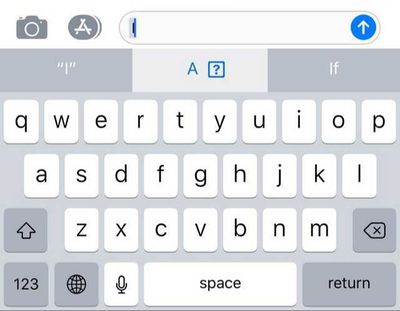
A window for the non-beta fix wasn't given by Apple, but the company said the wide release rollout will follow, which was expected. At this point, it's unclear whether Apple will introduce the autocorrect bug fix in a quick update, or wait and launch it in iOS 11.2. It's been one week since iOS 11.1 launched, so 11.2 will probably not drop until later in November.
Nevertheless, Apple said it would patch the problem in an iOS update. “A fix will be released very soon,” an Apple spokeswoman said. It will be included in this week’s public and developer beta releases, with wide rollout to follow.
Although Apple originally stated that the bug was related to iOS 11.1, Apple confirmed that it "could also appear in earlier versions of iOS 11." Both The Wall Street Journal and multiple MacRumors forum members mentioned seeing the issue surface on devices running iOS 11.0.3.
If you are having trouble with the bug, Apple's temporary solution is to set up a Text Replacement for the letter "i" by visiting the Settings app > General > Keyboard > Text Replacement. After tapping the plus button to add a new replacement, in the Phrase field type an uppercase "I", and in Shortcut type a lowercase "i".
You can also toggle "Predictive" off completely in the Keyboard section of Settings, although that would greatly hinder the keyboard usability for many users. Third-party keyboard apps like Gboard are also available to type on without having to worry about the autocorrect bug.

Popular Stories
Apple today updated its trade-in values for select iPhone, iPad, Mac, and Apple Watch models. Trade-ins can be completed on Apple's website, or at an Apple Store.
The charts below provide an overview of Apple's current and previous trade-in values in the U.S., according to its website. Maximum values for most devices either decreased or saw no change, but the iPad Air received a slight bump.
...
Apple is promoting the new Liquid Glass design in iOS 26, showing off the ways that third-party developers are embracing the aesthetic in their apps. On its developer website, Apple is featuring a visual gallery that demonstrates how "teams of all sizes" are creating Liquid Glass experiences.
The gallery features examples of Liquid Glass in apps for iPhone, iPad, Apple Watch, and Mac. Apple...
Apple's online store in the U.S. is suddenly offering a pack of four AirTags for just $29, which is the same price as a single AirTag.
This is likely a pricing error, and it is unclear if orders will be fulfilled. Apple has not discounted the AirTag four-pack in any other countries that we checked.
Delivery estimates are already pushing into late November to early December, suggesting...
Following more than a month of beta testing, Apple released iOS 26.1 on Monday, November 3. The update includes a handful of new features and changes, including the ability to adjust the look of Liquid Glass and more.
Below, we outline iOS 26.1's key new features.
Liquid Glass Toggle
iOS 26.1 lets you choose your preferred look for Liquid Glass.
In the Settings app, under Display...
IKEA today announced the upcoming launch of 21 new Matter-compatible smart home products that will be able to interface with HomeKit and the Apple Home app. There are sensors, lights, and control options, all of which will be reasonably priced. Some of the products are new, while some are updates to existing lines that IKEA previously offered.
There are a series of new smart bulbs that are...
We're officially in the month of Black Friday, which will take place on Friday, November 28 in 2025. As always, this will be the best time of the year to shop for great deals, including popular Apple products like AirPods, iPad, Apple Watch, and more. In this article, the majority of the discounts will be found on Amazon.
Note: MacRumors is an affiliate partner with some of these vendors. When ...
The future of Apple Fitness+ is "under review" amid a reorganization of the service, according to Bloomberg's Mark Gurman.
In the latest edition of his "Power On" newsletter, Gurman said that Apple Fitness+ remains one of the company's "weakest digital offerings." The service apparently suffers from high churn and little revenue.
Nevertheless, Fitness+ has a small, loyal fanbase that...
HTX Studio this week shared the results from a six-month battery test that compared how fast charging and slow charging can affect battery life over time.
Using six iPhone 12 models, the channel set up a system to drain the batteries from five percent and charge them to 100 percent over and over again. Three were fast charged, and three were slow charged.
Another set of iPhones underwent...
Apple in iOS 26.2 will disable automatic Wi-Fi network syncing between iPhone and Apple Watch in the European Union to comply with the bloc's regulations, suggests a new report.
Normally, when an iPhone connects to a new Wi-Fi network, it automatically shares the network credentials with the paired Apple Watch. This allows the watch to connect to the same network independently – for...











































