

iOS 11.1 Beta 2 Brings Back 3D Touch App Switcher - MacRumors
Skip to Content

iOS 11.1 Beta 2 Brings Back 3D Touch App Switcher

In the second beta of iOS 11.1, Apple has reintroduced the 3D Touch App Switcher gesture on devices that are equipped with 3D Touch.

The feature was "intentionally removed" during the iOS 11 beta testing process and was not reimplemented ahead of the official iOS 11 launch, but Apple software engineering chief Craig Federighi promised it would be re-added in a future iOS 11 update.
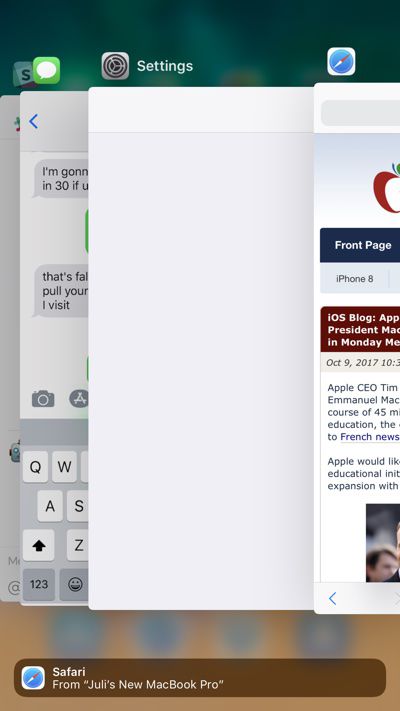
appswitcher
In an email to a MacRumors reader, Federighi said the feature needed to be temporarily removed in iOS 11 because of technical issues.

We regretfully had to temporarily drop support for this gesture due to a technical constraint. We will be bringing it back in an upcoming iOS 11.x update.

Thanks (and sorry for the inconvenience)!

The gesture, first implemented in iOS 9, allows users with a compatible iPhone to 3D Touch at the left edge of the display to bring up the App Switcher. When it was pulled from the beta, many iPhone users were disappointed as it is a convenient method for switching between apps with a single gesture. Sans gesture, the only way to bring up the App Switcher on an iPhone is by a double press on the Home button.


iOS 11.1 beta 2 is currently available for developers, but a public beta should be coming later this week. We're still early in the beta testing process, so it's not yet clear when iOS 11.1 will see a public release.


Related Forum: iOS 11

Popular Stories

iphone 16 teal

'Siri AI' Lawsuit Update: Apple to Pay Owners of These iPhone Models

Thursday July 9, 2026 7:08 am PDT by
In May, Apple agreed to pay $250 million to settle a U.S. class action lawsuit over Siri AI's delayed launch, and eligible iPhone users could receive up to a $95 payout. This week, the California court overseeing the case held a hearing regarding preliminary approval of the settlement, but the judge has not yet issued a ruling. It will likely be at least a few more months before eligible...
Apple TV Thumb 3

Everything Coming in the 2026 Apple TV 4K

Wednesday July 8, 2026 4:51 pm PDT by
The Apple TV 4K hasn't been updated since 2022, and it's due for a refresh. An update is planned for 2026, but Apple is likely going to wait to launch it after Siri AI launches in iOS 27. Design Apple TV design updates don't happen often, and that's not changing. The next Apple TV is going to have the same squircle shape as the current model, and it'll continue to be made from a black...
apple wallet drivers license feature iPhone 15 pro

Apple Says iPhone Driver's Licenses Will Expand to These 6 U.S. States

Thursday July 9, 2026 7:29 am PDT by
In select U.S. states, residents can add their driver's license or state ID to the Apple Wallet app on the iPhone and Apple Watch, and then use it to display proof of identity or age at select airports and businesses, and in select apps. To set up the feature, open the Wallet app on the iPhone and tap on the plus sign in the top-right corner. Next, tap on Driver's License and ID Cards,...

Top Rated Comments

penajmz Avatar
114 months ago
I’m so happy about this. Missed this BIGLY!
Score: 23 Votes (Like | Disagree)

thejadedmonkey Avatar
114 months ago
I wonder what sort of technical constraint would have caused the need to remove it.?
Score: 19 Votes (Like | Disagree)
gixxerfool Avatar
114 months ago
This is exciting. For all the naysayers claiming 3D Touch is a gimmick, when they pull something like this, you notice how much you actually use it.
Score: 13 Votes (Like | Disagree)
114 months ago
Whats the big deal never used it maybe fix 3d touch first
[doublepost=1507572527][/doublepost]Its quicker to double tap home button
Not when you are going to the previous app. Push down and swipe across the screen. Done.
Score: 11 Votes (Like | Disagree)
MartinAppleGuy Avatar
114 months ago
I’m enjoying this ‘listening’ Apple.
Score: 9 Votes (Like | Disagree)
114 months ago
There's now a toggle to manually turn off the Wi-Fi on the  Watch and force cellular in absence of bluetooth. It also displays the name of the Wi-Fi network!

Attachment Image
Score: 8 Votes (Like | Disagree)










































