Popular journaling app Day One received an update yesterday that introduces end-to-end encryption to its cloud server for the first time, as well as a handful of other improvements.

Rather than using iCloud, Day One synchronizes data between devices using its own servers, something that has opened it up to criticism in the past because of security concerns regarding private journal data.
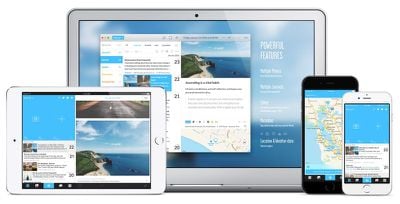
DayOne2 Showcase 001 03 1
Version 2.2 of the app should allay those worries, since Day One now encrypts journal data from client to server via a user-generated private key. However it's important to note that the new end-to-end encryption feature is enabled on a journal-by-journal basis, so users need to go to Journals in Day One's Settings and select the journals they want to encrypt from there.

If users do not enable end-to-end encryption, Day One defaults to standard encryption, which encrypts journal data "at rest" on the company's servers. This less secure method requires that Day One staff hold the keys to decrypt journal data.

In addition to the enhanced security feature, the in-app camera has been improved to make it easier to take photos and quickly add multiple square-cropped shots to entries. Journal metadata now also includes the device name on which an entry was created.

Elsewhere, recent searches are now saved in a list for convenient re-use, while an app-wide state restoration system has been implemented so that users can pick up where they left off in the event of a crash or a force quit. The update also includes several fixes that should improve the user experience.

End-to-end encryption is included in the 2.2 update for both iOS and Mac. Day One is a $4.99 app on the iOS App Store and costs $39.99 on the Mac App Store.
Tag: Day One

Top Rated Comments

miknos Avatar
111 months ago
This is how encryption should be! Only YOU should have access to YOUR data!
Score: 6 Votes (Like | Disagree)
AppleInLVX Avatar
111 months ago
Out of interest what benefit do you find in looking back at what you were doing a year ok this day
There's a couple things I'd consider benefits. I can see where I was a year or more ago with regard to what I was doing and see if I've moved the needle in any way, see which of my great ideas were just ideas and which had legs. I'm a hobby gardener, and so I can see when the plants are out this year vs. previous years and thereby track how the seasons are going. More surprizingly, I've noticed patterns in the wheel of the year that keep repeating year over year and it's just plain neat to see how precise the seasons are. A particular flower or bud will appear on *exactly* the same day. Sometimes I'll find I do yearly tasks like road trips on exactly the same days without thinking or planning, things I think are spontaneous are in fact running on feelings that get triggered by the time of year. It's hard to explain, but very cool. Also, the photos I take show the evolution of the world around me and document what I've been up to, how I've felt, etc. I've found it to be a really nifty sort of exercise. Whether these things are "benefits" are probably down to what you value personally, but it's been good for me.
Score: 2 Votes (Like | Disagree)
iDento Avatar
111 months ago
If they ever go out of business or stop making this app, is there any way to move all of your entries to something else?

The last time I attempted to keep anything like a journal was a notebook in college. Electronically I used a Word document but got tired of that after a week's worth of entries. Facebook was fun but obviously I can't write anything too private on there.

I'm 50 and while I don't need to pour my heart out into a diary I do need some way of remembering what happened last week. I meet a lot of people and forget who they are fifteen minutes later. It would be nice to have a journal to help refresh my memory about such things. I kind of survive off of post it notes. Or worse, I email myself. Doh.
I export my entires as PDF files each month, then use an app to hide it, I use Hider 2 for that.

The PDF files exported by DayOne looks gorgeous and frankly, I think they look even better than viewing my journal in the app interface!

Also, you can order prints of your data but I'm not quite familiar with that.
Score: 2 Votes (Like | Disagree)
DocPenguin Avatar
111 months ago
Most excellent. Day One is awesome, but now my tinfoil hat will glow a little less brighter when I use it.
Score: 2 Votes (Like | Disagree)
iDento Avatar
111 months ago
I've been using this app for 7 years and it's really useful, although when they released ver 2.0 I bought the iOS app only, partly because I don't use my Mac for this kind of apps anymore and partly because it is expensive, I got version 1 for 19.99$ if I am not mistaken.

End to end encryption and a solid sync are major features and they're nailing it.
Score: 2 Votes (Like | Disagree)
BigMcGuire Avatar
111 months ago
There's a couple things I'd consider benefits. I can see where I was a year or more ago with regard to what I was doing and see if I've moved the needle in any way, see which of my great ideas were just ideas and which had legs. I'm a hobby gardener, and so I can see when the plants are out this year vs. previous years and thereby track how the seasons are going. More surprizingly, I've noticed patterns in the wheel of the year that keep repeating year over year and it's just plain neat to see how precise the seasons are. A particular flower or bud will appear on *exactly* the same day. Sometimes I'll find I do yearly tasks like road trips on exactly the same days without thinking or planning, things I think are spontaneous are in fact running on feelings that get triggered by the time of year. It's hard to explain, but very cool. Also, the photos I take show the evolution of the world around me and document what I've been up to, how I've felt, etc. I've found it to be a really nifty sort of exercise. Whether these things are "benefits" are probably down to what you value personally, but it's been good for me.
What an awesome write up! Really great!

I was shocked to see that for my "goals" part of my daily logs - I was saying almost the IDENTICAL stuff years ago. Like wait a minute, I've been trying to do this for 2 years now? Really? lol. What am I not doing to make this happen? It was incredibly shocking.

I take a lot of photos of my surroundings just so I can remember what I did during the day - to make it easier to write a "daily log" when I get back home. This helps me with the self improvement process - noticing small things, habits, etc...

The biggest benefit that I've found writing these logs is the act of de-stressing. The world, my job, etc... is incredibly stressful. It's an incredibly de-stressing exercise to write my thoughts down, talk about my day, and recording information.

Many many years ago, while watching Star Trek episodes, I thought how cool it was - the Captain's log - daily logs of the crew. That's what started my whole "daily log" routine.

I've found that the quality of my "logs" go up if I don't do one every day because it's not every day I feel like spending 10-15 mins writing about my day. When I was writing every day it became a monotonous chore where I was listing off the things I did. When I write once or twice a week, I remember more, talk about thoughts, state of mind, etc...

I figure for the cost of 30 mins a few times a week - the relaxing (anti-stress) action is incredibly beneficial.
Score: 1 Votes (Like | Disagree)

Popular Stories

iOS 26

iOS 26.2 Coming Soon With These 8 New Features on Your iPhone

Thursday December 11, 2025 8:49 am PST by
Apple seeded the second iOS 26.2 Release Candidate to developers earlier this week, meaning the update will be released to the general public very soon. Apple confirmed iOS 26.2 would be released in December, but it did not provide a specific date. We expect the update to be released by early next week. iOS 26.2 includes a handful of new features and changes on the iPhone, such as a new...
Google maps feaure

Google Maps Quietly Added This Long-Overdue Feature for Drivers

Wednesday December 10, 2025 2:52 am PST by
Google Maps on iOS quietly gained a new feature recently that automatically recognizes where you've parked your vehicle and saves the location for you. Announced on LinkedIn by Rio Akasaka, Google Maps' senior product manager, the new feature auto-detects your parked location even if you don't use the parking pin function, saves it for up to 48 hours, and then automatically removes it once...
AirPods Pro Firmware Feature

Apple Releases New Firmware for AirPods Pro 2 and AirPods Pro 3

Thursday December 11, 2025 11:28 am PST by
Apple today released new firmware designed for the AirPods Pro 3 and the prior-generation AirPods Pro 2. The AirPods Pro 3 firmware is 8B30, up from 8B25, while the AirPods Pro 2 firmware is 8B28, up from 8B21. There's no word on what's include in the updated firmware, but the AirPods Pro 2 and AirPods Pro 3 are getting expanded support for Live Translation in the European Union in iOS...
iOS 26

iOS 26.4 and iOS 27 Features Revealed in New Leak

Friday December 12, 2025 10:56 am PST by
Macworld's Filipe Espósito today revealed a handful of features that Apple is allegedly planning for iOS 26.4, iOS 27, and even iOS 28. The report said the features are referenced within the code for a leaked internal build of iOS 26 that is not meant to be seen by the public. However, it appears that Espósito and/or his sources managed to gain access to it, providing us with a sneak peek...
Foldable iPhone 2023 Feature 1

Apple to Make More Foldable iPhones Than Expected [Updated]

Tuesday December 9, 2025 9:59 am PST by
Apple has ordered 22 million OLED panels from Samsung Display for the first foldable iPhone, signaling a significantly larger production target than the display industry had previously anticipated, ET News reports. In the now-seemingly deleted report, ET News claimed that Samsung plans to mass-produce 11 million inward-folding OLED displays for Apple next year, as well as 11 million...
AirTag 2 Mock Feature

Apple AirTag 2: Four New Features Found in iOS 26 Code

Thursday December 11, 2025 10:31 am PST by
The AirTag 2 will include a handful of new features that will improve tracking capabilities, according to a new report from Macworld. The site says that it was able to access an internal build of iOS 26, which includes references to multiple unreleased products. Here's what's supposedly coming: An improved pairing process, though no details were provided. AirTag pairing is already...
iOS 26

Apple Releases iOS 26.2 With Alarms for Reminders, Lock Screen Changes, Enhanced Safety Alerts and More

Friday December 12, 2025 10:10 am PST by
Apple today released iOS 26.2, the second major update to the iOS 26 operating system that came out in September, iOS 26.2 comes a little over a month after iOS 26.1 launched. ‌iOS 26‌.2 is compatible with the ‌iPhone‌ 11 series and later, as well as the second-generation ‌iPhone‌ SE. The new software can be downloaded on eligible iPhones over-the-air by going to Settings >...
iOS 26

15 New Things Your iPhone Can Do in iOS 26.2

Friday December 5, 2025 9:40 am PST by
Apple is about to release iOS 26.2, the second major point update for iPhones since iOS 26 was rolled out in September, and there are at least 15 notable changes and improvements worth checking out. We've rounded them up below. Apple is expected to roll out iOS 26.2 to compatible devices sometime between December 8 and December 16. When the update drops, you can check Apple's servers for the ...
maxresdefault

iOS 26 Code Leak Reveals Apple Smart Home Hub Details

Thursday December 11, 2025 4:02 pm PST by
Apple is working on a smart home hub that will rely heavily on the more capable version of Siri that's coming next year. We've heard quite a bit about the hub over the last two years, but a recent iOS 26 code leak provides additional insight into what we can expect and confirms rumored features. Subscribe to the MacRumors YouTube channel for more videos. Macworld claims to have access to an ...