'Finder for AirPods' App Can Help You Track Down a Missing AirPod [Update: App Removed From App Store]

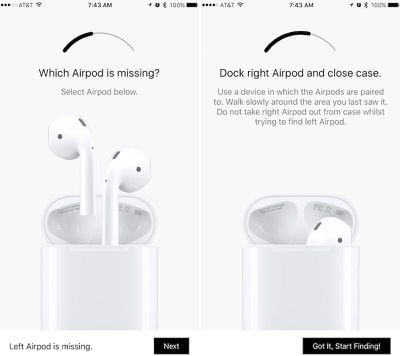
The lightweight nature and small size of Apple's AirPods have caused concerns for current and future owners of the Bluetooth headphones, centering around how easy it could be to lose them. iOS developer Deucks has made an effort to alleviate some of that worry for owners with a new app called "Finder for AirPods," [$3.99 Direct Link] which measures Bluetooth signal strength from a lost AirPod to guide the user in a hot-or-cold guidance system.
find-airpods-1
Similar in interface to Bluetooth trackers like Tile, Finder for AirPods uses an arc to assist users in finding a lost AirPod nearby. To begin the process users must choose which AirPod is missing, place the available AirPod in the Charging Case, and use an iOS device that's already been paired with the AirPods to begin searching for the missing headphone. Deucks said he lost one of his AirPods immediately after buying them, resulting in the inspiration for Finder for AirPods.

I actually lost one of my AirPods on the first day, I spent hours looking for it and then thought of making an app that will help me find them, which it did.

MacRumors has tested out Finder for AirPods over the last few days, and as a general indicator of where the small AirPod is hiding the app has the potential to be helpful for users afraid of having to pay $69 for a replacement AirPod. There are some shortcomings, however, namely the possibility for obstructing environmental factors that play around with the Bluetooth signal to the app's detriment.
find-airpods-3
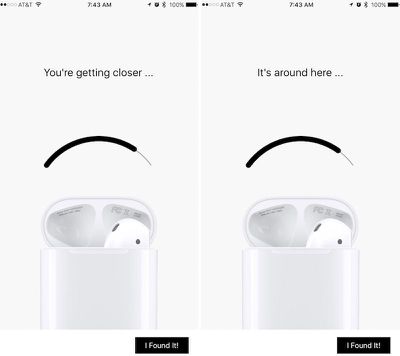
In multi-story homes, Finder for AirPods' signal can be unstable when the user is on one floor and the hidden AirPod is on another. Similarly, the app's two sentence help phrases -- "You're getting closer" and "It's around here" -- fluctuate far too often to be successful guidelines. On the bright side, an unstable signal can have a positive aspect: once users know what to look for, they can eliminate certain locations in an area where the signal is reacting poorly and move to somewhere until the bar becomes stable, bringing them closer to their lost AirPod.

Otherwise, when near an AirPod that's on the same floor, the meter is useful as an indicator of getting hotter or colder in the search. Users will have to already be near the lost AirPod due to the close proximity required for Bluetooth tracking between the paired iOS device and the missing headphone. For this reason, the tracking reliability also depends on the battery level of the missing AirPod -- if it's completely dead, users will be out of luck when trying to use Finder for AirPods.

Finder for AirPods is available on the App Store for $3.99 [Direct Link]. MacRumors was given a free code to test out the app.

Update: Finder for AirPods has been removed from the App Store by Apple. According to the creator of the app, Apple reportedly did not like the idea of people locating their AirPods and thus the app was deemed "not appropriate for the App Store."

Apple has not confirmed the reason why the app was removed from the store, and the app's developer recommends people ask for refunds via iTunes.
Related Roundup: AirPods 4
Buyer's Guide: AirPods (Neutral)
Related Forum: AirPods

Popular Stories

iOS 26

iOS 26.4 and iOS 27 Features Revealed in New Leak

Friday December 12, 2025 10:56 am PST by
Macworld's Filipe Espósito today revealed a handful of features that Apple is allegedly planning for iOS 26.4, iOS 27, and even iOS 28. The report said the features are referenced within the code for a leaked internal build of iOS 26 that is not meant to be seen by the public. However, it appears that Espósito and/or his sources managed to gain access to it, providing us with a sneak peek...
Apple Logo Top Half

Early iOS 26 Software Leak Uncovers Dozens of Upcoming Apple Features

Monday December 15, 2025 3:05 pm PST by
Software from an iPhone prototype running an early build of iOS 26 leaked last week, giving us a glimpse at future Apple devices and iOS features. We recapped device codenames in our prior article, and now we have a list of some of the most notable feature flags that were found in the software code. In some cases, it's obvious what the feature flags are referring to, while some are more...
apple beta 26 lineup

Apple Leak Confirms Work on Foldable iPhone, AirTag 2, and Dozens More Devices

Monday December 15, 2025 2:05 pm PST by
Last week, details about unreleased Apple devices and future iOS features were shared by Macworld. This week, we learned where the information came from, plus we have more findings from the leak. As it turns out, an Apple prototype device running an early build of iOS 26 was sold, and the person who bought it shared the software. The OS has a version number of 23A5234w, and the first...
iOS 26

iOS 26.3 Beta 1 Features: What's New So Far

Monday December 15, 2025 4:23 pm PST by
Apple is testing iOS 26.3, the next version of iOS 26 that will launch around January. Since iOS 26.3's testing is happening over the holidays, it is a smaller update with fewer features than we've seen in prior betas. We've rounded up what's new so far, and we'll add to our list with subsequent betas if we come across any other features. Transfer to Android Apple is making it simpler...
Apple Foldable Thumb

Leak Reveals Foldable iPhone Details

Monday December 15, 2025 9:09 am PST by
The first foldable iPhone will feature a series of design and hardware firsts for Apple, according to details shared by the Weibo leaker known as Digital Chat Station. According to a new post, via machine translation, Apple is developing what the leaker describes as a "wide foldable" device, a term used to refer to a horizontally oriented, book-style foldable with a large internal display....
iOS 26

Apple Releases iOS 26.2 With Alarms for Reminders, Lock Screen Changes, Enhanced Safety Alerts and More

Friday December 12, 2025 10:10 am PST by
Apple today released iOS 26.2, the second major update to the iOS 26 operating system that came out in September, iOS 26.2 comes a little over a month after iOS 26.1 launched. ‌iOS 26‌.2 is compatible with the ‌iPhone‌ 11 series and later, as well as the second-generation ‌iPhone‌ SE. The new software can be downloaded on eligible iPhones over-the-air by going to Settings >...
airpods max 2024 colors

AirPods Max 2 Likely to Offer These 10 New Features

Monday December 15, 2025 7:41 am PST by
Apple released the AirPods Max on December 15, 2020, meaning the over-ear headphones launched five years ago today. While the AirPods Max were updated with a USB-C port and new color options last year, followed by support for lossless audio and ultra-low latency audio this year, the headphones lack some of the features that have been introduced for newer generations of the regular AirPods and the ...
iOS 26

iOS 26.2 Coming Soon With These 8 New Features on Your iPhone

Thursday December 11, 2025 8:49 am PST by
Apple seeded the second iOS 26.2 Release Candidate to developers earlier this week, meaning the update will be released to the general public very soon. Apple confirmed iOS 26.2 would be released in December, but it did not provide a specific date. We expect the update to be released by early next week. iOS 26.2 includes a handful of new features and changes on the iPhone, such as a new...

Top Rated Comments

Quu Avatar
117 months ago
Thought I lost mine the other day, turned out they were in my ears. I forgot I turned my music off and kept working in a quiet environment then I was like wait where are my Airpods?!

Felt stupid but it's a testament to how light and comfortable they are in my ears.
Score: 29 Votes (Like | Disagree)
mceolsen Avatar
117 months ago
Where is this feature for the Apple TV remote?!
Score: 14 Votes (Like | Disagree)
vertsix Avatar
117 months ago
It's quite shocking how some random third-party developer thought of this when some multi-billion dollar company didn't.

It's a pretty good concept and better than nothing.
[doublepost=1483718525][/doublepost]
Because then they would lose money if people could find their AirPods instead of buying new ones.
We need to get Tim Crook out of Apple.

Make
Apple
Great
Again!
Score: 10 Votes (Like | Disagree)
dan110 Avatar
117 months ago
How do you lose the Apple TV remote? Is it under the couch pillow? There's no reason why that thing should be leaving the room in which the Apple TV is running :p
You must live alone.
Score: 8 Votes (Like | Disagree)
BaccaBossMC Avatar
117 months ago
why doesnt apple make this app for free or have it under find my phone?
Because then they would lose money if people could find their AirPods instead of buying new ones.
Score: 8 Votes (Like | Disagree)
Shredliotti Avatar
117 months ago
Bookmarked for when I inevitably lose an AirPod. I mean, it's gonna happen.
A free alternative is to use a BLE test app and walk around while paying attention to the signal strength. An app like LightBlue | Explorer did the trick for me.
Score: 7 Votes (Like | Disagree)