Alongside iOS 10, tvOS 10, and watchOS 3, Apple today officially released Swift Playgrounds, a new app aimed at teaching both children and adults how to code through simple interactive coding exercises. It's meant to make learning to code "easy and fun" for everyone.

First announced in June at WWDC, Swift Playgrounds is meant for beginners who have no experience with coding, and it will be deployed in numerous schools around the world as standard curriculum.
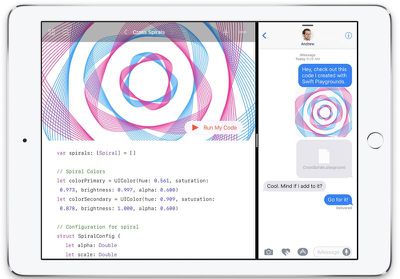
Swift Playgrounds

"Everyone should have the opportunity to learn coding, and we are excited to bring Swift Playgrounds to the next generation of programmers looking for a fun and easy way to explore key coding concepts using real code," said Craig Federighi, Apple's senior vice president of Software Engineering. "More than 100 schools around the world have already committed to adding Swift Playgrounds to their fall curriculum, and we can't wait to see what students create with it."

Swift Playgrounds is organized into a series of lessons that introduce new concepts and guide users through challenges and puzzles. It's centered on three characters that need to be guided through a graphical world using coding concepts like issuing commands, creating functions, performing loops, and using conditional code and variables. Apple plans to release new lessons on a regular basis.

The app also includes built-in templates that can be modified to create customized programs that can be shared with friends and family, and Swift Playgrounds code can be exported directly to Xcode to be turned into a full iOS or Mac app.

Swift Playgrounds is compatible with all iPad Air and iPad Pro models, along with the iPad mini 2 and later. iOS 10 is required to download the app, which is available for free from the App Store.


Top Rated Comments

ianKent Avatar
122 months ago
I wish it was available on all apple platforms.
Score: 5 Votes (Like | Disagree)
CarlJ Avatar
122 months ago
Swift Playgrounds for Apple Watch please. I can dream.
Why not on the iPod shuffle? Do we really need a display to learn?
Score: 3 Votes (Like | Disagree)
firewood Avatar
122 months ago
Wish this was available on my Mac. Coding would be easier on a computer than on a touch surface imo.
It is!

Download Xcode 8 from the Mac App store. It's free and includes being able to run Swift Playgrounds. Tons of online tutorials.
Score: 3 Votes (Like | Disagree)
Ben2998 Avatar
122 months ago
Next step: Xcode for iOS. Build and release from your iPad so they can stop selling the MacMini.
Score: 2 Votes (Like | Disagree)
jonblatho Avatar
122 months ago
Oh, seriously? The same Swift Playgrounds as on the iPad?
It doesn't include the lessons, so you have to start from scratch, but on the Mac, you get the benefit of live compiling (no need to press "Run My Code" unless you specifically turn automatic running off).
Score: 1 Votes (Like | Disagree)
Amazing Iceman Avatar
122 months ago
iTunes U has good courses from Stanford available for free that cover Xcode and iOS 9, but the basic parts of Swift haven't changed since then so it's still a relevant course. I learned a lot from the "build your own calculator" app. Was amazing to me how quickly I went from installing xcode (and being utterly lost) to writing and installing my own app on my phone. Was about 30-45 minutes. (First app didn't *do* anything except had calculator buttons and a readout display for the buttons pushed. Took a lot longer to get to finished product.) The iBook is great, but when I'm totally new video is more helpful for me.

I'm hoping Swift Playgrounds gets expanded so that it will actually let you build and install apps on the same device it's running on. That would be ground breaking, never seen before functionality in a major mobile os.

In playgrounds, I understand why Apple made the app so flashy with the waterfalls and very animated guy, but I really think it does a disservice to complete newcomers who may not realize that the effort to replicate such from scratch will probably never in their lifetime be within reach. Then again, as we move to higher level languages, "from scratch" will continue to be "soften". Like moving from assembler.
Stanford's iTunes-U course is too slow and doesn't cover much.
Check U-Demy iOS 10 course by Rob Percival.
Score: 1 Votes (Like | Disagree)

Popular Stories

iPhone Top Left Hole Punch Face ID Feature Purple

iPhone 18 Pro Launching Later This Year With These 12 New Features

Thursday January 15, 2026 10:56 am PST by
While the iPhone 18 Pro and iPhone 18 Pro Max are not expected to launch for another eight months, there are already plenty of rumors about the devices. Below, we have recapped 12 features rumored for the iPhone 18 Pro models, as of January 2026: The same overall design is expected, with 6.3-inch and 6.9-inch display sizes, and a "plateau" housing three rear cameras Under-screen Face ID...
iPhone Top Left Hole Punch Face ID Feature Purple

New Leak Reveals iPhone 18 Pro Display Sizes, Under-Screen Face ID, and More

Wednesday January 14, 2026 7:09 am PST by
While the iPhone 18 Pro models are still around eight months away, a leaker has shared some alleged details about the devices. In a post on Chinese social media platform Weibo this week, the account Digital Chat Station said the iPhone 18 Pro and iPhone 18 Pro Max will have the same 6.3-inch and 6.9-inch display sizes as the iPhone 17 Pro and iPhone 17 Pro Max. Consistent with previous...
2024 iPhone Boxes Feature

Apple Adjusts Trade-In Values for iPhones, Macs, and More

Thursday January 15, 2026 11:19 am PST by
Apple today updated its trade-in values for select iPhone, iPad, Mac, and Apple Watch models. Trade-ins can be completed on Apple's website, or at an Apple Store. The charts below provide an overview of Apple's current and previous trade-in values in the United States, according to the company's website. Most of the values declined slightly, but some of the Mac values increased. iPhone ...
Apple MacBook Pro M4 hero

These 5 Apple Products Will Reportedly Be Upgraded With OLED Displays

Friday January 16, 2026 7:07 pm PST by
Apple plans to upgrade the iPad mini, MacBook Pro, iPad Air, iMac, and MacBook Air with OLED displays between 2026 and 2028, according to DigiTimes. Bloomberg's Mark Gurman previously reported that the iPad mini and MacBook Pro will receive an OLED display as early as this year, but he does not expect the MacBook Air to adopt the technology until 2028 at the earliest. A new iPad Air is...
Verizon New

Verizon Offering $20 Credit After Major Outage, Here's How to Get It

Thursday January 15, 2026 7:37 am PST by
Verizon today announced it will be offering customers a $20 account credit after a major outage on Wednesday, and action is required to receive it. The carrier said affected customers can accept the credit by logging into the My Verizon app, but it might take some time before this option shows up in the app. Affected customers will receive a text message when the credit is available. On...