iOS 10 Beta 5 Tidbits: New Lock Screen Sound, Widget Tweaks, and More - MacRumors
Skip to Content

iOS 10 Beta 5 Tidbits: New Lock Screen Sound, Widget Tweaks, and More

Apple today released new versions of iOS 10 to both developers and public beta testers, and as with any major beta update, there are several small changes and tweaks that have been implemented as Apple works to refine the operating system ahead of its release this fall.

Today's update, available as an over-the-air download for those who installed the first four betas or the beta configuration profile, features a new Lock screen sound, tweaks to the Control Center and widgets screen, and more.

We've rounded up some of the biggest changes in beta five in the video below, so make sure to check it out to get a quick look at what's changed. We're also listing all of the changes in the post below.


Smart Battery Case - The iPhone 6 and 6s should now work properly with Apple's Smart Battery Case. According to the iOS 10 release notes, the case will no longer cause devices to panic.

Photos - Apple plans to reprocess facial recognition data in beta 5, so all named, favorited, and merged face data will be reset.

Lock sound - There's a new sound when locking the iPhone. It sounds like a door closing.

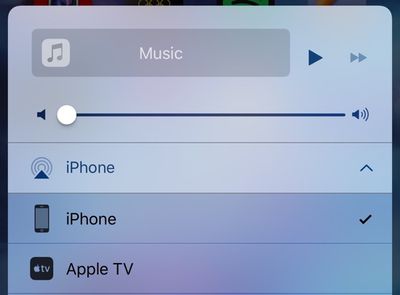
New Output icon - The output icon seen in the Control Center, the Music app, and other locations in iOS has been slightly tweaked. It is no longer represented by headphones and instead resembles a triangle with sound waves.
controlcentericons
Settings - The "Home" section in the Settings app has been removed on the iPhone, as it served no purpose, but it remains available on the iPad.

Widgets - The new widgets panel, accessible by swiping to the right, now displays the date on all devices.

Related Forum: iOS 10

Popular Stories

iPhone 18 Pro and Pro Max Feature

'Apple Upgrade' Program Reportedly Launching Next Week

Tuesday July 21, 2026 8:30 am PDT by
Apple and Klarna are partnering on a new "Apple Upgrade" leasing program set to launch in the U.S. on Tuesday, July 28, according to Bloomberg's Mark Gurman. The program will allow you to finance most iPhone, iPad, Mac, and Apple Watch models, with a 24-month term for iPhones and Apple Watches and a 36-month term for iPads and Macs. Customers will be able to pay off the device early during...
iPhone 18 Pro Deep Red Feature

iPhone 18 Pro Launching in Two Months With These 12 New Features

Friday July 17, 2026 10:39 am PDT by
It is now mid-July, and that means the iPhone 18 Pro and iPhone 18 Pro Max are now just two months away. The devices are expected to look similar to the iPhone 17 Pro and iPhone 17 Pro Max, but there will still be many year-over-year changes, with rumored features including a smaller Dynamic Island, 5G via satellite, and more. Apple is expected to unveil the iPhone 18 Pro, iPhone 18 Pro Max, ...
iPhone 18 Pro Deep Red Feature

iPhone 18 Pro Launching in Two Months With These 12 New Features

Tuesday July 21, 2026 6:22 am PDT by
It is now mid-July, and that means the iPhone 18 Pro and iPhone 18 Pro Max are now just two months away. The devices are expected to look similar to the iPhone 17 Pro and iPhone 17 Pro Max, but there will still be many year-over-year changes, with rumored features including a smaller Dynamic Island, 5G via satellite, and more. Apple is expected to unveil the iPhone 18 Pro, iPhone 18 Pro Max, ...

Top Rated Comments

LoveToMacRumors Avatar
130 months ago
I really hate the fact that there's a separate page for music on the control center...
Score: 26 Votes (Like | Disagree)
130 months ago
Up, Up, Down, Down, Shake iphone Left, Right, Left, Right. Yes! Music successfully paused
Score: 23 Votes (Like | Disagree)
LordQ Avatar
130 months ago
Oh, Apple...


Attachment Image
Score: 17 Votes (Like | Disagree)
Porco Avatar
130 months ago
Up, Up, Down, Down, Shake iphone Left, Right, Left, Right. Yes! Music successfully paused
Hadoken!!

I wish they weren't messing with Control Center so much. It's like when Exposé was perfect in about OS X Leopard, then they started messing about with it and ruined its brilliance, even if you could technically do more things. I'd love to have options for customising it more, but once you start having to scroll and swipe, you might as well be back in settings, so it defeats the object.


New Output icon - The output icon seen in the Control Center, the Music app, and other locations in iOS has been slightly tweaked. It is no longer represented by headphones and instead resembles a triangle with sound waves.
For what possible reason might they want to avoid people's attention being drawn to the subject of headphones?! :confused::rolleyes:;)
Score: 10 Votes (Like | Disagree)
tigres Avatar
130 months ago
Sorry, is it me or is this now awkward the way the dock is displaying the blurs?


Dude
I think someone's trying to reach you. Just sayin
Score: 9 Votes (Like | Disagree)
appleofmy"i" Avatar
130 months ago
Holy cow...I can not stand the amount of complainers on Macrumors anymore. Guys, cheer the heck up.
Score: 8 Votes (Like | Disagree)