Astropad's iPad App Updated With Speed, Performance, and Battery Efficiency Improvements - MacRumors
Skip to Content

Astropad's iPad App Updated With Speed, Performance, and Battery Efficiency Improvements

by

Astropad today launched version 2.0 of its iPad app, which transforms a compatible iPad into a drawing tablet for a connected Mac. Once connected, Astropad mirrors the Mac's display onto the iPad to let users take advantage of the tablet's touch controls for drawing and editing photos in various Mac apps. The new update follows last year's introduction of support for the 12.9-inch iPad Pro and Apple Pencil.

Free for any existing Astropad user, version 2.0 of the app brings a "high-performance Liquid upgrade" to the connected drawing app in order to triple its performance speeds and "massively" reduce any pixelation. The rest of the update adds similar performance-enhancing features to Astropad, including improved image quality and latency, lessening the strain on the iPad's battery, and making the actual drawing performed within the app more naturalistic.
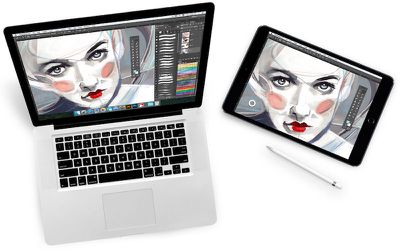
astropad app

High-performance Liquid upgrade: Powered by Liquid core technology, now running three times faster with massively reduced pixelation
New Velocity control: Analyzes network conditions dozens of times per second to balance image quality and latency
Uses 3x less CPU and 4x less memory: Allows longer work sessions and extended battery life
Refined pressure curve: Hand-tuned by artists for a more natural drawing feel
Enhanced software compatibility: Supports panning and zooming gestures across more programs, including: Affinity Designer, Affinity Photo, Art Rage, Clip Studio Paint, Lightroom, Mischief, Autodesk Sketchbook
Hidden cursor: Settings option to auto-hide the cursor while drawing
Updated UI: Sleek new look and feel

Otherwise, Astropad retains its general, high-quality drawing performance, with touch feedback at 60fps "for super smooth drawing" that results in interesting, diverse pieces of art. Users can connect their iPad to a Mac both via Wi-Fi or USB, with equally solid results, although compatible iPad devices must be running iOS 8 or later, while any Mac with Mavericks or later is required to use Astropad.

For users who have yet to purchase, Astropad Drawing Tablet is available for $29.99 on the iOS App Store. [Direct Link]

Top Rated Comments

127 months ago
Ok! Great! That sounds a little more promising!
Score: 1 Votes (Like | Disagree)
nagromme Avatar
127 months ago
Noticeable improvement! Scrolling still goes blurry, but less so. Very useful.

I wonder if a USB 3 cable on a newer iPad would help?
Score: 1 Votes (Like | Disagree)
Bbqthis Avatar
127 months ago
Been trying it out this morning. Really, really improved. If they just added keyboard support, I would happily pay double for it.
Score: 1 Votes (Like | Disagree)

Popular Stories

astropad workbench

Astropad Workbench Lets You Remotely Control Your Mac and AI Agents From iPhone and iPad

Wednesday April 8, 2026 10:20 am PDT by
Astropad, the company behind the popular Astropad Studio software for turning the iPad into a drawing tablet, today launched a new app called Astropad Workbench. Astropad Workbench is a remote desktop app designed for the Mac, and more specifically, built for use with AI. With Astropad Workbench, you can control your AI agents remotely, which makes it useful for people who have set up a Mac...
macworld iphone 18 pro colors

iPhone 18 Pro's Four Rumored Colors Revealed, Including 'Dark Cherry'

Friday April 17, 2026 3:50 am PDT by
A source said to be familiar with Apple's supply chain today revealed the color options Apple is planning for the iPhone 18 Pro, iPhone 18 Pro Max, and the upcoming foldable iPhone. Image via Macworld. The information comes from Macworld, which says the signature new color for this year's Pro models will be Dark Cherry, a deep wine-like red. While other sources had previously reported on a...
macOS 27 on MacBook Pro

macOS 27 Will Mark the End of an Era

Saturday April 18, 2026 6:45 am PDT by
During its Platforms State of the Union segment at WWDC 2025, Apple revealed that macOS 26 Tahoe is the final major macOS version for Intel-based Macs. The upcoming macOS 27 release will be compatible with Apple silicon Macs only, meaning that you will need a Mac with an M-series chip or a MacBook Neo with an A18 Pro chip in order to install the software update. macOS 27 should be available...