Microsoft Launches 'Office 365 Personal' Plan for One Mac and One iPad at $69/Year
Microsoft today started selling its Office 365 Personal subscription, a less expensive version of Office 365 that targets individual users. The cloud-based subscription service provides access to online versions of Microsoft's Office productivity suite, online storage in OneDrive and a block of Skype calling minutes.
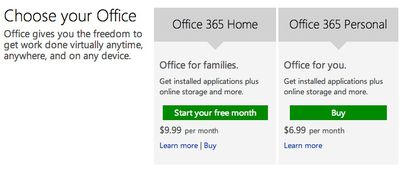
The new personal option allows subscribers to connect one PC or Mac desktop computer and one tablet, including the iPad, to the online service. It will cost $69 per year or $6.99 per month. Customers who require more connections can sign up for the Office 365 Home plan, which is geared towards families with support for up to five desktops and five tablets.
The new Office 365 Personal plan is available for purchase at Office365.com. It also is available at Microsoft Stores and through Microsoft’s online and retail partners. Microsoft also offers Office 365 business plans, which are priced by the number of users and are designed for real-time, online collaboration using the Office 365 suite.
Popular Stories
In a memo shared with Apple Stores and Apple Authorized Service Providers this week, and later obtained by MacRumors, Apple provided technicians with guidance on how to diagnose and address the iPhone Duo's inner display cracking issue.
If a customer reports the issue, Apple advised technicians to inspect the iPhone Duo and repair or replace it in accordance with their standard procedures....
Apple is releasing five new products this Friday, November 6, following pre-orders that opened last week, including its first touchscreen MacBook Pro models.
The following new products will be available from Friday:
iPad mini with OLED display and A20 Pro chip
iMac with M6 chip
14-inch MacBook Pro with M6 chip
14-inch MacBook Pro with OLED touchscreen
16-inch MacBook Pro with OLED...
Apple released iOS 27.2 on October 26, bringing enhancements to Siri AI, adding Suggestions in Messages, and sneaking in a string of smaller additions across Photos, Podcasts, Games, Apple TV, and FaceTime.
iOS 27.2 is available to download to your device now via Settings ➝ General ➝ Software Update. Note that some features may not be available in all regions or on all iPhone models....


















































