Apple TV Update 6.1 Allows AirPlay Discoverability Over Bluetooth

When the Apple TV was updated to version 6.1 earlier this week, it was initially thought that there were minimal changes outside of the ability to hide icons in the main menu. However, a new report from AFP548 (via Daring Fireball) indicates that Apple also enabled AirPlay device discovery over Bluetooth as well.

Here’s one that will make educators and education network administrators realllllly happy. There’s a hidden gem in the AppleTV 6.1 update that was released today.

In addition to bonjour negotiation for AirPlay, iOS 7.1 devices will also look for AirPlay sources over bluetooth when doing it’s scan! This means you do NOT need bonjour to AirPlay.
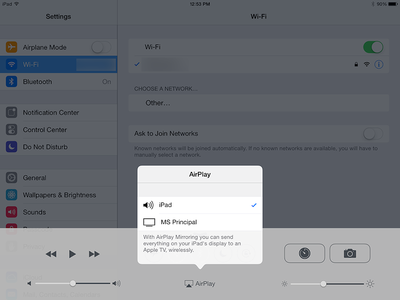
appletvbluetoothImage via AFP548

This change allows Apple TV to search for connectable devices over Bluetooth, bypassing Bonjour and making it easier for education and business administrators to set up iOS device and Apple TV pairings. Previously, Apple TVs could have a difficult time discovering devices on networks that might block Bonjour.

The new feature has three requirements: an Apple TV updated to 6.1, an iOS device updated to 7.1, and IP connectivity between both devices. AFP548 found during its testing that the feature doesn't yet support Macs, but that the ability could be added in a future update.

Apple TVs have become an important replacement for traditional projectors in both educational and business settings, and these changes are likely to make it even easier for administrators to consider switching to Apple's solution.

Related Roundup: Apple TV
Buyer's Guide: Apple TV (Don't Buy)

Popular Stories

iOS 26

iOS 26.4 and iOS 27 Features Revealed in New Leak

Friday December 12, 2025 10:56 am PST by
Macworld's Filipe Espósito today revealed a handful of features that Apple is allegedly planning for iOS 26.4, iOS 27, and even iOS 28. The report said the features are referenced within the code for a leaked internal build of iOS 26 that is not meant to be seen by the public. However, it appears that Espósito and/or his sources managed to gain access to it, providing us with a sneak peek...
iOS 26

iOS 26.2 Coming Soon With These 8 New Features on Your iPhone

Thursday December 11, 2025 8:49 am PST by
Apple seeded the second iOS 26.2 Release Candidate to developers earlier this week, meaning the update will be released to the general public very soon. Apple confirmed iOS 26.2 would be released in December, but it did not provide a specific date. We expect the update to be released by early next week. iOS 26.2 includes a handful of new features and changes on the iPhone, such as a new...
iOS 26

Apple Releases iOS 26.2 With Alarms for Reminders, Lock Screen Changes, Enhanced Safety Alerts and More

Friday December 12, 2025 10:10 am PST by
Apple today released iOS 26.2, the second major update to the iOS 26 operating system that came out in September, iOS 26.2 comes a little over a month after iOS 26.1 launched. ‌iOS 26‌.2 is compatible with the ‌iPhone‌ 11 series and later, as well as the second-generation ‌iPhone‌ SE. The new software can be downloaded on eligible iPhones over-the-air by going to Settings >...
AirPods Pro Firmware Feature

Apple Releases New Firmware for AirPods Pro 2 and AirPods Pro 3

Thursday December 11, 2025 11:28 am PST by
Apple today released new firmware designed for the AirPods Pro 3 and the prior-generation AirPods Pro 2. The AirPods Pro 3 firmware is 8B30, up from 8B25, while the AirPods Pro 2 firmware is 8B28, up from 8B21. There's no word on what's include in the updated firmware, but the AirPods Pro 2 and AirPods Pro 3 are getting expanded support for Live Translation in the European Union in iOS...
macOS Tahoe 26 Thumb

Apple Releases macOS Tahoe 26.2 With Edge Light

Friday December 12, 2025 10:08 am PST by
Apple today released macOS Tahoe 26.2, the second major update to the macOS Tahoe operating system that came out in September. macOS Tahoe 26.2 comes five weeks after Apple released macOS Tahoe 26.1. Mac users can download the macOS Tahoe update by using the Software Update section of System Settings. macOS Tahoe 26.2 includes Edge Light, a feature that illuminates your face with soft...
AirTag 2 Mock Feature

Apple AirTag 2: Four New Features Found in iOS 26 Code

Thursday December 11, 2025 10:31 am PST by
The AirTag 2 will include a handful of new features that will improve tracking capabilities, according to a new report from Macworld. The site says that it was able to access an internal build of iOS 26, which includes references to multiple unreleased products. Here's what's supposedly coming: An improved pairing process, though no details were provided. AirTag pairing is already...
ipados 26 1 slide over

Apple Releases iPadOS 26.2 With Multitasking Improvements

Friday December 12, 2025 10:09 am PST by
Apple today released iPadOS 26.2, the second major update to the iPadOS 26 operating system released in September. iPadOS 26.2 comes a month after iPadOS 26.1. The new software can be downloaded on eligible iPads over-the-air by going to Settings > General > Software Update. iPadOS 26.2 continues with the multitasking improvements that were added with iPadOS 26.1. You can now drag and...
bug security vulnerability issue fix larry

Update Now: iOS 26.2 Fixes 20+ Security Vulnerabilities

Friday December 12, 2025 11:11 am PST by
Apple today released iOS 26.2, iPadOS 26.2, and macOS 26.2, all of which introduce new features, bug fixes, and security improvements. Apple says that the updates address over 20 vulnerabilities, including two bugs that are known to have been actively exploited. There are a pair of WebKit vulnerabilities that could allow maliciously crafted web content to execute code or cause memory...

Top Rated Comments

zorinlynx Avatar
154 months ago
Once again, Apple does things half-assed.

It would be great if Bluetooth could be used to negotiate a direct Wifi connection between the devices, so it would be possible to stream media to an Apple TV even when there's no local WiFi network both devices can connect to.

It isn't even that difficult to implement, and would be awesome in situations where someone brings along an Apple TV and plugs it into an available projector or TV, then streams to it with their phone or iPad, without having to join any local Wifi networks.

But of course, this is Apple we're talking about. They tend to half-ass really cool ideas.
Score: 7 Votes (Like | Disagree)
JerryCards Avatar
154 months ago
That is a great feature. Apple should have done this long time ago.
Score: 5 Votes (Like | Disagree)
MikhailT Avatar
154 months ago
So I don't get it. What's the advantage? My iPhone syncs instantly with my Apple TV over the AirPort router at work. But the work network is really unstable. I wish I could just connect via Bluetooth.

No advantages for regular customers.

Bonjour is for automatically establishing a connection between two endpoints without doing any configuration, it's used to find a specific resource (computer, printer, etc) on the network to register your app with. The actual data transfer is then handled by Wi-Fi or ethernet now that the two know each other.

In a home network, it's not a problem to have bonjour running sending out data to find services/devices to register with.

If we didn't have bonjour, we would have to figure out the IP address manually on the printer/computer, and then manually enter it in the app to start the connection.

This is for networks where Bonjour is restricted or blocked outright, such as corporate or school networks where there might be dozens or hundreds of devices.

Instead of using Bonjour to establish the connection, you can now use Bluetooth, which doesn't use up the network traffic and instead uses short-wave radio to find other bluetooth devices to establish the connection. After the connection is established, Airplay will use the Wi-Fi network to transmit the data now it knows both endpoints to transmit the data between.
Score: 3 Votes (Like | Disagree)
ManifoldSky Avatar
154 months ago
But of course, this is Apple we're talking about. They tend to half-ass really cool ideas.

You apparently didn't bother to think this through. In fact, your comment is entirely irrelevant to this article. Allowing Bluetooth handshaking does NOT have anything to do with ad hoc streaming. They are two entirely different things. To allow this to happen, ad hoc streaming would have to be added, completely independent of Bluetooth, to the AppleTV software stack. In fact, while this capability would be nice, there is no need for bluetooth to be involved at all, only the ability for the AppleTV to join ad hoc networks, which, again, has nothing to do with Bluetooth.
Score: 2 Votes (Like | Disagree)
w0lf Avatar
154 months ago
Wi-Fi is just a bit faster than bluetooth. A rather large bit. You can send high quality audio over bluetooth, but not YET the video resolution WiFi can do.
Clearly you misread what they wrote. They wanted bluetooth to initiate an ad-hoc Wi-Fi connection, not actually use a bluetooth connection to stream the content.
Score: 2 Votes (Like | Disagree)
Solver Avatar
154 months ago
Once again, Apple does things half-assed.

It would be great if Bluetooth could be used to negotiate a direct Wifi connection between the devices, so it would be possible to stream media to an Apple TV even when there's no local WiFi network both devices can connect to.

It isn't even that difficult to implement, and would be awesome in situations where someone brings along an Apple TV and plugs it into an available projector or TV, then streams to it with their phone or iPad, without having to join any local Wifi networks.

But of course, this is Apple we're talking about. They tend to half-ass really cool ideas.

Wi-Fi is just a bit faster than bluetooth. A rather large bit. You can send high quality audio over bluetooth, but not YET the video resolution WiFi can do.
Score: 2 Votes (Like | Disagree)


















