A Look at Apple's Assistant Interface for the New iPhone

Apple has been rumored to be working on advanced speech recognition technology for some time.

After Apple's acquisition of Siri, TechCrunch reported in May that negotiations were ongoing with Nuance to integrate their speech recognition technology into iOS. Earlier this week, 9to5mac detailed much of what is expected to be the major new feature in the next generation iPhone to be release on October 4th. The story was met with some skepticism in our forums, but we were especially confident in the report as we had privately heard the exact same story from our sources.

The Siri/Nuance-based voice recognition Assistant will be the major new feature in the next generation iPhone and will be an iPhone 4S/5 exclusive feature. As detailed, the Assistant will allow users to speak to their iPhones in order to schedule appointments, send text messages, retrieve information and much more. Voice recognition happens on the fly and reportedly with great accuracy.
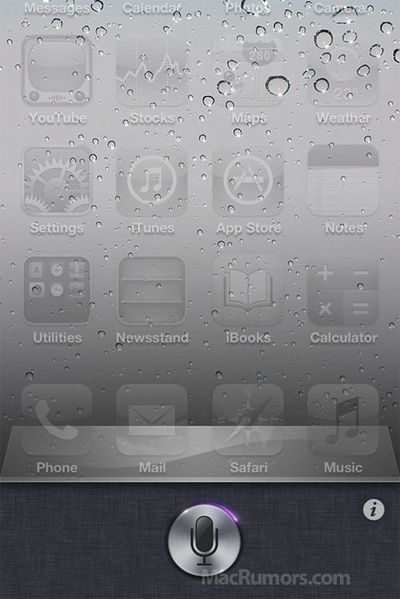
assistant
Assistant interface, artist rendition

We've created this artist rendition (above) of what the Assistant interface looks like based on sources with knowledge of the feature. After a long press on the home button, the screen fades and slides up, just like with the multitasking interface. Revealed is a silver icon with an animated orbiting purple flare which indicates a ready state. From what we've been told, this image is a close representation of the actual Assistant interface.

From there, the user may be taken to a conversation view that somewhat mimics Siri's original interface, but in Apple's own styling.

Based on this knowledge, we contracted Jan-Michael Cart to put together a video representation of the Assistant workflow. Cart had been responsible for a number of iOS concept videos in the past, but we wanted to mock up what the actual Assistant interface looked like. Due to the short turnaround, we know that not all elements in the video represent actual look/feel of the Assistant interface, but should show off the general workflow.


After receiving spoken commands, the Assistant shows you back the recognized text and then takes the next step. This could involve sending a text message (with confirmation) or pulling data from Wolfram Alpha. The feature is said to be one of the major differentiators for the next generation iPhone.

Apple is hosting a media event on October 4th, where they will introduce the next iPhone and these new features.

Popular Stories

AirPods Pro Firmware Feature

Apple Releases New Firmware for AirPods Pro 2, AirPods Pro 3, and AirPods 4

Thursday November 13, 2025 11:35 am PST by
Apple today released new firmware designed for the AirPods Pro 3, the AirPods 4, and the prior-generation AirPods Pro 2. The AirPods Pro 3 firmware is 8B25, while the AirPods Pro 2 and AirPods 4 firmware is 8B21, all up from the prior 8A358 firmware released in October. There's no word on what's include in the updated firmware, but the AirPods Pro 2, AirPods 4 with ANC, and AirPods Pro 3...
iOS 26

iOS 26.2 Available Next Month With These 8 New Features

Tuesday November 11, 2025 9:48 am PST by
Apple released the first iOS 26.2 beta last week. The upcoming update includes a handful of new features and changes on the iPhone, including a new Liquid Glass slider for the Lock Screen's clock, offline lyrics in Apple Music, and more. In a recent press release, Apple confirmed that iOS 26.2 will be released to all users in December, but it did not provide a specific release date....
CarPlay Pinned Messages

iOS 26.2 Adds New CarPlay Setting

Thursday November 13, 2025 6:48 am PST by
iOS 26 extended pinned conversations in the Messages app to CarPlay, for quick access to your most frequent chats. However, some drivers may prefer the classic view with a list of individual conversations only, and Apple now lets users choose. Apple released the second beta of iOS 26.2 this week, and it introduces a new CarPlay setting for turning off pinned conversations in the Messages...
homepod mini thumb feature

New HomePod Mini, Apple TV, and AirTag Were Expected This Year — Where Are They?

Wednesday November 12, 2025 11:42 am PST by
While it was rumored that Apple planned to release new versions of the HomePod mini, Apple TV, and AirTag this year, it is no longer clear if that will still happen. Back in January, Bloomberg's Mark Gurman said Apple planned to release new HomePod mini and Apple TV models "toward the end of the year," while he at one point expected a new AirTag to launch "around the middle of 2025." Yet,...
ios 26 digital id passport wallet

Apple Announces Launch of U.S. Passport Feature in iPhone's Wallet App

Wednesday November 12, 2025 9:15 am PST by
Apple today announced that iPhone users can now create a Digital ID in the Apple Wallet app based on information from their U.S. passport. To create and present a Digital ID based on a U.S. passport, you need: An iPhone 11 or later running iOS 26.1 or later, or an Apple Watch Series 6 or later running watchOS 26.1 or later Face ID or Touch ID and Bluetooth turned on An Apple Account ...
Tesla Charging

Tesla Working to Add Apple CarPlay Support to Vehicles

Thursday November 13, 2025 8:31 am PST by
Tesla is working to add support for Apple CarPlay in its vehicles, Bloomberg's Mark Gurman reports. Tesla vehicles rely on its own infotainment software system, which integrates vehicle functions, navigation, music, web browsing, and more. The automaker has been an outlier in foregoing support for Apple CarPlay, which has otherwise become an industry standard feature, allowing users to...
m1 chip slide

Five Years of Apple Silicon: M1 to M5 Performance Comparison

Monday November 10, 2025 1:08 pm PST by
Today marks the fifth anniversary of the Apple silicon chip that replaced Intel chips in Apple's Mac lineup. The first Apple silicon chip, the M1, was unveiled on November 10, 2020. The M1 debuted in the MacBook Air, Mac mini, and 13-inch MacBook Pro. The M1 chip was impressive when it launched, featuring the "world's fastest CPU core" and industry-leading performance per watt, and it's only ...
iOS 26

Everything New in iOS 26.2 Beta 2

Wednesday November 12, 2025 3:29 pm PST by
Apple today provided developers with the second beta of iOS 26.2, which adds a few new features worth knowing about. Measure App Apple's Measure app now features a Liquid Glass design for the level, with two Liquid Glass bubbles instead of white circles. Games App There's now an option to sort games in the Games app Library by size, in addition to Name and Recent. CarPlay The...
tvOS 26 Profiles

tvOS 26.2 Adds a Useful New Feature to Your Apple TV

Friday November 14, 2025 10:02 am PST by
Starting with the upcoming tvOS 26.2 update, currently in beta, additional profiles created on the Apple TV no longer require their own Apple Account. In the Settings app on the Apple TV, under Profiles and Accounts, anyone can create a new profile by simply entering a name and indicating whether the profile is for a kid. The profile will be associated with the primary user's Apple Account,...
apple intelligence erroneous support list

Apple Intelligence Apparently Too Smart for M1 Macs After Listing Error

Wednesday November 12, 2025 2:49 am PST by
Update: It took a day, but Apple has now corrected its Apple Intelligence device compatibility list to show support for the earliest Apple silicon Macs. The original article follows. Apple's website is causing some confusion among Mac owners, and for good reason – its device compatibility listing for Apple Intelligence appears to have dropped support for M1 Macs. The U.S. version...

Top Rated Comments

robbieduncan Avatar
184 months ago
Have they solved the problem of feeling like a complete idiot when you use these sort of interfaces?
Score: 49 Votes (Like | Disagree)
theperipheral Avatar
184 months ago
Hopefully this will be for the iphone 4 as well.. Otherwise we will all have to continue texting while driving.

I don't see a problem with texting while driving. I do it almost every day, and I've never h
Score: 35 Votes (Like | Disagree)
arn Avatar
184 months ago
If you activate it by holding down the home button, how will you rearrange your apps?

by long pressing on the app icon as usual. :)

long press home button is already occupied by voice control.

arn
Score: 34 Votes (Like | Disagree)
DrJohnnyN Avatar
184 months ago
Pretty cool! Tuesday cannot come fast enough!!
Score: 25 Votes (Like | Disagree)
euphlyusUNO Avatar
184 months ago
This is the fundamental difference between the Android and the Apple camps.

Androidies think and talk in terms of features, hardware specs

Applelites think in terms of experience


Case In Point:

For those comparing WP7 Tell Me and Google Voice Actions with Apple Assistant:

WP7 and Tell Me are not "Assistants". They perform actions based on voice inputs. WP7 implementation does simpler things (invoking apps, calling a cell phone number). Voice Action packs in more capability (though I haven't worked with either of those, this is based purely on watching videos)

However, if iOS Assistant is anything close to what's described in the Video and something akin the App Siri, then, the Assistant won't simply be "voice commands". You can have conversations, do more things than just call or send text. The assistant will also be more accurate by the virtue of understanding the context of a conversation (you'll understand this if you've carefully observed Siri mobile apps).

Just recognizing voice accurately is not enough. There has to be a simple and logical flow, like a conversation. I'm hoping Apple will nail that (as they've done sometimes before)
Score: 22 Votes (Like | Disagree)
gugy Avatar
184 months ago
this thing looks cool
Score: 20 Votes (Like | Disagree)