Apple Preps for Thunderbolt Display Release with MacBook Air EFI Firmware Update
thunderbolt display macbook air
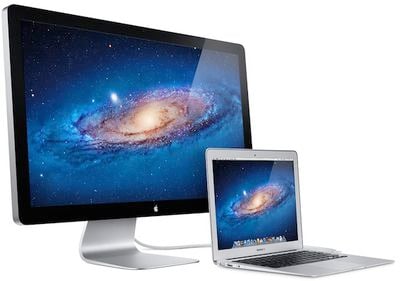
Apple today released MacBook Air EFI Firmware Update 2.1, a 3.99 MB update addressing a pair of issues on the company's latest MacBook Air models. The fixes include enhanced stability for Lion Recovery over the Internet and improvements for Thunderbolt-related issues including compatibility with Apple's forthcoming Apple Thunderbolt Display.

This update includes fixes that enhance the stability of Lion Recovery from an Internet connection, and resolve issues with Apple Thunderbolt Display compatibility and Thunderbolt Target Disk Mode performance on MacBook Air (mid 2011) models.

For more information about Lion Recovery, please visit http://www.apple.com/macosx/recovery/.

The MacBook Air EFI Update will update the EFI firmware on your notebook computer. Your computer's power cord must be connected and plugged into a working power source. When your MacBookAir restarts, a gray screen will appear with a status bar to indicate the progress of the update. It will take several minutes for the update to complete. Do not disturb or shut off the power on your MacBookAir during this update.

We noted last week that the new Apple Thunderbolt Display was beginning to ship to stores in anticipation of a launch in the near future, and today's release to ensure compatibility with the new MacBook Air offers further evidence that a launch for the display is near.

Apple announced the display back in July with a shipping date of "within 60 days", a timeframe that is rapidly approaching. Apple's order page for the $999 display is showing a 2-3 week estimate for new orders, but earlier pre-orders will likely ship sooner than that. We have yet to hear, however, of any pre-orders being prepared for shipment.

Related Forums: Mac Accessories, MacBook Air

Popular Stories

iOS 26

iOS 26.2 Coming Soon With These 8 New Features on Your iPhone

Thursday December 11, 2025 8:49 am PST by
Apple seeded the second iOS 26.2 Release Candidate to developers earlier this week, meaning the update will be released to the general public very soon. Apple confirmed iOS 26.2 would be released in December, but it did not provide a specific date. We expect the update to be released by early next week. iOS 26.2 includes a handful of new features and changes on the iPhone, such as a new...
iOS 26

iOS 26.4 and iOS 27 Features Revealed in New Leak

Friday December 12, 2025 10:56 am PST by
Macworld's Filipe Espósito today revealed a handful of features that Apple is allegedly planning for iOS 26.4, iOS 27, and even iOS 28. The report said the features are referenced within the code for a leaked internal build of iOS 26 that is not meant to be seen by the public. However, it appears that Espósito and/or his sources managed to gain access to it, providing us with a sneak peek...
AirPods Pro Firmware Feature

Apple Releases New Firmware for AirPods Pro 2 and AirPods Pro 3

Thursday December 11, 2025 11:28 am PST by
Apple today released new firmware designed for the AirPods Pro 3 and the prior-generation AirPods Pro 2. The AirPods Pro 3 firmware is 8B30, up from 8B25, while the AirPods Pro 2 firmware is 8B28, up from 8B21. There's no word on what's include in the updated firmware, but the AirPods Pro 2 and AirPods Pro 3 are getting expanded support for Live Translation in the European Union in iOS...
iOS 26

Apple Releases iOS 26.2 With Alarms for Reminders, Lock Screen Changes, Enhanced Safety Alerts and More

Friday December 12, 2025 10:10 am PST by
Apple today released iOS 26.2, the second major update to the iOS 26 operating system that came out in September, iOS 26.2 comes a little over a month after iOS 26.1 launched. ‌iOS 26‌.2 is compatible with the ‌iPhone‌ 11 series and later, as well as the second-generation ‌iPhone‌ SE. The new software can be downloaded on eligible iPhones over-the-air by going to Settings >...
Google maps feaure

Google Maps Quietly Added This Long-Overdue Feature for Drivers

Wednesday December 10, 2025 2:52 am PST by
Google Maps on iOS quietly gained a new feature recently that automatically recognizes where you've parked your vehicle and saves the location for you. Announced on LinkedIn by Rio Akasaka, Google Maps' senior product manager, the new feature auto-detects your parked location even if you don't use the parking pin function, saves it for up to 48 hours, and then automatically removes it once...
AirTag 2 Mock Feature

Apple AirTag 2: Four New Features Found in iOS 26 Code

Thursday December 11, 2025 10:31 am PST by
The AirTag 2 will include a handful of new features that will improve tracking capabilities, according to a new report from Macworld. The site says that it was able to access an internal build of iOS 26, which includes references to multiple unreleased products. Here's what's supposedly coming: An improved pairing process, though no details were provided. AirTag pairing is already...
macOS Tahoe 26 Thumb

Apple Releases macOS Tahoe 26.2 With Edge Light

Friday December 12, 2025 10:08 am PST by
Apple today released macOS Tahoe 26.2, the second major update to the macOS Tahoe operating system that came out in September. macOS Tahoe 26.2 comes five weeks after Apple released macOS Tahoe 26.1. Mac users can download the macOS Tahoe update by using the Software Update section of System Settings. macOS Tahoe 26.2 includes Edge Light, a feature that illuminates your face with soft...
iOS 26

15 New Things Your iPhone Can Do in iOS 26.2

Friday December 5, 2025 9:40 am PST by
Apple is about to release iOS 26.2, the second major point update for iPhones since iOS 26 was rolled out in September, and there are at least 15 notable changes and improvements worth checking out. We've rounded them up below. Apple is expected to roll out iOS 26.2 to compatible devices sometime between December 8 and December 16. When the update drops, you can check Apple's servers for the ...

Top Rated Comments

hefeglass Avatar
186 months ago
there is so much misinformation in this thread...i really hope nobody comes here for factual information


^...wow..


.."demi-god"
Score: 12 Votes (Like | Disagree)
ksgant Avatar
186 months ago
I was looking elsewhere for a high-quality monitor like the 27" display, but all I found were these around $400 monitors that were certainly 27" displays, but were limited to the 1080P resolution of 1920 x 1080 and none at the Apple monitor's 2560 x 1440.

I looked over at Dell and they have 27" IPS monitors that can do 2560 x 1440 but they're like fricken $1200. Again, Dell has lower cost monitors but they're only 1080P ones. What happened to other manufacturers having lower cost hardware yet the same quality as Apple?

Are there any high end 27" monitors with 2560 x 1440 that are under the $999 of Apple? Or is this thing truly a bargain?
Score: 9 Votes (Like | Disagree)
scarred Avatar
186 months ago
So, TBolt means upgrading your BIOS just to attach a display?

I thought that we'd eliminated that kind of crap in the early 1990's.

1. EFI isn't BIOS.

2. What's so wrong with updating some low level functionality? Anyone who knows anything about computers knows that there are various levels put together to ultimately provide the end user with a nice experience. EFI is one of those layers... I'm glad they have a nice easy way to update it.
Score: 6 Votes (Like | Disagree)
Icaras Avatar
186 months ago
These displays are definitely a rip off but Apple built this as a luxury machine intended for the rich. Sure it may be 1000$ but people will flock to but it just because its apple. The thunderbolt port is useless as my Windows computer only has USB and many others only have USB.

You're in the wrong thread, sir.
Score: 5 Votes (Like | Disagree)
catalyst6 Avatar
186 months ago
For those of you that are interested in having this display work with anything other than Mac products, go buy the 27 Cinema Display now.

That's what I did about 2 hours ago. $899 and free shipping at B&H.

I have a Thunderbolt enabled Macbook Pro, but I would much rather have the version of this that I can use with BOTH my gaming PC and my Macbook Pro.

The Thunderbolt Display is not backwards compatible with mini displayport!
Score: 4 Votes (Like | Disagree)
milkaxor Avatar
186 months ago
That is completely false. The Thunderbolt port is not just an extra port. It's an extra port that is compatible with every other kind of port.

Without this display, my Macbook Air has no ability to connect to my gigabit ethernet. With the Thunderbolt display, it does.

Without this display, my Macbook Air has no ability to connect to my firewire 800 drive. With the Thunderbolt display, it does.

It's not just an extension cord. It's allowing me to use devices/networking that I'm not otherwise able to.
Don't forget the 3 usb ports (one more than your MBA), the 2.1 speaker system, or built-in webcam. This is a great monitor for the price and the fact that I have to connect 2 cables (thunderbolt and optional power) to get all of that is what makes it a true companion hub to any TB-enabled laptop.
Score: 4 Votes (Like | Disagree)