Apple to Begin Taking Orders for New Mac Pro on August 9th
Several readers have informed us and we have confirmed that Apple Store representatives are telling potential buyers of the company's new Mac Pro
announced earlier this week that the updated models are set to become available for ordering on August 9th. Company sales representatives on both chat and telephone support systems have cited that date for the launch.
While Apple will begin taking orders on August 9th, it is not yet confirmed that machines will actually begin shipping on that date. Representatives have claimed, however, that the August 9th date will be for actual orders and not for a pre-order program, suggesting that orders should begin shipping fairly soon after that date.
Apple's press release from earlier this week and the Mac Pro pages on its website simply state "August" as the availability date for the new Mac Pros, so it has been unclear at what point in the month customers could expect to begin placing their orders.
Popular Stories
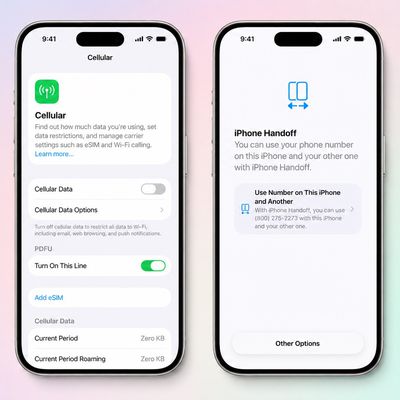
T-Mobile will charge customers $5 per month to use iPhone Handoff, an e-SIM feature that allows the same phone number to be used on two separate iPhones.
iPhone Handoff requires carrier support, and at launch, only T-Mobile users in the U.S. and Deutsche Telekom users in Germany will be able to use it.
T-Mobile says customers can use their number across two compatible iPhone models and...
Production theater company IMAX has responded in a mixed way to Apple's embrace of a 1:1.4 aspect ratio on the iPhone Duo's inner and outer displays. The boxier ratio happens to be very close to the classic "full-frame" IMAX 1.43:1 aspect ratio, which comes from the geometry of the company's original 15-perforation/70mm film system.
In response to an X post from someone wondering if we'll see...
At its event today unveiling the iPhone 18 Pro, AirPods 5, Apple Watch Series 12, and more, Apple announced that iOS 27 will be released later this month.
iOS 27 has already been available as a developer beta since June and as a public beta since July, and Apple today said that the update will be released for all users with a compatible iPhone model on Monday, September 14.
iOS 27 is...