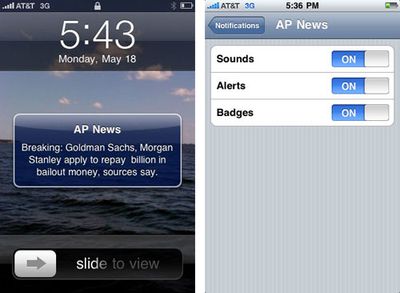
iPhone Push Notification Settings and Screenshots
Apple began
high volume testing of the upcoming Push notification system for iPhone applications earlier this week. The system offers 3rd party applications the ability to push notifications to the user even when they are not the running application.
Each application will ask for permission to provide push notifications upon launch. Once authorized, you can customize the type of notifications you wish to receive: sounds, alerts, and/or badges. Alerts provide an SMS-like pop up dialog while badges simply add a number to the corner of the app's icon. An additional gallery of screenshots is provided by MyAppleGuide.
The Push notification system will accompany the iPhone 3.0 release which is scheduled this summer.
Popular Stories
Apple is releasing five new products this Friday, November 6, following pre-orders that opened last week, including its first touchscreen MacBook Pro models.
The following new products will be available from Friday:
iPad mini with OLED display and A20 Pro chip
iMac with M6 chip
14-inch MacBook Pro with M6 chip
14-inch MacBook Pro with OLED touchscreen
16-inch MacBook Pro with OLED...
In a memo shared with Apple Stores and Apple Authorized Service Providers this week, and later obtained by MacRumors, Apple provided technicians with guidance on how to diagnose and address the iPhone Duo's inner display cracking issue.
If a customer reports the issue, Apple advised technicians to inspect the iPhone Duo and repair or replace it in accordance with their standard procedures....
Apple released iOS 27.2 on October 26, bringing enhancements to Siri AI, adding Suggestions in Messages, and sneaking in a string of smaller additions across Photos, Podcasts, Games, Apple TV, and FaceTime.
iOS 27.2 is available to download to your device now via Settings ➝ General ➝ Software Update. Note that some features may not be available in all regions or on all iPhone models....