Apple Reveals 8 Scenarios Where iPhone 14 Pro's Always-On Display Turns Off
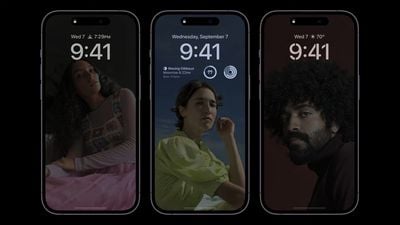
Apple today published a new support document with additional details about the new always-on display mode on the iPhone 14 Pro and iPhone 14 Pro Max. Notably, the document lists eight scenarios where the always-on display temporarily turns off.
To save battery life, Apple says the display goes completely dark when:
- Your iPhone is lying face down
- Your iPhone is in your pocket or bag
- Sleep Focus is on
- Low Power Mode is on
- Your iPhone is connected to CarPlay
- You're using Continuity Camera
- You haven't used your iPhone for a while (see paragraph below)
- Your iPhone detects that you moved away from it with a paired Apple Watch
According to Apple, the iPhone 14 Pro and iPhone 14 Pro Max can learn your "activity patterns" and turns the always-on display off and on accordingly. For example, Apple says the display can work in tandem with a user's alarm or sleep schedule if they have one set.
Always-on display mode is enabled by default. To turn it off, open the Settings app, tap on the Display & Brightness menu, and turn off Always On.
iPhone 14 Pro models can drop down to a refresh rate as low as 1Hz to ensure that the always-on display does not have too significant of an impact on battery life. Apple says the always-on display uses multiple coprocessors in the A16 Bionic chip to refresh the display using "minimal power," making the display "incredibly power efficient."
Always-on display mode dims the entire Lock Screen, but still shows information like the time, widgets, and wallpaper. Once you raise the iPhone, tap the screen, or press the side button, the display returns to normal brightness. You can also swipe up from the bottom of the display and authenticate with Face ID to wake the iPhone as usual.
Popular Stories
Apple today shared an ad that shows how the upgraded Center Stage front camera on the latest iPhones improves the process of taking a group selfie.
"Watch how the new front facing camera on iPhone 17 Pro takes group selfies that automatically expand and rotate as more people come into frame," says Apple. While the ad is focused on the iPhone 17 Pro and iPhone 17 Pro Max, the regular iPhone...
Apple is planning to launch new MacBook Pro models as soon as early March, but if you can, this is one generation you should skip because there's something much better in the works.
We're waiting on 14-inch and 16-inch MacBook Pro models with M5 Pro and M5 Max chips, with few changes other than the processor upgrade. There won't be any tweaks to the design or the display, but later this...
In select U.S. states, residents can add their driver's license or state ID to the Apple Wallet app on the iPhone and Apple Watch, and then use it to display proof of identity or age at select airports and businesses, and in select apps.
The feature is currently available in 13 U.S. states and Puerto Rico, and it is expected to launch in at least seven more in the future.
To set up the...
Wednesday February 11, 2026 10:07 am PST by
Juli CloverApple today released iOS 26.3 and iPadOS 26.3, the latest updates to the iOS 26 and iPadOS 26 operating systems that came out in September. The new software comes almost two months after Apple released iOS 26.2 and iPadOS 26.2.
The new software can be downloaded on eligible iPhones and iPads over-the-air by going to Settings > General > Software Update.
According to Apple's release notes, ...
It has been a slow start to 2026 for Apple product launches, with only a new AirTag and a special Apple Watch band released so far. We are still waiting for MacBook Pro models with M5 Pro and M5 Max chips, the iPhone 17e, a lower-cost MacBook with an iPhone chip, long-rumored updates to the Apple TV and HomePod mini, and much more.
Apple is expected to release/update the following products...