Everything New in iOS 15 Beta 6: SharePlay Disabled, Safari Redesigned and More

Apple released the sixth beta of iOS 15 just a week after the fifth beta, but the new update brings some of the most significant tweaks that we've seen to iOS 15 during the beta testing period.

iOS 15 General Feature Yellow

Safari Redesign

Apple in iOS 15 beta 6 has added a toggle to move the Safari address bar to the top of the interface, which returns Safari to an iOS 14-like design and mitigates all of the Safari changes introduced in earlier betas.
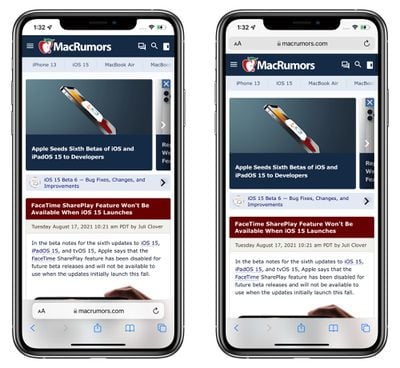
new safari design options ios 15
Those who prefer the bottom bar can still opt to have that toggled on with the Tab Bar view, but Apple has also changed the look and the url bar at the bottom has been merged with a dedicated control panel that does away with trying to merge all page management options into a single address bar view.
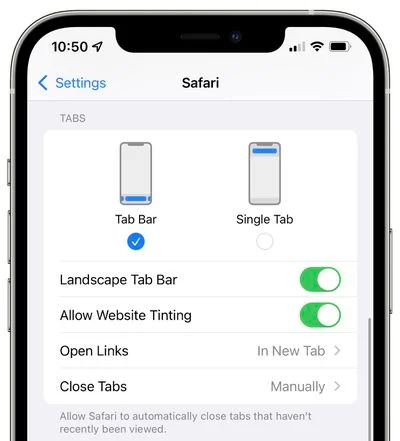
ios 15 beta 6 safari options
Safari design options let you swap between the Tab Bar at the bottom or the Single Tab at the top, plus there are toggles to disable website tinting and enable or disable a landscape tab bar. "Allow Website Tinting" appears to be the same as the prior "Show Color in Tab Bar" setting that was available in earlier betas.

You can swap between the two views in Safari using the "Aa" menu right in Safari without having to access the Safari app.
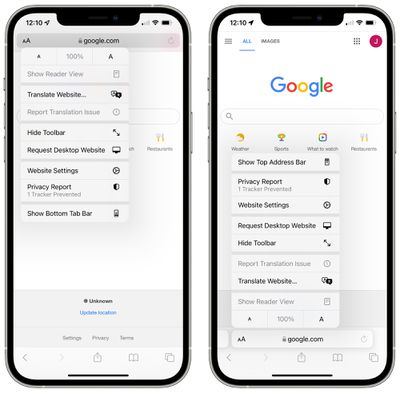
safari show bottom tab bar ios 15 option

Safari Bookmarks and History

When accessing Safari History, Bookmarks, and Reading List in iOS 15 with the bottom Tab Bar view toggled on, the interface comes up from the bottom and takes up less space on the screen. With Single Tab enabled, the interface looks the same as it did before.
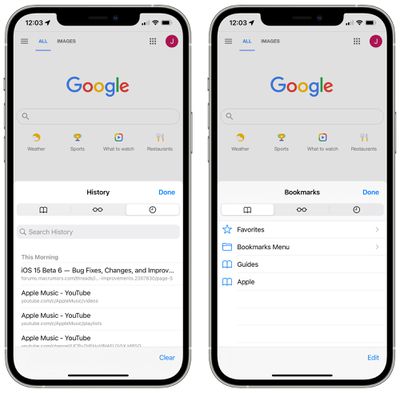
safari history bookmarks

SharePlay Removed

SharePlay is no longer functional in the sixth beta of iOS 15, because Apple has temporarily removed it. When iOS 15, iPadOS 15, tvOS 15, and macOS Monterey launch, there will be no SharePlay feature available.
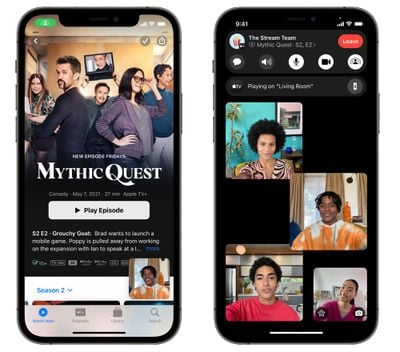
facetime shareplay screenshots mythic quest
Apple instead plans to reintroduce SharePlay in a later software update this fall after the iOS 15, iPadOS 15, tvOS 15, and macOS Monterey updates debut.

Watch Face Automation

The fifth beta of iOS 15 removed the Automation for automatically setting a watch face on the Apple Watch at a specific time, but in the sixth beta, the option is once again available in the Shortcuts app.

Other New Features

Know of something new in the beta that we left out? Let us know in the comments below.

Related Forum: iOS 15

Popular Stories

maxresdefault

Apple Shows Off a Key Reason to Upgrade to the iPhone 17

Saturday February 7, 2026 9:26 am PST by
Apple today shared an ad that shows how the upgraded Center Stage front camera on the latest iPhones improves the process of taking a group selfie. "Watch how the new front facing camera on iPhone 17 Pro takes group selfies that automatically expand and rotate as more people come into frame," says Apple. While the ad is focused on the iPhone 17 Pro and iPhone 17 Pro Max, the regular iPhone...
apple wallet drivers license feature iPhone 15 pro

Apple Says These 7 U.S. States Plan to Offer iPhone Driver's Licenses

Monday February 9, 2026 6:24 am PST by
In select U.S. states, residents can add their driver's license or state ID to the Apple Wallet app on the iPhone and Apple Watch, and then use it to display proof of identity or age at select airports and businesses, and in select apps. The feature is currently available in 13 U.S. states and Puerto Rico, and it is expected to launch in at least seven more in the future. To set up the...
m5 macbook pro deal

Why You Shouldn't Buy the Next MacBook Pro

Tuesday February 10, 2026 4:27 pm PST by
Apple is planning to launch new MacBook Pro models as soon as early March, but if you can, this is one generation you should skip because there's something much better in the works. We're waiting on 14-inch and 16-inch MacBook Pro models with M5 Pro and M5 Max chips, with few changes other than the processor upgrade. There won't be any tweaks to the design or the display, but later this...
Apple Logo Zoomed

Apple Expected to Launch These 10+ Products Over the Coming Months

Tuesday February 10, 2026 6:33 am PST by
It has been a slow start to 2026 for Apple product launches, with only a new AirTag and a special Apple Watch band released so far. We are still waiting for MacBook Pro models with M5 Pro and M5 Max chips, the iPhone 17e, a lower-cost MacBook with an iPhone chip, long-rumored updates to the Apple TV and HomePod mini, and much more. Apple is expected to release/update the following products...
iOS 26

Apple Releases iOS 26.3 and iPadOS 26.3

Wednesday February 11, 2026 10:07 am PST by
Apple today released iOS 26.3 and iPadOS 26.3, the latest updates to the iOS 26 and iPadOS 26 operating systems that came out in September. The new software comes almost two months after Apple released iOS 26.2 and iPadOS 26.2. The new software can be downloaded on eligible iPhones and iPads over-the-air by going to Settings > General > Software Update. According to Apple's release notes, ...

Top Rated Comments

HALE101 Avatar
59 months ago
You guys top or bottom ? ?
Score: 26 Votes (Like | Disagree)
Bawstun Avatar
59 months ago
I’ve literally been saying (for years) that browsers should have a user interface with their URL bar at the bottom.

Because it makes sense. It is good design. While holding your device, your thumb can easily reach the bottom of the screen. You hold your device at the bottom, so that’s where our thumbs are. It has NEVER EVER made sense to keep the URL bar at the top, where you can’t hold your device and tap it at the same time or with one hand. It has never made sense.

Years and years of such backwards, stupid design. I’m actually grateful someone finally took note of how much more sense it makes to include it at the bottom. Hopefully this makes other browsers do the same, since I don’t use Safari because it lacks features and is crap compared to the competition.
Score: 16 Votes (Like | Disagree)
LFC2020 Avatar
59 months ago

While it's good that they are offering choices, but it's hard not to think this is a defeat for the new Safari design. I hope they put more effort into it though as I think it's overall better. Still some quirks, but much more comfortable to use.
People complain that iOS hasn’t changed, then when it does change they still complain, can’t please everyone I guess. ?‍♂️

Keep the changes coming. ?
Score: 10 Votes (Like | Disagree)
macduke Avatar
59 months ago
That's literally all they needed to do. Just move it to the bottom and make it swipeable. Problem solved.

While it's good that they are offering choices, but it's hard not to think this is a defeat for the new Safari design. I hope they put more effort into it though as I think it's overall better. Still some quirks, but much more comfortable to use.
This is good. Sometimes new isn't better. For instance, the new interface was so dense with tap targets, some very tiny, that it violated Apple own HIG for crying out loud. That should've been a red flag right there that killed this before it even got out of alpha internally. The fact that it made it this far has me a little concerned about Apple's design team, but at least it was ultimately killed off. Design is how it works and this made discoverability difficult, made it hard to tap things you want to tap and made it easy to tap things you didn't mean to tap. Sure it looked cool but that is all. They kept the two new features as I mentioned at the top: easy to reach and easy to swipe between tabs.
Score: 8 Votes (Like | Disagree)
Jeaz Avatar
59 months ago
While it's good that they are offering choices, but it's hard not to think this is a defeat for the new Safari design. I hope they put more effort into it though as I think it's overall better. Still some quirks, but much more comfortable to use.
Score: 7 Votes (Like | Disagree)
59 months ago
that's 2 of the major features they announced being rolled back, so... what's actually going to be new?
Score: 5 Votes (Like | Disagree)