Hands-On Walkthrough of Apple Music and Beats 1 Radio - MacRumors
Skip to Content

Hands-On Walkthrough of Apple Music and Beats 1 Radio

Apple's much-anticipated music service, Apple Music, launched this morning as part of iOS 8.4, bringing on-demand streaming music, the Beats 1 radio station, and Apple Connect, Apple's new social network aimed at letting artists connect with fans in new and unique ways.

We went hands-on with Apple Music in iOS 8.4 to give you a look at how the new service works, what it looks like, what it costs, and how to use it. Check out the video below to get a thorough overview of all three Apple Music components.


Apple Music's main streaming feature is a "For You" section within the Music app that offers up on-demand music recommendations based on preferences you've entered and music you've listed to previously. "For You" is able to offer more refined, tailored recommendations as you listen to more and more music.
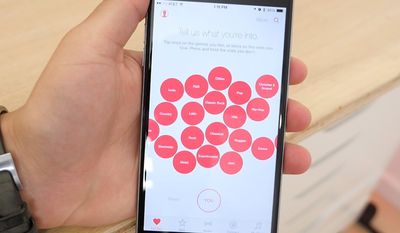
applemusicforyou
The "New" tab, also part of the on-demand streaming service, displays a variety of music that's new and popular, organized into songs and albums. This section also includes music picks from Apple Music editors.
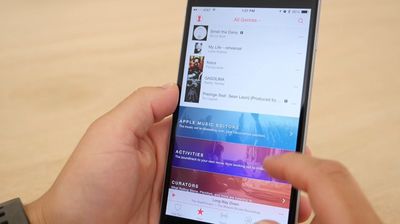
curatedmusicnew
Much of the content in these two Music app features requires a subscription to Apple Music, which is free for three months, after which it's priced at $9.99 or $14.99 for a family. A third "Radio" tab in the app houses the new 24/7 live Beats 1 radio station and other radio offerings, and radio content will always be free to access.
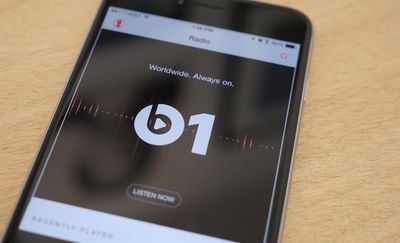
beats1radio
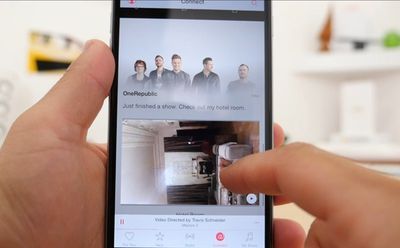
Apple Connect, the artist-centric social network, is also available through a tab in the Music app, and it displays status updates, photos, videos, and more from artists you follow. The final section is focused on "My Music," housing music you've added from Apple Music, songs you've purchased from iTunes, and playlists you've created, all in one spot.
applemusicconnect
All of these features that are available in iOS 8.4's new Music app are also available in iTunes 12.2, which was just released this afternoon. iTunes 12.2 offers up all of the same tabs and access to music, radio stations, and curated playlists.

Because Apple Music is free for the first three months, all iTunes users can download it and check it out for themselves without having to shell out cash. If you haven't downloaded Apple Music yet, it's well worth giving it a look.

To read more about setting up Apple Music, make sure to check out our guide on Getting Started with Apple Music and Beats 1 on iOS, Mac, and PC.


Popular Stories

imac video apple feature

Apple Released Yet Another New Product Today

Friday March 20, 2026 2:39 pm PDT by
Apple has unveiled a whopping nine new products so far this March, including an iPhone 17e, iPad Air models with the M4 chip, MacBook Air models with the M5 chip, MacBook Pro models with M5 Pro and M5 Max chips, the all-new MacBook Neo, an updated Studio Display, a higher-end Studio Display XDR, AirPods Max 2, and now the Nike Powerbeats Pro 2. iPhone 17e features the same overall design as...
HomePod mini and Apple TV Sage

New Apple TV and HomePod Mini Remain 'Ready' to Launch

Sunday March 22, 2026 6:33 am PDT by
Apple has unveiled nine new products this month, but the wait continues for the next-generation Apple TV 4K and HomePod mini models. In his Power On newsletter today, Bloomberg's Mark Gurman said new versions of the Apple TV and HomePod mini have been "ready" since last year, but he reiterated that Apple has held off on releasing them until the more personalized version of Siri and other...
iOS 26

iOS 26.4 Adds Two New Features to CarPlay

Tuesday March 24, 2026 1:55 pm PDT by
iOS 26.4 was released today, and it includes a couple of new features for CarPlay: an Ambient Music widget and support for voice-based chatbot apps. To update your iPhone 11 or newer to iOS 26.4, open the Settings app and tap on General → Software Update. CarPlay will automatically offer the new features so long as the iPhone connected to your vehicle is running iOS 26.4 or later....

Top Rated Comments

BoxerGT2.5 Avatar
140 months ago
Settings > iCloud > Family planning
Proceed to put phone in pocket and let the radiation kill all your sperm. iSterilization
Score: 12 Votes (Like | Disagree)
140 months ago
The new UI is a step back. Clicking through artists > albums > then having to go through each album to find a song doesn't make sense. The old way of listing songs under the albums was so much easier- especially while driving. Why remove this and require more work and clicks? I don't understand the reasoning.
In my mind this is a huge step "forward" to the old glory days. I hated, hated, having to scroll though hundreds of songs (when you have an artist with lots of albums) that came with iOS7 and above. Now it looks like if there's more than 2 albums in an artist, it shows you the album view. Thank you Apple!!
Score: 8 Votes (Like | Disagree)
Dilster3k Avatar
140 months ago
This service is top notch! Eat your heart out Spotify!
Score: 6 Votes (Like | Disagree)
AngerDanger Avatar
140 months ago
I totally hate the new Apple "My Music" UI. It requires too many clicks for basic things. Can't enjoy my purchased music on my iPhone no more, need to go back to an iPod. :(
If anything on iOS requires clicks, you're doing something wrong. :p
Score: 4 Votes (Like | Disagree)
iapplelove Avatar
140 months ago
I don't stream anything, gave up on Netflix don't do spotify don't even use the free pandora. Had no interest in apple music but I signed up for it anyway and to be honest I have yet to stop using it. Love it.
Score: 3 Votes (Like | Disagree)
MacrumoursUser Avatar
140 months ago
Well so far it's very convoluted. Too much stuff in there. Doesn't really work as i expect it to. For example i wanted to add few albums i like to my music and then make them available offline - nothing happens. I can see them in my music, but they are in the cloud.

I have some songs i have purchased and if i use the option to show only songs available offline they are all there since i have downloaded them, but if i go to iTunes store app to the purchased section it shows them with a cloud icon on the right as if they are in the cloud, but not downloaded.


It takes some skill to make it so convoluted and unintuitive.
Score: 3 Votes (Like | Disagree)