

Apple today launched a new version of its iTunes U app, adding several new iPad-related features designed to make it easier for both students and teachers to use the iPad for online courses. Apple first announced plans to update iTunes U in late June.
Today's version 2.0 update allows teachers to create full courses entirely on the iPad, importing content from other Apple software like iWork, iBooks Author, and other educational apps in the App Store. The camera can also be used to add photos and videos directly to course material and teachers can easily track student progress online.
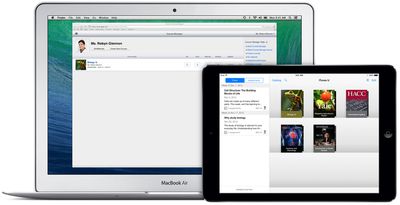
Students gain a new discussion feature that lets them collaborate both with classmates and teachers, and they're able to follow discussions and receive push notifications when new topics or comments are added.
Let the discussion begin
- The new iTunes U makes it simple for students participating in private courses to pose questions on the course or any post or assignment
- Other students in the class can jump into the discussion and ask more questions or provide answers
- Teachers and students can keep up with the conversation when they receive push notifications as the discussion progressesCreate courses on iPad
- Teachers can now create and update their courses using the iTunes U app on their iPad--getting started is fast, simple, and completely free
- Provide every student a course outline, write posts, distribute assignments, upload class materials, easily track participating students, and much more
- Take advantage of the built in camera on iPad to easily capture photos or videos and upload them for course assignments
- Create materials using Pages, Numbers, and Keynote--or other apps from the App Store--and add them to your course by using "Open in iTunes U" from within each app
- Teachers affiliated with qualified institutions have the option to publish their courses to the iTunes U Catalog--making them available to everyone for free
iTunes U can be downloaded from the App Store for free. [Direct Link]




















Top Rated Comments
Besides downloading podcasts, you can't get the full functionality of the course on a non-iOS device. The courses are supposed to have the look and feel of iPad native apps.
I realize that Apple is trying to only sell Apple products, but another nice thing would be if iBooks Author was also ported over to PC. My school has plenty of iPads, but very few Macs.