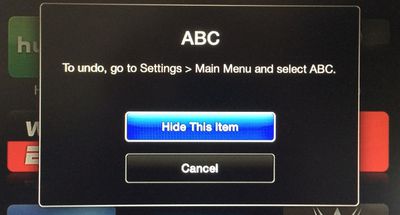
Alongside the launch of iOS 7.1, Apple today updated its Apple TV software to version 6.1, adding a much-requested feature that allows users to hide unwanted channel icons from the main screen without needing to access the Parental Controls menu. The hiding feature joins an already existing rearranging feature, letting users further customize their Apple TV home screens as the number of channels has grown significantly in recent months.
appletvarrange
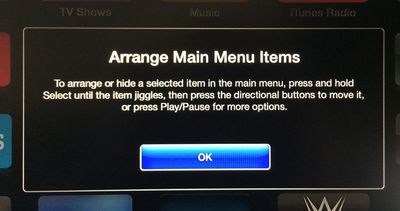
Arranging or hiding icons can be initiated by selecting an item in the main menu and then pressing and holding on the Select button of the remote control until the icon jiggles, much as how icon rearranging functions within iOS. Icons can be moved using directional buttons, with Play/Pause available for more options.
appletvhideitems
The Apple TV software was last updated to version 6.0.1 in October, following the release of the 6.0 software in September, which brought several new features including iTunes Radio and AirPlay from iCloud. Earlier this week, the Apple TV gained a new iTunes Festival channel ahead of SXSW.

Users can download the Apple TV 6.1 software through the Apple TV’s over-the-air update mechanism found in Settings --> General –-> Software Update.

Apple has also updated the Remote app for iOS devices to version 4.2, adding a feature that allows users to browse purchased movies and TV shows within the app and then play them on the Apple TV. The update also includes the ability to control iTunes Radio on the Apple TV and offers bug fixes and stability improvements. [Direct Link]


Top Rated Comments

dearfriendx Avatar
156 months ago
Sweet! An easy way for a grown man to hide 8 Disney channels
Score: 16 Votes (Like | Disagree)
musika Avatar
156 months ago
Add this feature to iOS for iPhone and iPad!
Score: 13 Votes (Like | Disagree)
GenesisST Avatar
156 months ago
Finally! No more annoying posts about not being able to hide apps (when you could, in a convoluted way)!
Score: 11 Votes (Like | Disagree)
Northgrove Avatar
156 months ago
BRB, hiding 80% of all icons...
Score: 8 Votes (Like | Disagree)
156 months ago
Safari feels.... oh sorry, wrong device.
Score: 8 Votes (Like | Disagree)
KylePowers Avatar
156 months ago
Neato.

Now release an App Store and a dope 4th gen AppleTV :D
Score: 5 Votes (Like | Disagree)

Popular Stories

maxresdefault

Apple Shows Off a Key Reason to Upgrade to the iPhone 17

Saturday February 7, 2026 9:26 am PST by
Apple today shared an ad that shows how the upgraded Center Stage front camera on the latest iPhones improves the process of taking a group selfie. "Watch how the new front facing camera on iPhone 17 Pro takes group selfies that automatically expand and rotate as more people come into frame," says Apple. While the ad is focused on the iPhone 17 Pro and iPhone 17 Pro Max, the regular iPhone...
apple wallet drivers license feature iPhone 15 pro

Apple Says These 7 U.S. States Plan to Offer iPhone Driver's Licenses

Monday February 9, 2026 6:24 am PST by
In select U.S. states, residents can add their driver's license or state ID to the Apple Wallet app on the iPhone and Apple Watch, and then use it to display proof of identity or age at select airports and businesses, and in select apps. The feature is currently available in 13 U.S. states and Puerto Rico, and it is expected to launch in at least seven more in the future. To set up the...
m5 macbook pro deal

Why You Shouldn't Buy the Next MacBook Pro

Tuesday February 10, 2026 4:27 pm PST by
Apple is planning to launch new MacBook Pro models as soon as early March, but if you can, this is one generation you should skip because there's something much better in the works. We're waiting on 14-inch and 16-inch MacBook Pro models with M5 Pro and M5 Max chips, with few changes other than the processor upgrade. There won't be any tweaks to the design or the display, but later this...
iOS 26

Apple Releases iOS 26.3 and iPadOS 26.3

Wednesday February 11, 2026 10:07 am PST by
Apple today released iOS 26.3 and iPadOS 26.3, the latest updates to the iOS 26 and iPadOS 26 operating systems that came out in September. The new software comes almost two months after Apple released iOS 26.2 and iPadOS 26.2. The new software can be downloaded on eligible iPhones and iPads over-the-air by going to Settings > General > Software Update. According to Apple's release notes, ...
Apple Logo Zoomed

Apple Expected to Launch These 10+ Products Over the Coming Months

Tuesday February 10, 2026 6:33 am PST by
It has been a slow start to 2026 for Apple product launches, with only a new AirTag and a special Apple Watch band released so far. We are still waiting for MacBook Pro models with M5 Pro and M5 Max chips, the iPhone 17e, a lower-cost MacBook with an iPhone chip, long-rumored updates to the Apple TV and HomePod mini, and much more. Apple is expected to release/update the following products...