Last month, Logitech launched its G series of gaming keyboards and mice. The devices feature numerous programmable buttons, custom color backlighting, and other features designed for MMORPG players.

The company has now announced that its Logitech Gaming Software is now available on OS X.
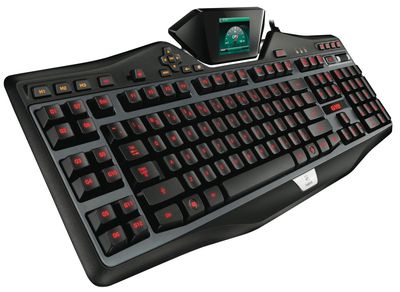
G19
The top of the line models are the $100 G700s Rechargeable Wireless Gaming Mouse and the $200 G19s LCD Gaming Keyboard.

Today, we are excited to share that Logitech Gaming Software (LGS) has been updated to support Mac OS for our full keyboard and mouse lineup. Now Mac gamers can enjoy the same great personalization and customized control our PC customers have come to reply on. You can download the latest version of LGS from the Logitech support page for each compatible product.

Several of us on the gaming team switch back and forth between Mac and PC, so we’re thrilled to have this support on both platforms. We can’t wait for you to now have the option to experience your favorite Logitech gaming accessories on Mac.

The G19s keyboard, for example, includes an LCD screen to monitor game statistics, custom-color backlighting for keys, and a number of custom programmable keys. The G700s mouse runs over a wireless connection, but can recharge batteries and continue working at the same time, with a number of programmable thumb controls on the side, and more.

Both are available from Logitech's online store and elsewhere.

Top Rated Comments

167 months ago
That keyboard looks hideous.
Score: 10 Votes (Like | Disagree)
Yvan256 Avatar
167 months ago
The proper pointer device for using a Mac is a trackpad. I love my three and four finger gestures. It's downright fun to use (without even launching a game.)

I've tried these complicated mice - they suck.

I've never felt a need to have additional buttons on my keyboard... Why would I? In game the controls can all be mapped to the 60+ keys already on a standard keyboard.

In my opinion, a trackpad can't compare to a mouse in games where you control the camera, such as Left 4 Dead 2 or even World of Warcraft.
Score: 8 Votes (Like | Disagree)
class77 Avatar
167 months ago
All my mice are Logitech and I think they're the best/smoothest on the market
Score: 6 Votes (Like | Disagree)
MagnusVonMagnum Avatar
167 months ago
The proper pointer device for using a Mac is a trackpad.

Trackpads suck. Yes, even Mac ones. I hate my trackpad on my Macbook Pro. They're mostly miserable to use. I'll take my 5-button Intellimouse over that crap any day of the week. The only thing I like about a trackpad is side-to-side scrolling and a couple of gestures, but trying to do a right button click with two fingers is just awkward compared to a dedicated right mouse button, let alone the middle mouse button which is irreplaceable for most first person shooter games. I mean the very idea of trying to play a 1st person shooter with a trackpad is laughable. Frankly, it'd be better to have a touchscreen setup with the Mac than a trackpad. At least then a game like Bejeweled could be played quickly and easily like on the iPad/iPhone whereas it's slow going by comparison on a trackpad OR a mouse. And just try drawing and editing in Photoshop with a trackpad. It's miserable since it lacks precision trying to move and press the entire trackpad as a button or lift your finger up, etc. whereas you just glide and click with a mouse (drawing pads using stencils are different, of course).

Thus, in conclusion, the very idea that a trackpad is "proper" is such a joke it's unreal. Yes, notebooks come with trackpads. That doesn't make them "proper". Up until recently, all other Macs came with mice (admittedly Apple mice have always sucked since they could never admit that one button is stupid and always has been always will be and that hiding a second button just shows how much they refused to acknowledge the truth rather than any indication that yes, a second or even a 3rd button is needed. And frankly, I couldn't do without my roller wheel. Two finger scrolling is OK, but it's too easy to move your hand sideways a tad and the next thing you know you're off center on a large web page and that is irritating.
Score: 1 Votes (Like | Disagree)
167 months ago
The proper pointer device for using a Mac is a trackpad. I love my three and four finger gestures. It's downright fun to use (without even launching a game.)

I've tried these complicated mice - they suck.

I've never felt a need to have additional buttons on my keyboard... Why would I? In game the controls can all be mapped to the 60+ keys already on a standard keyboard.

The proper pointing device for anything other than casual surfing and consumption is a mouse. Doing any sort of real work, or any gaming requires the speed and accuracy of a mouse... clearly you're not much of a gamer either since you can definitely make use of a couple side buttons plus the usual right and left click.
Score: 1 Votes (Like | Disagree)
mrxak Avatar
167 months ago
I like the idea of these keyboards. Unfortunately I kind of hate their design. There is too much bulk around the keys, and the F-key groupings are bad. Also the escape key is too small and no command key.
Score: 1 Votes (Like | Disagree)

Popular Stories

maxresdefault

Apple Shows Off a Key Reason to Upgrade to the iPhone 17

Saturday February 7, 2026 9:26 am PST by
Apple today shared an ad that shows how the upgraded Center Stage front camera on the latest iPhones improves the process of taking a group selfie. "Watch how the new front facing camera on iPhone 17 Pro takes group selfies that automatically expand and rotate as more people come into frame," says Apple. While the ad is focused on the iPhone 17 Pro and iPhone 17 Pro Max, the regular iPhone...
m5 macbook pro deal

Why You Shouldn't Buy the Next MacBook Pro

Tuesday February 10, 2026 4:27 pm PST by
Apple is planning to launch new MacBook Pro models as soon as early March, but if you can, this is one generation you should skip because there's something much better in the works. We're waiting on 14-inch and 16-inch MacBook Pro models with M5 Pro and M5 Max chips, with few changes other than the processor upgrade. There won't be any tweaks to the design or the display, but later this...
apple wallet drivers license feature iPhone 15 pro

Apple Says These 7 U.S. States Plan to Offer iPhone Driver's Licenses

Monday February 9, 2026 6:24 am PST by
In select U.S. states, residents can add their driver's license or state ID to the Apple Wallet app on the iPhone and Apple Watch, and then use it to display proof of identity or age at select airports and businesses, and in select apps. The feature is currently available in 13 U.S. states and Puerto Rico, and it is expected to launch in at least seven more in the future. To set up the...
iOS 26

Apple Releases iOS 26.3 and iPadOS 26.3

Wednesday February 11, 2026 10:07 am PST by
Apple today released iOS 26.3 and iPadOS 26.3, the latest updates to the iOS 26 and iPadOS 26 operating systems that came out in September. The new software comes almost two months after Apple released iOS 26.2 and iPadOS 26.2. The new software can be downloaded on eligible iPhones and iPads over-the-air by going to Settings > General > Software Update. According to Apple's release notes, ...
Apple Logo Zoomed

Apple Expected to Launch These 10+ Products Over the Coming Months

Tuesday February 10, 2026 6:33 am PST by
It has been a slow start to 2026 for Apple product launches, with only a new AirTag and a special Apple Watch band released so far. We are still waiting for MacBook Pro models with M5 Pro and M5 Max chips, the iPhone 17e, a lower-cost MacBook with an iPhone chip, long-rumored updates to the Apple TV and HomePod mini, and much more. Apple is expected to release/update the following products...