Apple Thunderbolt Display with Multiple Monitors: No Daisy Chaining Mini DisplayPort Monitors [Updated]

With the new 27" Apple Thunderbolt Display now shipping to customers, Apple has posted a new support document outlining what can and can not be accomplished with multiple monitors on Thunderbolt-enabled Mac systems.
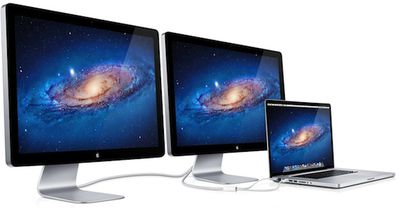
thunderbolt displays macbook pro
As far as compatibility, Apple notes that all Thunderbolt-enabled systems with the exception of the MacBook Air can handle two Thunderbolt displays, with a caveat for the 13-inch MacBook Pro being that the computer's internal display will not function if two Thunderbolt displays are connected. The high-end $799 Mac mini with discrete AMD graphics is also capable of running a third display via HDMI.

- MacBook Air (Mid 2011): One Thunderbolt display.

- MacBook Pro (Early 2011): Two Thunderbolt displays. Connecting a second Apple Thunderbolt Display (27-inch) to a 13-inch MacBook Pro will make the screen on the MacBook Pro turn black. This is expected behavior.

- iMac (Mid 2011 and Late 2011): Two Thunderbolt displays. iMac (27-inch, Mid 2011) with two Thunderbolt ports supports a total of two Thunderbolt displays regardless of which Thunderbolt port each display is connected to.

- Mac mini (Mid 2011): Two Thunderbolt displays. Mac mini with AMD graphics can support a HDMI compatible device on its HDMI port when using two Thunderbolt displays.

One other note of interest that will be a disappointment for some users is the disclosure that users will not be able to daisy chain a Mini DisplayPort display off an Apple Thunderbolt Display.

Mini DisplayPort displays will not light up if connected to the Thunderbolt port on an Apple Thunderbolt Display (27-inch).

The revelation is a bit of a surprise, as Mini DisplayPort displays can currently be daisy chained off other Thunderbolt peripherals. Some users had been hoping to reuse their existing Mini DisplayPort displays as part of multiple-monitor setups using the new Thunderbolt display, but will apparently be unable to do so.

Finally, Apple recommends that users daisy chaining the Apple Thunderbolt Display with Thunderbolt storage devices connect the display directly to the computer's Thunderbolt port, with other peripherals daisy chaining off of the display.

Update: Macworld appears to have demonstrated that you can indeed daisy chain a Mini DisplayPort monitor as long as it is connected to some other device than the Thunderbolt display. In Macworld's apparent setup, a Pegasus RAID storage device is placed between the Thunderbolt display and an older Mini DisplayPort display from Apple and all displays work properly.

It is unclear why simply inserting another Thunderbolt device into the middle of the chain allows the Mini DisplayPort display to function, but at least one MacRumors forum member has confirmed that he is unable to daisy chain his Mini DisplayPort-enabled Apple Cinema Display directly off of the new Thunderbolt display.


Related Forum: Mac Accessories

Popular Stories

iphone 16 apple intelligence

Apple Aiming to Release 'Breakthrough' New iPhone Accessory

Wednesday February 18, 2026 12:43 pm PST by
Apple is looking for a "breakthrough" with its push into wearable AI devices, including an "AirTag-sized pendant," according to Bloomberg's Mark Gurman. In a report this week, he said the pendant is reminiscent of the failed Humane AI Pin, but it would be an iPhone accessory rather than a standalone product. The pendant would feature an "always-on" camera and a microphone for Siri voice...
Apple Watch 15 Tips Every Owner Needs to Know Feature

Apple Watch: 15 Tips Every Owner Needs to Know

Thursday February 19, 2026 7:38 am PST by
Apple Watch is now eleven generations in, and packed with useful features that are easy to miss at first glance. To help you get more out of your new device, we've rounded up 15 practical tips you might not have discovered yet, including a few that long-time users often overlook. Bounce Between Two Apps On your Apple Watch, double-press the Digital Crown to see a deck of all currently...
Dynamic Island iPhone 18 Pro Feature

10 Reasons to Wait for Apple's iPhone 18 Pro

Wednesday February 18, 2026 5:12 am PST by
Apple's iPhone development roadmap runs several years into the future and the company is continually working with suppliers on several successive iPhone models at the same time, which is why we often get rumored features months ahead of launch. The iPhone 18 series is no different, and we already have a good idea of what to expect for the iPhone 18 Pro and iPhone 18 Pro Max. One thing worth...
iphone 17 pro green

iPhone 17 Pro Max Curiously Becomes Most Traded-In Smartphone

Wednesday February 18, 2026 9:13 am PST by
New trade-in data indicates that Apple's iPhone 17 Pro Max has rapidly become the single most traded-in smartphone. According to a new report from SellCell, Apple's latest flagship iPhone has quickly risen to the top of the independent trade-in market, accounting for 11.5% of all devices appearing in the top-20 trade-in rankings just months after release. The analysis is based on SellCell...
Multicolored Low Cost A18 Pro MacBook Feature

Low-Cost MacBook Expected on March 4 in These Colors

Wednesday February 18, 2026 5:42 am PST by
Apple will announce its rumored low-cost MacBook at its event on March 4, with the device coming in a selection of bold color options, according to a known leaker. Earlier this week, Apple announced a "special Apple Experience" for the media in New York, London, and Shanghai, taking place on March 4, 2026 at 9:00am ET. Posting on Weibo, the leaker known as "Instant Digital" said that the...

Top Rated Comments

miles01110 Avatar
188 months ago
Once again Apple decides what's best for the customer.
Score: 14 Votes (Like | Disagree)
AAPLaday Avatar
188 months ago
Would have been nice if this information had been divulged on day one.
Score: 9 Votes (Like | Disagree)
zorinlynx Avatar
188 months ago
Wow, this sounds so half-assed. You'd think Apple would be able to get something like this right!
Score: 9 Votes (Like | Disagree)
188 months ago
Adding my existing 24" IPS monitor as a daisy-chain from my as-of-yet-unordered t-bolt display was my grand scheme. So now its off.

This limitation is very head scratchy...
Score: 9 Votes (Like | Disagree)
188 months ago
Wow... so other thunderbolt devices allow MDP to be used at the end of the chain, but not Apple's own display?

Forcing the TB displays to be the first in line makes me think something's not quite right.
Score: 9 Votes (Like | Disagree)
188 months ago
Apple's hedging it's bets in case 3rd party makers skimp on quality parts. It's smart to have the largest power drawing item first...in any situation.
I'm guessing the screen could flicker.
But the display has its own power connection cable. I doubt it'd be possible to power an entire 27" display through Thunderbolt.
Score: 8 Votes (Like | Disagree)