Make Your iPhone Display Flash for Alerts - MacRumors
Skip to Content

Make Your iPhone Display Flash for Alerts

by

Unlike some Android phones, iPhones don't have a dedicated notification LED that lights up when you get a call, text, or other alert. What iPhones do include is an optional Accessibility feature for the deaf and hard of hearing that blinks the rear camera flash and provides a visual cue for incoming notifications. And in iOS 26.2, Apple has added the ability to flash the front display, too.
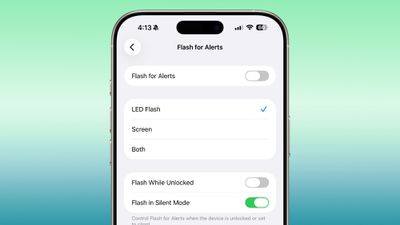
ios 26 2 flash alert
Even if your hearing is fine, having a visual cue for incoming alerts can be handy to have if, say, you're in a quiet environment like a library and don't want to create a disturbance. What's more, in iOS 26.2, you can choose for both the display and the camera LED to flash. That way, you'll see the alert flash whichever way your iPhone is lying on a table.

How to Enable Flash for Alerts

Follow the steps below to turn on screen flash for alerts on your ‌iPhone‌ running iOS 26.2.

  1. Open the Settings app on your iPhone, then tap Accessibility.
  2. Under "Hearing," tap Audio & Visual.
  3. Scroll to the bottom and tap Flash for Alerts.
  4. Toggle on Flash for Alerts, then tap LED Flash, Screen, or Both.

You'll see that the last menu includes toggle switches so that you can control whether the flash happens when your device is unlocked, as well as if it should flash when in silent mode.


Top Rated Comments

turbineseaplane Avatar
23 weeks ago

If it is in my pocket and I have AirPods, can I have it whisper in Siri's voice that I have a message?
(Siri, whispering in a very low volume)

"pssst..."
"you there?"
"here's what I found for you on the web"
Score: 5 Votes (Like | Disagree)
krspkbl Avatar
23 weeks ago
no thanks.

people who have their camera flash every time they get a message are so annoying.

if you're disabled i get it but c'mon. can't wait to see how it takes before their entire phone, front and back, starts lighting up to let everyone in the room know they got a message.

Score: 5 Votes (Like | Disagree)
23 weeks ago
Flashing the camera flash for alerts has been there since iPhone 4 by the way.


no thanks.

people who have their camera flash every time they get a message are so annoying.

if you're disabled i get it but c'mon. can't wait to see how it takes before their entire phone, front and back, starts lighting up to let everyone in the room know they got a message.
This is one aspect of certain Android phones that I like: a small subtle notification LED in the front.
Score: 3 Votes (Like | Disagree)
23 weeks ago

Feels like vibrate is still a better option than this. Wouldn't it be easier to feel or see a vibration?
Feeling the vibration, yes. Seeing it, no. I'm not Deaf and I won't speak in their place, but a vibrating phone (that is not in the pocket) will not be noticeable. You won't always be attached to the desk where it's vibrating, so you won't always feel the phone.

A lot of Deaf people will probably appreciate this as an enhancement to quality of life. They'll probably be able to notice notifications more easily, especially if their device is at a distance. ... If I'm understanding it correctly, anyway.
Score: 2 Votes (Like | Disagree)
23 weeks ago
Sure. Not for every one. But I like it.
Score: 2 Votes (Like | Disagree)
23 weeks ago
The last thing I need in my life is even more alerts, tweets, beeps, chimes, rings, reminders, or “flashing screens.”
Score: 2 Votes (Like | Disagree)

Popular Stories

Four iPhone 18 Pro Colors Mock Feature

iPhone 18 Pro Launching Later This Year With These 10 New Features

Tuesday May 26, 2026 6:32 am PDT by
While the iPhone 18 Pro and iPhone 18 Pro Max are not launching until September, there are already plenty of rumors about the devices. It was initially reported that the iPhone 18 Pro models would have fully under-screen Face ID, with only a front camera visible in the top-left corner of the screen. However, the latest rumors indicate that only one Face ID component will be moved under the...
Apple Watch Ultra 2 Black Titanium

watchOS 27 Will Add These New Features to Your Apple Watch

Sunday May 24, 2026 11:53 am PDT by
Apple will unveil watchOS 27 during its WWDC 2026 keynote on Monday, June 8, and a handful of new features have been rumored already. The first developer beta of watchOS 27 should be available immediately following the keynote, and a public beta typically follows in July. The update should be released to all users with a compatible Apple Watch model in September. Below, we recap watchOS...
Apple Watch Blood Glucose Monitoring Feature 2

Apple Watch for Diabetes: The Latest on Apple's Plans for Non-Invasive Blood Sugar Monitoring

Tuesday May 26, 2026 9:30 am PDT by
For many years now, it has been rumored that the Apple Watch will eventually gain non-invasive blood sugar monitoring capabilities, which would enable millions of people with diabetes to track their blood glucose levels without needing to prick their skin with a needle or wear a dedicated continuous glucose monitor. According to Bloomberg's Mark Gurman, Apple recently shifted oversight of...