

Zagg's Mobile Charging Station for the Apple Watch and iPhone is both a portable charging platform and a backup battery for your Apple products. With its 5,000 mAh battery, the Mobile Charging Station is meant to be used while away from a power source. It has enough capacity to provide a full charge for both an iPhone and an Apple Watch, with a little juice left over.
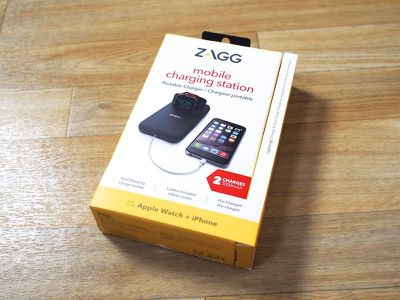
There are a few features that set the Mobile Charging Station apart from other portable charging solutions, including a cord management system and a unique pop-up design that charges the Apple Watch in landscape mode and folds flat for travel, but on the downside, it is expensive and unattractive.
Design
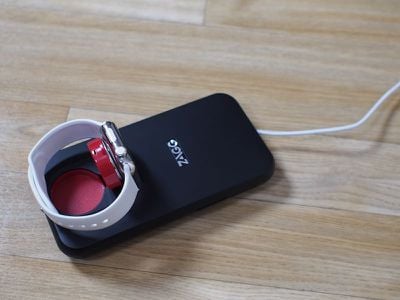
Zagg's Mobile Charging Station is not an attractive accessory, but it is functional. Made from black plastic with red plastic accents, the Charging Station has a pop-up charging platform for the Apple Watch, allowing it to be charged in landscape mode, and it includes a built-in cable management system.
It's clear aesthetics weren't on the top of the priority list when it came to creating the Charging Station. It feels well made, but at the same time, the materials used feel cheap, and the thick black plastic certainly doesn't match or complement the iPhone or Apple Watch.
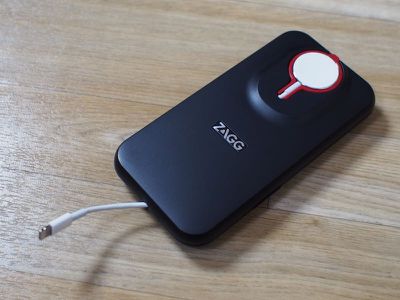
In a bag, backpack, or purse, the Charging Station is portable enough, but it's not pocketable due to its thickness. In width and height, it's similar in size to the iPhone 6s Plus, but it is more than twice as thick. It's all plastic, black outside and red inside, with a soft padded strip on the bottom to keep it from damaging desks and other surfaces.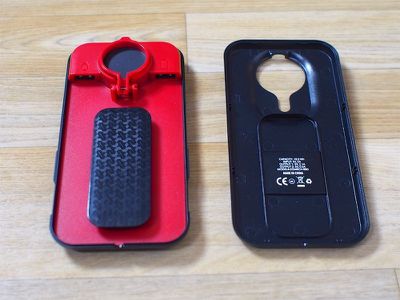
The two halves of the Mobile Charging Station come apart so the charging cables for the iPhone and Apple Watch can be inserted. The Apple Watch charger goes in first, with the USB end plugged into the USB port marked with the Apple Watch symbol. From there, the cord can be wrapped around the center island, which accommodates the full 2 meter cable length. Once the Apple Watch cord is wound up, the charging puck is placed inside the designated slot, which, as mentioned, is adjustable from flat to a 90 degree angle.
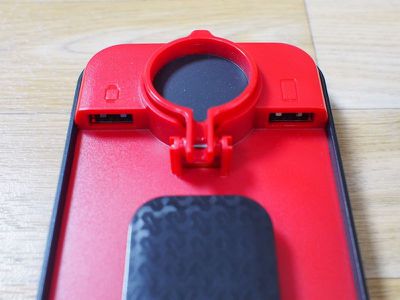
Zagg includes a Lightning cable for the iPhone, which is shorter than the standard cable. The iPhone cable does not wrap around the center island, instead plugging directly into the USB slot at the top and routing out through the bottom. There's actually quite a bit of cord left when using it this way, and I did wish the cable had been made somewhat shorter. I rectified this by using a 1m Apple Watch charging cable and my own 1m iPhone cable, which could be wrapped around to make it shorter.
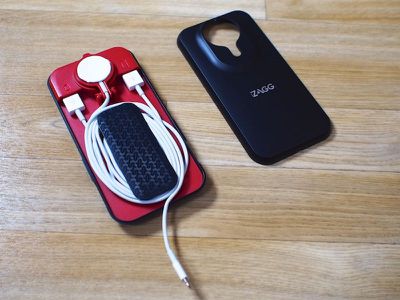
With both the iPhone and Apple Watch cables in place, the top of the Zagg Mobile Charging Station can be snapped back on, hiding the cords and leaving just the end of the Lightning cable and the Apple Watch charger exposed. The two halves of the Mobile Charging Station are held together with magnets that are strong enough to keep it from coming apart in a bag or backpack. Getting the cords in and out of the Mobile Charging Station is relatively simple, and the cord management system works well.
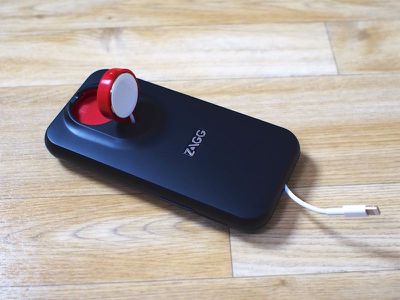
Both closed-loop and open loop Apple Watch bands fit on the pop-up Apple Watch charger, and open loop bands can also be charged while lying flat across the top of the Mobile Charging Station. The pop-up Apple Watch charger is a clever design element that makes it easy to charge an Apple Watch when on the go, and it's nice to have support for Nightstand mode. An Apple Watch and an iPhone can both charge at once, with the iPhone charging through the Lightning cable at the bottom of the dock while the Apple Watch charges on the Apple Watch charging puck.
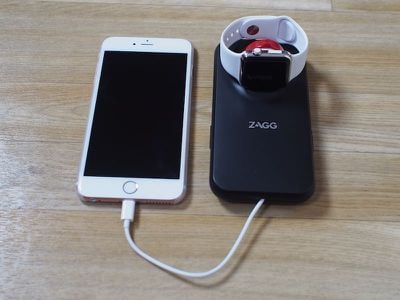
While the Apple Watch has a clever stand to charge on, the same isn't true of the iPhone. I wish Zagg had built in some kind of iPhone stand to prop up the iPhone to give this accessory more utility, but there's just a plain Lightning cable. On the top of the Mobile Charging Station, there's an LED that gives an approximation on how much battery life is remaining, and there's a button that needs to be pressed to initiate charging when a device is plugged in. There's also a micro-USB port for charging the Station itself.
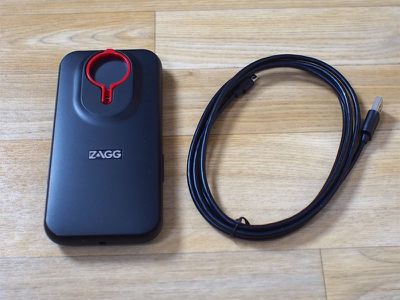
My biggest gripe with the Mobile Charging Station relates to how it charges. When the 5,000 mAh battery inside is dead, it needs to be charged using an accompanying 6-foot micro-USB cable, which is long, thick, and ugly. It's thick enough that it doesn't wind up well, and long enough that it completely negates the convenience of having my iPhone and Apple Watch cords wrapped up.
When I travel, am I supposed to take this thick, unwieldy micro-USB cord with me? Without a micro-USB cord, I can't use the charger for more than a single day, and when traveling, I don't want to bring Zagg's super thick micro-USB cord. Obviously one can solve this problem with a different micro-USB cord because most of us have oodles of them lying around, but Zagg's cord choice here is simply baffling.
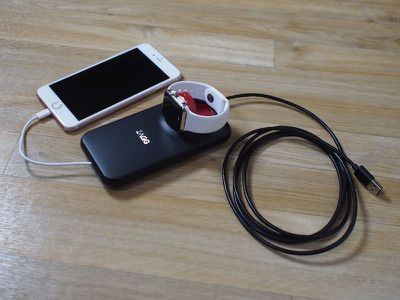
Taking into account the cord, the best use case for the Mobile Charging Station seems to be on a desk where it has a permanent charging position, with the option to remove it for day trips, long work days, school, and other times where charging might be required mid-day.
Battery Life
There's a 5,000mAh battery in the Zagg Mobile Charging Station, enough to provide one full charge to an iPhone 6s Plus and an Apple Watch when charged at the same time. With smaller iPhones like the iPhone 6s, the battery will go further, and thus this is best suited towards iPhone users with smaller capacity devices.
In my testing, the Mobile Charging Station charged my iPhone 6s Plus at a satisfactory rate. I plugged in a completely dead iPhone at 5:08 p.m., and by 5:55, it was at 50 percent battery life. At 7:25, it was charged to 100%. I drained my iPhone again, but the leftover battery life in the Charging Station was only able to charge it to 3%.
I saw similar numbers when charging my iPhone and Apple Watch at the same time. Both were completely dead at 5:41, and I plugged them in to the fully charged Charging Station. At 7:24, my Apple Watch was fully charged and my iPhone was at 95%.
Zagg claims the Mobile Charging Station can deliver one full charge to an iPhone and an Apple Watch, and that was true -- I got exactly one full charge for both, but no more than that.
As for the Mobile Charging Station itself, it took a couple of hours to charge from empty to full using the included micro-USB cable.
When charging my devices with the Mobile Charging Station, I did notice a high-pitched whining sound once or twice. It's not something that's audible from across a room, but if you're sitting next to the accessory, it's noticeable.
Bottom Line
Zagg's Mobile Charging Station, like several of the mobile Apple Watch chargers on the market, is of questionable use. Zagg did a good job with the cable management features and the pop-up Apple Watch dock, but those features and the built-in battery make the Mobile Charging Station much bulkier than a standard 5,000 mAh battery pack and much more expensive.
Zagg is charging $79.99 for the Mobile Charging Station, a price that seems unreasonably high for a hunk of plastic and a 5,000 mAh battery. For comparison, Anker sells a 10,000 mAh battery on Amazon for $21.99, and it's the same general size as the Zagg Mobile Charging Station. Sure, it doesn't offer cable management or a pop-up holder for the Apple Watch charger, but it's double the power at a third of the cost. Are the extra features the Mobile Charging Station offers worth $55? I'm not sure.
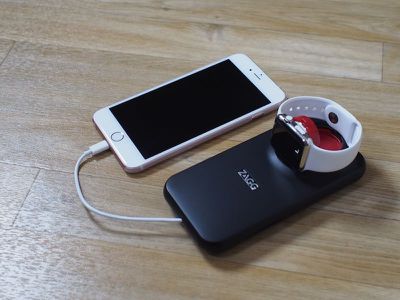
I wasn't a fan of the design of the Mobile Charging Station because it in no way matches the aesthetic of my Apple Devices, something I tend to look for in an Apple accessory. Others may not mind the look, and even with the price premium, I can see where the Mobile Charging Station may be useful as a no-hassle desktop charging accessory that gives users the option to grab it and go on a day when extra power is needed.
Pros:
- Keeps cords organized
- Clever pop-up Apple Watch charging function
- Nightstand mode supported
- Charges Apple Watch and iPhone simultanously
- Offers pass-through charging
Cons:
- Design is not attractive
- Thick and bulky, not pocketable
- Expensive
- Micro-USB cord for charging is thick and unwieldy
- 5,000 mAh battery doesn't offer much power for the price
- Occasional high-pitched noise when charging
How to Buy
Zagg's Mobile Charging Station can be purchased from the Zagg website for $79.99.













































Top Rated Comments
Wait a minute, tell me again... we can charge full price for a charging solution and not provide any cables???
And people would be gullible enough to buy that???
What kills me is that so many companies refuse to use the lightning cable for charging. It makes no sense, or very little sense. I have a raft of Apple cables, and have a mass of assorted USB cables, and not there are THREE different types of USB cables, and it's getting ridiculous having to haul around three different cables!
Whatever happened to the EU? Weren't they coming up with regulations requiring a single charging port for all devices? I was looking forward to that eventually eliminating so many of the cords.
Third party love the huge margin coattails of the Apple ecosystem.
Think $9 Pencil cozy that costs $1 to make.
Apple accessories are a license to print money.
They applied a Zagg tax.