

Apple makes a keyboard designed for the 11 and 12.9-inch iPad Pro models, the Smart Keyboard Folio, but some people dislike it because of the thin keys, the lack of key travel, and the high price tag. For those who don't like the Smart Keyboard, Logitech has designed the Slim Folio Pro, a new keyboard case available for the 2018 iPad Pro models.
Logitech's Slim Folio Pro is more affordable than Apple's Smart Keyboard, with the 11-inch version priced at $120 and the 12.9-inch model priced at $130. For comparison's sake, Apple charges $179 for its 11-inch Slim Folio Keyboard and $199 for the 12.9-inch model.
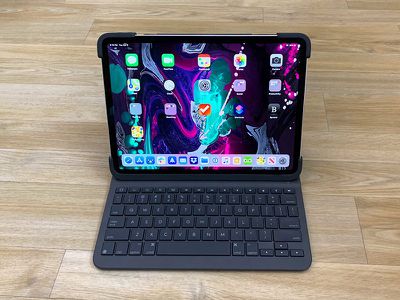
Design wise, the Logitech Slim Folio Pro is a lot thicker than the Apple Smart Folio Keyboard and it adds quite a bit of weight and bulk to my iPad. I am not and have not ever been a fan of thick cases that add a lot of extra weight to my devices, and for my iPads, I almost always go case free and use a Smart Cover. With my iPad Pro, I've been using Apple's Folio, which is already more thickness than I like.
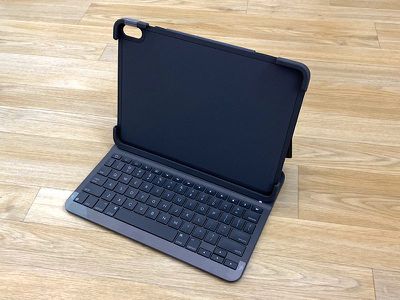
If you're like me and prefer devices with thin cases or with no case, the Logitech Slim Folio Pro probably isn't going to be what you're looking for, but let me go into a bit more detail on how it works and how it looks on the iPad.
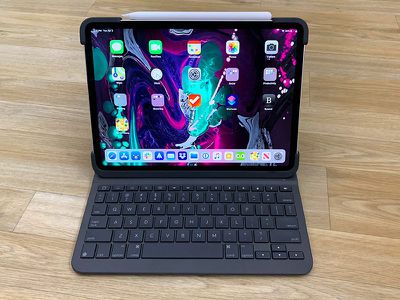
Like the Smart Folio Keyboard from Apple, the Slim Folio Pro is available in dark gray. It would be nice to have color options, but the gray is an appropriate neutral color. The Slim Folio Pro connects to the iPad Pro using Bluetooth, so you're going to need to set it up in the Settings app the first time you use it. After that, though, it connects quickly when you put it in typing mode and start to use it.
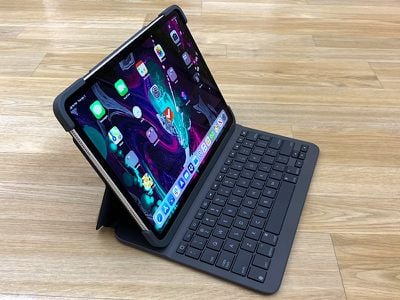
There's a base rubber and plastic case that the iPad Pro fits into, which provides protection for the iPad when it's not in use. There's thick rubber at the corners and on the left side, but on the right, there's an open space because that's where the Apple Pencil 2 goes for charging purposes. The top and bottom are also left open because of the speakers and the USB-C port.
Logitech has covered the power button and the two volume buttons in rubber, which makes them harder to use. With the iPad Pro, there's no Home button so it's sometimes hard to tell whether it's facing up or down, and it's harder to find the power button/volume buttons by feel and it's also more difficult to press them. It's by no means a deal breaker, but a little annoying.
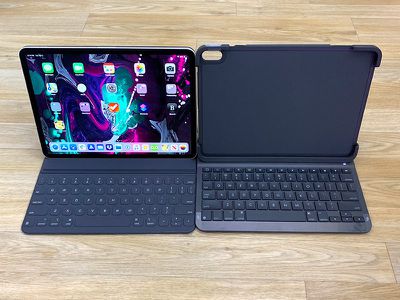
The case that the iPad Pro fits into is rather thin, but with the added weight of the keyboard, there's a lot of bulk to deal with. The case portion of the folio that holds the iPad is attached to the keyboard with a second layer of material that also serves as a stand, with the iPad held magnetically in place for comfortable typing. There's just a lot of case here.
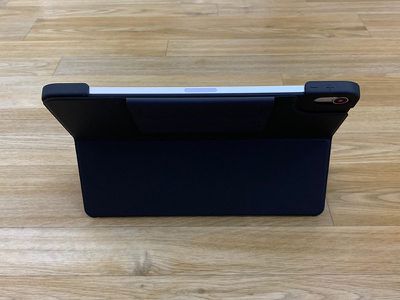
With the iPad Pro in an upright position for typing I don't mind the extra bulk of the case because it's appropriately distributed, but since this is a folio, you're meant to keep it on the iPad at all times. So when not typing on the keyboard, you're supposed to fold it back either under the iPad to use it as a stand for something like drawing with the Apple Pencil, or up and behind the iPad for reading, browsing the web, playing games, etc.
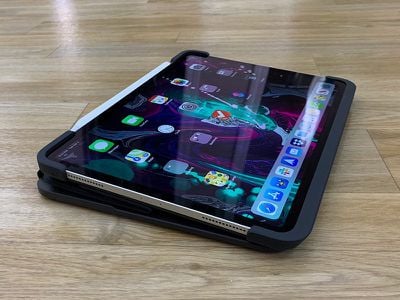
In either of these orientations, the keyboard is in an uncomfortable position that adds a lot of weight to the back of the iPad, though having an angled surface for drawing with Apple Pencil can be convenient at times. I do a lot of non-typing things with my iPad Pro like playing games and browsing the web, and I don't like the extra weight. Getting the folio on the iPad is a little bit of a struggle, so this isn't a situation where I'd want to have to put the folio case on to type and then take it off to play a game, though that's an option.
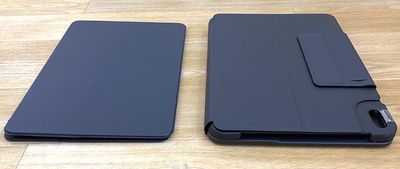
If you're using your iPad Pro for typing and sketching with Apple Pencil, you probably won't mind the extra bulk of the case quite as much, but if you're using it for other purposes too, it's not great because it's just always in the way. My 11-inch iPad Pro weighs a pound on its own while the Slim Folio Pro weighs 1.27 pounds, and I don't want to hold over two pounds when I'm trying to play a game.
For typing, though, I have no complaints. I like Apple's Smart Keyboard Folio and I can type just fine with it, but it's nice having the Slim Pro with much squishier keys that have a good amount of press and more satisfying travel. It's a pleasure to type on, and for most people, it's probably going to be a more enjoyable experience typing on the Slim Folio Pro than the Smart Keyboard.
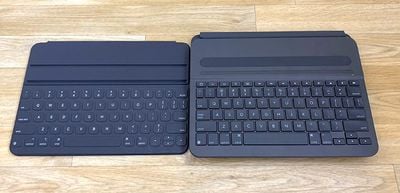
The keys are all backlit, and while this isn't a full-sized keyboard, there's enough spacing between the keys that I was able to type at close to my normal typing speed. All of the keys are in their proper places, and instead of a Fn key, there's an emoji key so you can get to emoji quickly if you want to (or swap keyboards if you use multiple languages).
A set of shortcut keys at the top of the keyboard is available for adjusting the brightness of the backlighting on the keys, bringing up the iPad's search interface, activating or deactivating the on-screen keyboard, controlling volume, controlling media playback, locking the iPad and turning off the display, accessing the Home screen, and activating Bluetooth.
When closed up, the Slim Folio Pro's keyboard rests against the iPad Pro's screen. I don't know if this has the potential to cause any damage over time, but it's also how Apple's model works. With the Slim Folio Pro closed, there's an extra little strap of fabric that's meant to hold the Apple Pencil 2 in place so it can charge while you're on the go, which is handy.
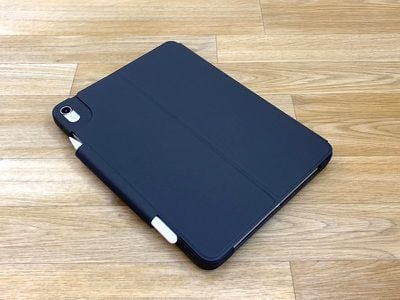
The case itself offers a decent amount of protection when closed because of the rubber corners and the keyboard cover for the display, so it's probably going to hold up well to minor drops, bumps, and dings. There are exposed elements though, so it's best to avoid dust and liquids.
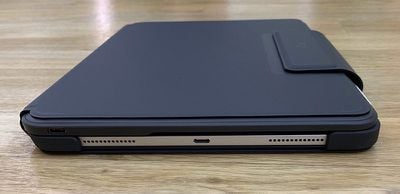
I didn't have to charge the Slim Folio Pro during my time testing it, and Logitech says that it can last for two to three months used for about two hours a day. If you do need to charge it, there's a USB-C port on the right side, so you can use the same charger that you use for your iPad Pro.
Bottom Line
The Logitech Slim Folio Pro is a more affordable alternative to the Smart Keyboard Folio that for most people, is going to provide a better typing experience because the keys aren't as thin and flat.
The keyboard itself is excellent, but because this is a folio case, it has the major downside of being bulky. It weighs more than the iPad Pro, so it's not going to be for those who like their devices to be thin and lightweight. You can, of course, take this case off when not using the keyboard, but that's a hassle to do on a regular basis if you type a lot.
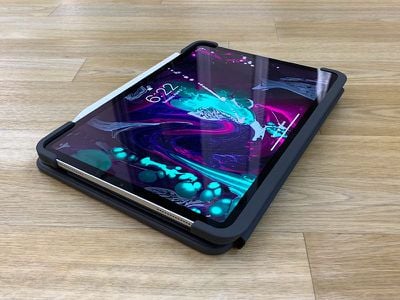
If bulk isn't an issue and you're primarily using your iPad Pro as a laptop alternative for writing and sketching with the Apple Pencil, the Logitech Slim Folio Pro may be for you.
For those who don't want the bulk and hassle of an always-attached keyboard but also don't care for Apple's super expensive Smart Keyboard Folio, an affordable standalone Bluetooth keyboard is potentially the better option.
How to Buy
You can order the Slim Folio Pro from the Logitech website. It costs $120 for the 11-inch model and $130 for the 12.9-inch model.
Note: Logitech provided MacRumors with a Slim Folio Pro for the purpose of this review. No other compensation was received.














































Top Rated Comments
First impressions.
Pros...
I like the new material. Feels much better than the previous one.
I like that it allows charging the Apple Pencil.
I like that it offers a place to store the Apple Pencil. Keeps it from getting knocked off in my bag.
Keys click great like the previous.
Backlit keys are great.
Haven’t had any issues with the Bluetooth connection.
Can charge from the iPad with a USB-C to USB-c cable.
Goes in and out of the case pretty easy.
Function keys.
Cons...
Cover doesn’t come off like previous model.
No (Surface like) kickstand like the previous model.
Only offers one viewing angle unlike previous model.
Volume and power buttons are somewhat difficult to use.
It doesn’t double the thickness. (This wasn’t as bad on the previous model since the keyboard cover could be removed while still offer back protection)
Needs to charge since it doesn’t use the smart connector.
I personally prefer the kickstand on the previous model. I do a ton of international flying and liked how I could type with backlit keys, then simply remove the cover and continue using the kickstand for watching videos without the keyboard taking up tray table space.
Two of the corners cracked (after very extended use) on my previous model.
The new version uses better material/design on the corners.
Will I keep it?
Yes. I fly enough overnight international flights that I need backlit keys.
Will I use it as my everyday carry case?
No.
I also have Apple’s Folio Keyboard and will continue using it when I don’t need backlit keys.
However, the Logitech Slim Pro fits a need in my travel workflow that makes it work the cost for me.
[doublepost=1554868405][/doublepost]It charges with the exact cable your iPad Pro uses. You can also charge the keyboard with your iPad using a USB-C to USB-C cable.
Still without the backlight, I much prefer the Apple smart keyboard folio, why? 1) Because of the slim profile, lightweight, and no battery needed (thanks to the smart connector. 2) Because of the great convenience, and ease at attaching and detaching the iPad from the keyboard. I change pretty often from keyboard mode to book mode (with the smart keyboard folded in the back side of the iPad) or quick detaching it from the case. With the smart keyboard folio I can do this easily in less that 2 seconds.
Manufacturing License Features
Technical specifications
Sample quantities of MFi components
Development/testing tools
MFi logos With Apple approval
MFi certification
Mass-production quantities of MFi components
Mass-production manufacturing
Submission of sales, inventory, forecast reports to Apple
Developer Technical Support (DTS) incidents
https://mfi.apple.com/MFiWeb/getFAQ.action#1-7