

Headphone jack controversies aside, Apple's cord-free AirPods have contributed to a recent surge of interest in "truly wireless" earphones, with several companies vying for a piece of the market.
Denmark-based audio outfit Jabra has embraced the freedom-of-movement appeal of wireless buds more than most with its Elite Sport headphones ($250), which it calls "the most technically advanced true wireless sports earbuds" around. Boasting a number of features such as in-ear coaching and heart-rate tracking, they're an intriguing prospect for fitness-focused headphone users frustrated by flailing cords.
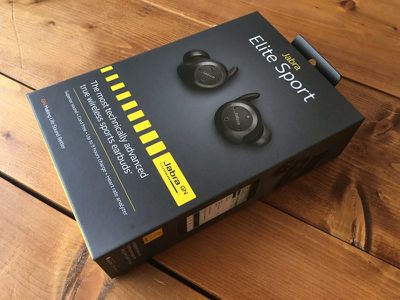
While Jabra claims the Elite Sport buds improve your workouts while providing great sound, $250 is a lot to pay for a wireless headset. We checked out a pair to see if they deliver on their promises.
Design and Features
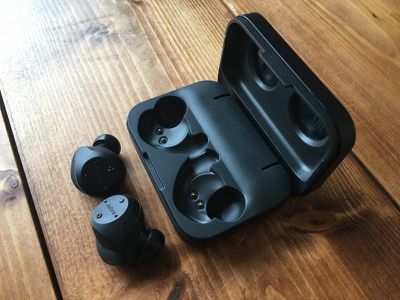
Opening the Elite Sport box presents you with a number of accessories for use with the buds, which come with an on-the-go charging case. Three sets of EarGels and three pairs of FoamTips are included, plus two sets of EarWings to secure each bud more firmly in your ear. There's also a micro-USB to USB-A cable for connecting up the charging case to a power source when its internal battery is drained.
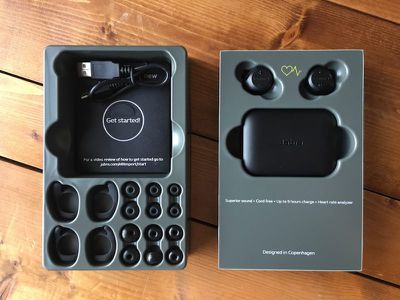
A quick start guide is included in the box, while the accompanying Jabra Sport Life iOS app is a free download on the App Store. The earbuds have a stated battery life of up to three hours, while the charging case provides an extra two full charges, hence the "up to nine hours charge" claim on the packaging.
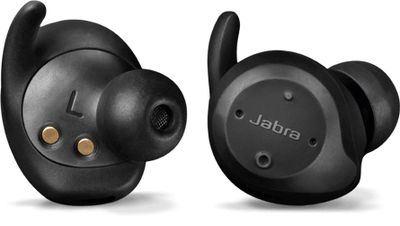
While the earbuds look bulkier than most, Jabra deserves credit for packing a lot of tech into them, including a heart-rate monitor and a tri-axis accelerometer to track motion. Each earpiece also contains two integrated microphones: The first listens out for your voice, while the other is sensitive to external noise. With audio pass through, the two are overlaid to make voice calls clearer.
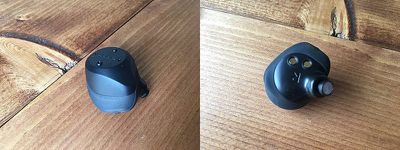
Like Bragi's The Headphone, the Elite Sport earbuds have physical buttons so you don't have to touch your phone during a workout. The +/- buttons on the left bud can be tapped to change volume or held to skip tracks, while the right bud has a Sports button that starts and stops recorded workout sessions and offers activity updates on demand. A power/playback button below it can also be used to take/end calls or activate the HearThrough mode, which mutes playback and lets in sound from the outside world.
The earbuds are listed as having IP67 water resistance, so they're not covered for swimming purposes, but sweat and rain aren't going to cause issues. If you lose an earbud, Jabra offers individual replacements on its online store for $79. For comparison, replacement Apple AirPods cost $69 each.
Jabra says the buds have a "flexible wearing style". This refers to the fact that you can wear one or both earbuds to receive music, calls, audio guidance, and biometric tracking. They also provide stereo audio for calls and music, whereas most other "truly wireless" products only offer mono audio for calls.
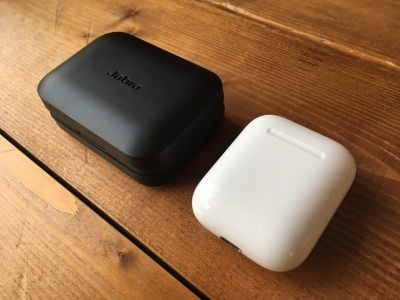
The charging case for the Elite Sport earbuds is bulkier than the AirPods case, but it has a nice solid heft and the rounded edges make it feel pebble-smooth.
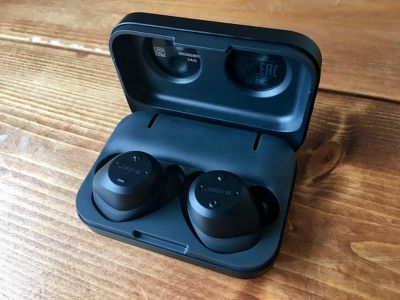
Dropping the buds into the charging cradle automatically charges them, while a couple of LEDs light up on the case edge to indicate the charge level of each bud, glowing red during charging and blue when fully charged. Leaving them in for 15 minutes gets your buds around an hour of juice. The AirPods case, which holds up to 24 hours of battery, delivers three hours of battery life to the AirPods for the same 15-minute charge.
Performance
It took a while for me to find my preferred combination from the bevy of tips and wings provided with the Elite Sports, but after some mixing and matching I found the foam tips to be most comfortable. They were also better for boosting bass and blocking out noise – suitable for the gym, perhaps – although I preferred the silicone tips when out on runs because they allowed me to hear more road traffic.
Inserting the buds into your ear involves rotating each one to fit snug inside your ear canal, and then tucking the ridge of the EarWing into the ridge of your ear. It's easier than it sounds, and after a couple of attempts inserting them, the action became second nature. I also ended up taking off the Earwings after a few test sessions without any appreciable difference in the fit, making insertion even quicker.
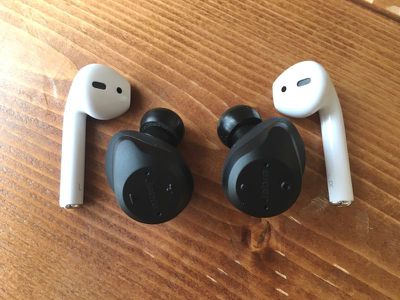
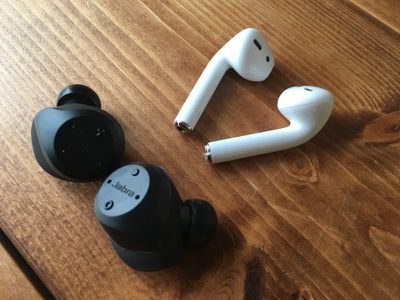
As mentioned, the Elite Sports are a bit bulkier than your average bud, but the black color scheme makes them fairly inconspicuous and they don't stick out of your ears anything like the AirPods do. They're deceptively light, too.
Using the Elite Sports for the first time involves holding down the multifunction Sport button on the right bud and the volume down button on the left, after which a voice guides you through a pretty straightforward Bluetooth pairing process that involves firing up the Jabra Sport Life mobile app and performing a calibration test.
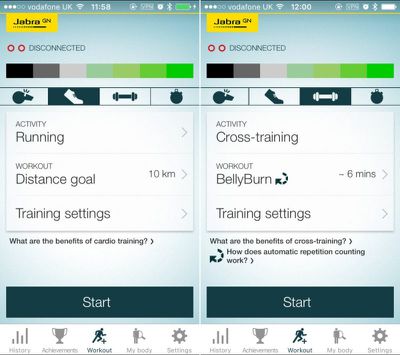
Once that's done, the in-ear heart rate monitor and TrackFit motion sensor feed biometric data to the app, which provides the ability to plan, monitor, and analyze your workouts in real-time with in-ear guidance.
After filling in a user profile, you select the type of activity you'd like to try: Cycling, running, and walking make up the most used outdoor workouts, with additional options like skating, spinning and hiking included in the activities list. Alternatively, you can choose "Just Track Me" if your activity isn't defined. The ability to track an interval training session sounded impressive at first glance, but I was disappointed to find there aren't any pre-loaded interval workouts to get you up and running – you have to set them up manually.
The situation is markedly different when it comes to cross-training activities, which get a separate section in the app that includes a number of pre-defined Jabra circuits with names like "CardioCore" and "BellyBurn". Over 55 different exercises are listed, with clearly laid-out sets and resting periods, and video demonstrations provided for each exercise.
I found the available selection of mostly bodyweight circuits just right, with equivalent beginner, intermediate, and advanced options catering to a mix of fitness abilities. Whatever the activity I chose, I could set activity goals for distance, duration, or calories burned, as well as a target pace, cadence, or heart-rate zone. A battery of fitness tests are also on offer, including VO2max and a Cooper endurance test.
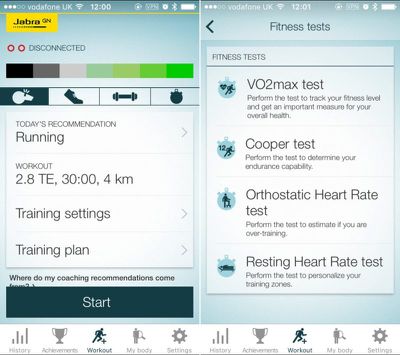
Once you've racked up a few activity sessions, the app starts offering meaningful coaching recommendations based on your current fitness level, your training load over the past four weeks, and the training days in your chosen plan. The app also offers a Race Time Predictor and a Recovery Advisor. The former works by estimating the time it takes to complete your runs based on your current fitness level and your personal profile (age, weight, height, and so on), while the latter works by keeping track of your physiological state and automatically suggests a recovery schedule to optimize the balance between rest and training.
All of these features were more than welcome, and made my exercise routine feel less aimless and a lot more structured, giving me a clear view to improving on my fitness goals. I was particularly impressed by the way my repetitions were counted automatically during cross-training sets, thanks to the sensors in the earbuds. The voice readouts during workouts were also helpful and informative, telling me when to get moving or rest, and I was able to customize which metric data was piped into my ears as well as how frequently the updates occurred. A slew of data is on offer in real time, so the granular options here made a big difference and allowed me to avoid being bombarded with numbers and achievements while exercising.
The only blot on the analytics front was the accuracy of the in-ear heart-rate tracking, which seemed to fluctuate wildly at the top end when I really pushed my runs. I consistently recorded a 1-5bpm difference in average heart rate readings between the Elite Sport buds and my Wahoo Tickr HRM chest strap. That doesn't sound like much, but it's enough to push you into another HR zone and skew the overall results. The issue didn't crop up during cross-training though, oddly. Unless you're a professional athlete I wouldn't call the issue a deal breaker. Otherwise, the post-workout analytics were well presented in-app and offered nuanced, practicable performance insights to take into future training.
The earbuds communicate with each other using near-field magnetic induction, which worked flawlessly throughout my tests. There was no perceptible delay when listening to video on my iPhone either. The Bluetooth proved plenty strong enough, too, and kept a connection during all my workouts, including circuit training when I left my phone nearby in the same room instead of secured to my body in a waistband.
The dual mics on each earbud did a good job of picking up my voice during outdoor activity (according to Jabra, they dynamically switch between left and right buds to whichever picks up the least external noise) and I was able to say "answer" to take an incoming call on every occasion I tried it. I was also able to communicate with Siri by using the multifunction button, but just saying "Hey Siri" doesn't work like it does with Apple's AirPods, and in-ear button pressing isn't always a comfortable experience.
With all these fitness-focused features headlining in the marketing material, the big question is whether they actually sound any good. I thought they delivered great audio for in-ear buds – definitely beating what Bragi has managed with The Headphone, which have a similar design but a lot less built-in tech.
The clarity and detail are impressive considering the physical limitations of the driver housing, and with the silicone tips attached the bass doesn't feel so overblown. There's surprising detail to be enjoyed in instrumental tracks and easy-listening numbers, and if you do want to listen to, say, hip hop or drum n' bass, then you can switch to the gel tips for a boomier sound, which is arguably more suited to doing strenuous reps in a crowded gym.
Bottom Line
Overall, the Jabra Elite Sport earbuds live up to their billing as a fully fitness-focused wireless audio accessory. The advanced activity tracking features work well and with the amount of cross-training (if not interval running) categories on offer as well as the custom-training options, there's a real incentive to take on new training challenges or improve upon your existing performance and analytic scores.
Despite the convenience of an on-the-go charging case, I do feel the Elite Sport buds are still lacking in the battery department. The three-hour capacity of the buds means they're unlikely to get most runners through a marathon, whereas a pair of AirPods will. That makes the Elite Sport buds more suited to training rather than race day, and given Jabra's general marketing message, most users will likely be fine with that caveat.
Pros
- Comfy and secure fit
- Surprisingly good sound
- Advanced tracking features
- Motivational workout app
Cons
- Occasionally erratic HR tracking
- Short battery life
- In-ear buttons won't suit everyone
How to Buy
Jabra Elite Sport cost $250 and can be ordered from the company's website.
Note: Jabra supplied the Elite Sport earbuds to MacRumors for the purposes of this review. No other compensation was received.
















































Top Rated Comments
[doublepost=1489708562][/doublepost]
And yes it matters a lot, the same as placing cellphones in your hands. As far as ear size it matters, AirPods looks ok even on smaller/big ears while something w the jabra design does not. Even if the person had big ears by showing how both products look on them it makes it easier to extrapolate how they would look on the street. Plus if it's too big some people will be uncomfortable w the jabra design.
As far as your statements about people that are interested on them should go to the brand website then why even do a review of the product, just link each product page and be done. TBH I can't take seriously none of your "arguments".
Thanks for the image!! Ear wear matters the most for earbuds and you explain more important things in your post than the review as far as comparisons.
If apple "believes in a wireless future", perhaps they should include the airpods in the next iterations to convince us...