

Wireless CarPlay has yet to take off with car manufacturers, with BMW (as well its MINI brand) being the first major car manufacturer to support the feature several years ago. As we recently covered, Porsche is in the process rolling out wireless CarPlay to its lineup, but there's at least one other notable manufacturer adopting the technology, and that's VW's luxury brand Audi.

Audi's latest "MMI touch response" infotainment system replaces nearly all center stack controls with a pair of touchscreens that offer haptic feedback when you touch on icons and other user interface elements. I've had a chance to test out a 2019 Audi A7 to see how the MMI touch response system works both on its own and in conjunction with CarPlay, so read on for all of the details.
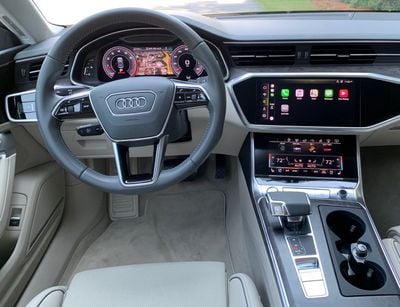
Audi MMI Touch Response
The A7's dual center display setup consists of an 8.8-inch upper screen that serves as a traditional infotainment display and an 8.6-inch lower screen that supports climate controls, a few other vehicle functions, and customizable shortcuts that allow for one-touch access to items on the main infotainment screen like favorite radio stations, destinations, and more.
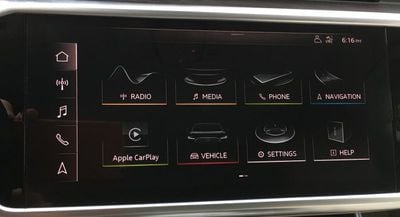
On the Premium Plus trim and higher, the upper display is upgraded to a 10.1-inch widescreen display, which is what my test vehicle came equipped with. Regardless of screen size, both the top and bottom displays include the haptic feedback system that lets you know that your touch has been registered.
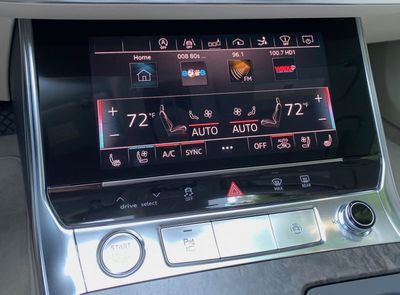
The haptic feedback system is an interesting innovation that will be familiar to iPhone users. On the MMI touch response system, it means you do have to press a bit harder on the screen than a simple touch, and I'd say the force required is roughly equivalent to a 3D Touch press on an iPhone. It doesn't require a terribly hard press, but it's enough to help avoid stray taps.
The elimination of nearly all hardware knobs and buttons from the dashboard of the A7 undoubtedly makes for a cleaner look, and the haptic feedback helps the touchscreen system mimic physical controls to some degree, but it still means you'll likely need to glance at the screen to see what you're doing rather than being able to rely on tactile feel like you can with physical controls.
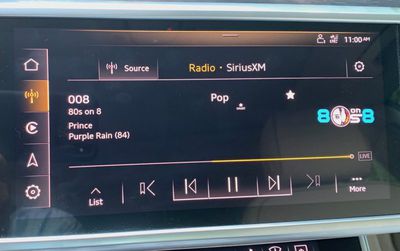
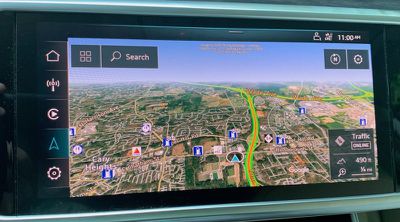
That said, the MMI system has a clean layout that features minimal color aside from the navigation system. The color that is used elsewhere in the MMI system is primarily for showing the state of virtual toggles, sparse highlights, or grouping home screen icons by function such as a strip of yellow for audio-related functions, green for phone-related functions, and blue for navigation.
With this much touchscreen covering the center stack, it's unsurprising that it suffers from a bit of glare, but it's not bad enough to really interfere with operation. It also attracts some fingerprints, so it's a good idea to wipe things clean once in a while.
Virtual Cockpit
As if two displays on the center stack weren't enough, my test A7 was also equipped with Audi's virtual cockpit, a customizable 12.3-inch display right in front of the driver.
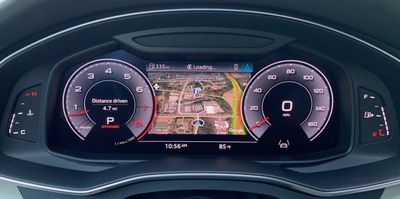
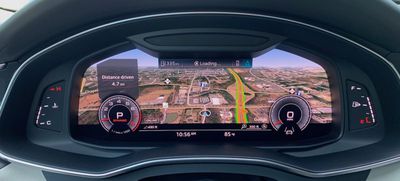
With customization settings, you can put the built-in Audi navigation closer to your line-of-sight, and you can opt for either a small map window flanked by large digital speedometer and tachometer gauges or let an aerial perspective mapping view take over nearly the entire screen. It's an impressive view to help guide you on your route, but unfortunately CarPlay can't take advantage of this extra screen real estate.
CarPlay
With the widescreen setup on the higher trims of the A7, you'll get a widescreen version of CarPlay that shows a 5x2 grid of home screen icons rather than the more common 4x2 grid seen on most other systems.
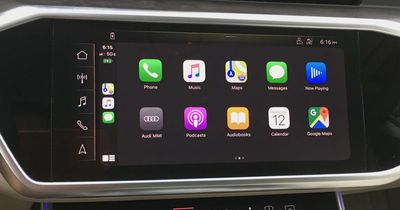
Even with the widescreen CarPlay, however, Audi's MMI system maintains both a strip of icons along the left side for quick access to native functions like radio and navigation, as well as its own narrow status bar along the top that shows information like the time, signal strength, driver profile, device battery level, and wireless charging status. The status bar also provides a small pull-down to let you access any notifications from the MMI system.
Wireless CarPlay is a great feature, as it means you can leave your phone in your pocket and still have CarPlay pop right up as soon as you start up the car. It's great for short trips where you're not too concerned about getting your phone charged up while driving. Using CarPlay can burn through battery a bit, so for longer trips you'll want to use either a wired connection or wireless charging (which I'll talk about a bit later) to help keep your phone from running down.
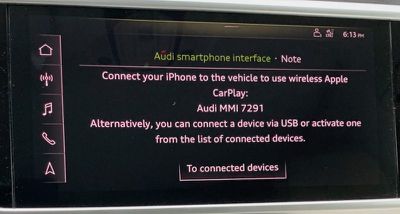
Setup for wireless CarPlay is extremely simple, using a Bluetooth pairing process to get things going. Once the pairing is established, the phone and infotainment system communicate over Wi-Fi, and I experienced no lag when interacting with CarPlay wirelessly on the MMI system.
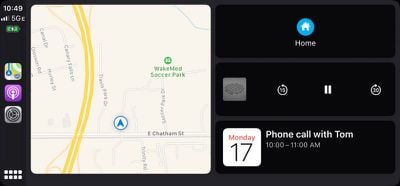
CarPlay on a widescreen display is fantastic for Maps and other navigation apps like Google Maps and Waze, as it gives you an expansive view of the area around your route even with the various informational overlays and icons showing on top of the map. Other apps see less benefit from the widescreen treatment, as many already have fairly sparse interfaces that are uncluttered even on smaller displays.

Unfortunately, the haptic feedback that's a key feature of the native MMI system doesn't work with CarPlay, so when you're using CarPlay the system will respond to capacitive taps like any other touchscreen.
Wireless Charging
The A7 has a shallow storage compartment in the center console, and Audi offers a combination phone storage tray with wireless charger inside the compartment. The feature is part of a convenience package on the base Premium trim and comes standard on the higher-level Premium Plus and Prestige trims. Unlike wireless chargers in some other vehicles, the one in the A7 is a simple tray that accommodates a wide range of phone sizes and keeps your device hidden away. It does only charge at a maximum of 5 watts, so don't expect super fast battery charging from it.
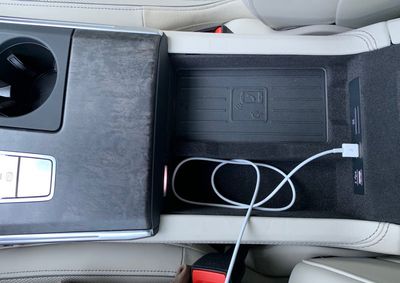
The charger, known as the Audi phone box, also provides a cellular signal booster to help maintain a strong signal by leveraging an external antenna. It's all done seamlessly from the user perspective, so all you have to do is place your phone on the charger in the storage compartment.
Ports and Connectivity
Inside the center console storage compartment, you'll also find a pair of USB-A ports if you prefer to use a wired connection for CarPlay and charging. Both USB ports are capable of transmitting data.
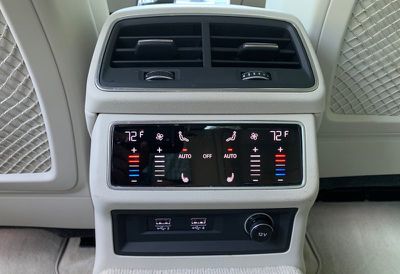
On the rear of the center console is another pair of USB-A ports for the rear passengers, but these are charge-only ports that can't be used to deliver wired CarPlay, for example.
Wrap-up
Wireless CarPlay remains primarily limited to luxury brands so far, and it would be great to see it trickle down into more mainstream vehicles sooner rather than later. With rumors of Apple launching its first "completely wireless" iPhone without a Lightning port as soon as 2021, it appears users are going to be increasingly looking for wireless CarPlay support.
While I still prefer to plug into a USB port to top off my phone's battery on longer trips, it's convenient on shorter trips to have CarPlay automatically pop up with my phone still in my pocket. And if I just want a little extra juice, the wireless charger can provide that without needing to deal with cables.
From a broader perspective, I'm less of a fan of Audi's touchscreen-heavy interface. Yes, it offers a very clean look for the dash, and the screens allow for some customizability and flexibility that you can't get from hardware buttons, but I still prefer to operate many functions by feel, and touchscreens make that difficult.
Still, Audi's MMI touch response is a powerful infotainment system, particularly on upgraded models that include a total of three large screens. CarPlay integrates well with the main center stack screen, offering a wide view of the CarPlay interface while still maintaining access to native functions. And if you're up for using the native navigation system, the beautiful virtual cockpit offers some great functionality.
All of this doesn't come cheaply, of course, with the base 2019 Audi A7 quattro starting at a sticker price of $68,000 and the recently launched 2020 model coming in $1,000 higher with a few additional standard features. My test vehicle was naturally specced out with plenty of extras, including the $8,300 Prestige package that added the larger 10.1-inch main screen, the virtual cockpit, premiums Bang & Olufson sound, the phone box with wireless charging and antenna boost, and much more.
Toss in a driver assistance package, upgraded seating and wheels, and a few more extras, and my tester came in at a bit over $85,000. That's obviously out of reach for a good many car buyers, but for those who can afford it there's a lot to like, and hopefully innovations similar to some of those found in the A7 will make their way into cheaper vehicles over time as technology tends to do.

















Top Rated Comments
First, all-touchscreen controls seems a terrible idea, at least until we have fully autonomous cars.
Second... with all of this modern hardware design, how can the screens still look so terrible and dated? The fact that CarPlay looks to be the most advanced and polished interface shows just how bad the rest of the interface seems to be.
I drive a latest gen A5 and had an A6 fully loaded as a loan car while mine was having some maintenance servicing work.
Let me tell you, I HATED the A6. It's one thing to not be able to fully control the entertainment safely while driving. Like okay, just wait until/ if you hit traffic to change it, but when your main functions of the car other than the hazards, such as temperature control, seat functions or demisting the car windscreen or rear window rely on super low down buttons with at least 20 of them thrown together, then it is a recipe for disaster.
On my A5, I can not only control important functions, such as demisting and getting myself, the driver, to a comfortable temperature, I can scroll wheel or press my way through pretty much every other function of the car. Start making an adjustment to music I.e. scrolling, drive and then continue to make an adjustment when it's safe to do so.
As a side note, as some other posters have mentioned, my car also does the whole steering in lane for you, and keeping a safe distance, cruise control etc. This is all nice and certainly reduces the fatigue while driving, but it definitely does not make you a better driver. Sometimes you have to be prepared to step in and correct mistakes the system will make.
I absolutely detest touch screen only controls in cars, and I'll be pretty tempted to move over to Mercedes for my next car because of it. Audi be stupid.
I've also noticed the latest habit which is to pull slightly right when taking a left turn as though they are driving an articulated truck!
It seems a lot of people over the last several years have zero road awareness!