How to Install macOS 27 Golden Gate Public Beta 6 - MacRumors
Skip to Content

How to Install macOS 27 Golden Gate Public Beta 6

by

Apple has made the sixth macOS 27 Golden Gate public beta available for testing before the new Mac operating system's official release in the fall. Keep reading to learn whether you should install it on your Mac, and if so, how to go about it.
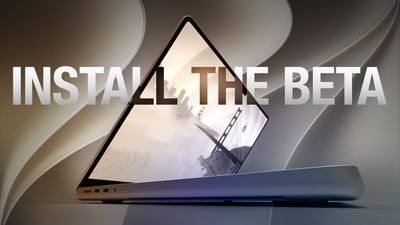
How to Install macOS 27 Golden Gate Public Beta Feature
Getting access to the macOS Golden Gate public beta is simple, and can be done by enrolling your Mac in Apple's free Apple Beta Software Program. The steps you need to complete to install the software on your Mac are provided towards the end of this article, but before you jump ahead, here are a few things worth considering.

Should I Install macOS Golden Gate Public Beta?

With macOS Golden Gate, Apple includes the same Siri AI features as iOS 27 and iPadOS 27, accessed through Spotlight with the Command + Space keyboard shortcut. Siri can search the web, find information in your photos, emails, and messages, answer questions about what's on your screen with Visual Intelligence, and complete actions within and across apps. A dedicated Siri app also supports ongoing conversations.

Apple has also refined the Liquid Glass design introduced last year. A new transparency slider lets you adjust the overall system effect, while updated opacity improves readability by better diffusing complex content. Additional interface refinements also add depth and separation, making it easier to identify the active window. There are a lot more improvements beyond the above, so the availability of the public beta will no doubt generate a lot of interest among Mac users.

But before you commit, bear in mind that Apple does not recommend installing macOS beta updates on your main Mac. However stable you may have heard it is anecdotally, this is beta software, which means there are almost certainly bugs and issues that can prevent certain software from working properly or cause other problems with the system. Indeed, one of the reasons that Apple releases the beta early is so that users can feed back problems and help Apple debug them. If you have a spare Mac hanging around, by all means use that, otherwise consider holding off until the general release in the fall.

Is My Mac Supported?

The update confirms the end of Intel Mac support. Apple said last year that macOS Tahoe would be the final release to run on pre-Apple silicon machines, and macOS 27 makes that official – you'll need an Apple silicon Mac to install it.

Here are the Macs compatible with macOS Golden Gate:

  • MacBook Neo (2026)
  • MacBook Air with Apple silicon (2020 and later)
  • MacBook Pro with Apple silicon (2020 and later)
  • iMac with Apple silicon (2021 and later)
  • Mac mini with Apple silicon (2020 and later)
  • Mac Studio with Apple silicon (2022 and later)
  • Mac Pro with Apple silicon (2023 and later)

Four models that ran macOS Tahoe didn't make the cut this year. They include the MacBook Pro (16-inch, 2019), the MacBook Pro (13-inch, 2020, Four Thunderbolt 3 ports), the iMac (2020), and the Mac Pro (2019).

Don't Forget to Back Up Your Mac

Be sure to back up your Mac using Time Machine before installing the software using the method, otherwise you won't be able to revert back to the previous version of macOS if things go wrong.

How to Install macOS Golden Gate Public Beta

  1. Head over to Apple's Beta Software Program website and sign up using your Apple Account credentials, then agree to the terms and conditions if required.
    beta software program

  2. Next, open System Settings on your Mac and select General ➝ Software Update.
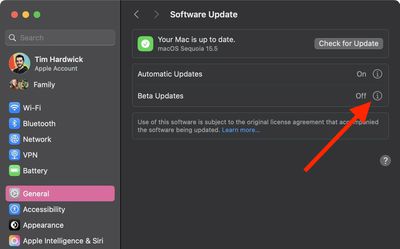
  3. Look for "Beta Updates" and click the info (i) symbol next to it.
    settings

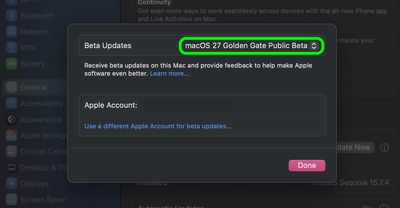
  4. Choose macOS 27 Golden Gate Public Beta from the dropdown list.
    settings

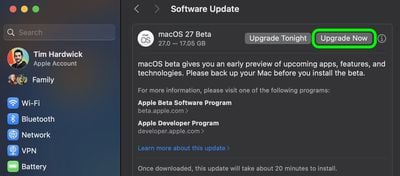
  5. Click Upgrade Now to begin the update process to macOS 27.

    install macos 27 beta2

That's all you need to do. The installation process will complete just like a standard macOS update, so sit back and let the installation finish, after which your Mac will boot directly into the macOS Golden Gate beta.


Popular Stories

iphone duo screen crack

Apple Responds to iPhone Duo Display Cracking Reports

Monday October 26, 2026 10:20 am PDT by
Shortly after the iPhone Duo launched, a few users reported hinge issues that were causing cracks in the inner display. Apple has now responded to the reports in a statement to MacRumors, saying a small number of units are affected. The response to iPhone Duo from early users has been incredibly positive, and we are seeing exciting things from developers who are rapidly updating their apps...

iphone duo screen crack in store

Crackgate? iPhone Duo Owners Report Screens Breaking Along the Hinge

Friday October 23, 2026 11:05 am PDT by
Some iPhone Duos are already experiencing hinge issues that cause display cracks, based on photos shared on Reddit and the MacRumors forums. Almost all of the display faults are right along the hinge, and most result in a line of bright pixels across one side of the screen. An iPhone Duo owner in Australia said his device cracked after being opened fewer than 20 times, and there was no...
iPad mini OLED feature 1

Apple Announces New iPad Mini With 8.5-Inch OLED Display, A20 Pro Chip, and More

Monday October 26, 2026 6:05 am PDT by
Apple today announced a new iPad mini with a larger 8.5-inch OLED display, a nano-texture display option, a thinner and lighter design, an A20 Pro chip, a new Acoustic Display audio system that eliminates speaker holes, IP67-rated water and dust resistance, a landscape front camera, Apple's N1 chip with Wi-Fi 7 and Bluetooth 6 support, and more. Altogether, Apple says this amounts to the iPad...
Latest Stories
M6 iMac Sticks With Its Five-Year-Old Color Lineup
22 minutes ago
ChatGPT Can Now Access Your iCloud Mail and Calendar
1 hour ago
Best Buy Details Black Friday Plans With Early Deals Available on Halloween
4 hours ago
Apple Reportedly Plans to Release MacBook Neo 2 in First Half of 2027
4 hours ago
M5 vs. M6 MacBook Pro Buyer's Guide: All Differences Compared
5 hours ago
New iMac Available With 2.5 Gigabit Ethernet Port on Power Adapter
5 hours ago
M4 vs. M6 iMac Buyer's Guide: Should You Upgrade?
5 hours ago
Apple Expected to Announce MacBook Pro With Touchscreen Tomorrow
6 hours ago
Banktivity Offers 30% Off First Year Subscriptions for MacRumors Readers
7 hours ago
M6 MacBook Pro's 170GB/s Memory Bandwidth Skips Base 16GB Model
7 hours ago
M6 iMac Pre-Orders and Release Date Announced
7 hours ago
Apple Updates Creator Studio With New Tools and AI Features
7 hours ago
M6 14-Inch MacBook Pro: Pre-Orders and Release Date Announced
8 hours ago
Apple Announces New 14-Inch MacBook Pro With M6 Chip
8 hours ago
Apple Announces New iMac With M6 Chip and More
8 hours ago
Apple Fixes Possibly Exploited CoreGraphics Flaw on Older iPhones
9 hours ago
Apple's MacBook Pro Touch Bar Was Announced 10 Years Ago Today
10 hours ago
iPhone 18e Could Get Two Key Upgrades While Keeping 60Hz Display
10 hours ago
New iMac and 14-Inch MacBook Pro With M6 Chip Expected Tomorrow
18 hours ago
JAŸ-Z to Headline 2027 Apple Music Super Bowl LXI Halftime Show
19 hours ago
macOS 27.2 Stops Upgrades From Removing Rosetta
19 hours ago
Older Siri Remotes Now Show Up in Find My With iOS 27.2
21 hours ago
iPhone Duo Features Independent Rotation Lock Controls
21 hours ago
iOS 27.2 Features: Everything New in iOS 27.2
22 hours ago
Why Can't iPhone Duo Users Make Eye Contact on FaceTime?
22 hours ago
iOS 27.2 Fixes Over 160 Security Vulnerabilities
23 hours ago
iPhone AI Images and Edits Now Have a Hidden Watermark
1 day ago
iOS 27.2 Lets You Watch Four Live Sports Streams on iPhone
1 day ago
iOS 27.2 Expands Dual Capture to Group FaceTime
1 day ago
Here's Why Apple's Next Pre-Orders Begin on Wednesday at 10:10 AM
1 day ago