

Anker 535 Portable Power Station Review - MacRumors
Skip to Content

Review: Anker's 535 Portable Power Station Keeps Your Devices Running While You're Off the Grid

by

At CES earlier this year, Anker introduced the 535 Portable Power Station, the latest entrant in its PowerHouse lineup of large portable batteries for supporting electronic devices while camping, during power outages, and in other situations where you're off the grid.
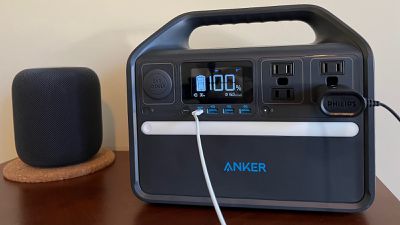
anker 535 front
I've had a bit of time to test out the $500 Anker 535, and it delivers a handy set of connectivity options for charging up a variety of devices, and a decent charging capacity that can keep things going for quite a while.

The Anker 535 includes a 512 watt-hour battery, and it weighs in at a hefty 16.5 pounds (7.5 kg), so while it's not something you're going to want to carry with you on a hike, it's compact enough to be stored out of the way in your home or easily transported in a car.

While I haven't an opportunity to use the Anker 535 out on the road yet, I have been able to test it out around the house and it was comforting to know it was available during a couple of ice storms in my area over the winter, even though we ultimately experienced nothing more than a few power blips here and there.

So while I haven't needed the power station in a true off-the-grid scenario, I've used it quite a bit around the house for powering and charging up various devices, and it's worked very well.

There's a host of ports and outlets including four AC outlets supporting devices up to 500 watts, one USB-C port that supports fast charging at up to 60 watts, three USB-A ports, and one 12V vehicle-style outlet. An integrated light bar on the front of the unit helps to illuminate your surroundings while also making it easy to manage all of the devices you might be connecting to its ports.
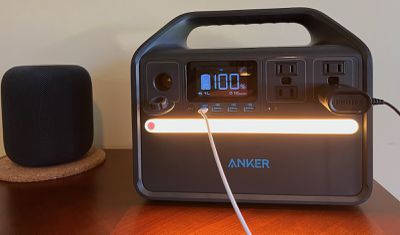
anker 535 light
The power station comes with a 120-watt AC adapter, and it can also be recharged at 60 watts via its USB-C port. For even faster recharging (0 to 80% in about two and a half hours), you can connect via both methods simultaneously. It can also be recharged via a vehicle power port (though that will take significantly longer at just 12 watts), or via any 12V–28V solar panel charger equipped with an 8mm DC power connector.

On the front of the unit, there's an informative LED display that shows the current battery level in both percentage and a rougher pictorial display, and it reports real-time input and output wattages, as well as the estimated time to fully recharge or to power connected devices. A series of icons across the top of the display can illuminate to let you know what types of devices are currently connected and provide high- and low-temperature warnings.

I really like the amount of detail shown on the display, letting you know exactly which ports are currently active and giving you up-to-the-second data on input or output so you can tell how much battery life you have left or how long the station will take to recharge, or even just to have an understanding of how much power an individual device draws while charging.

A switch near the AC outlets let you turn a power-saving mode on and off. When turned on, the power station will automatically turn off once all connected devices are fully charged, saving battery. Turning it off will provide continuous, stable power for devices like CPAP machines that are running constantly while connected to the power station.

Anker says the 535 power station can fully charge a MacBook Air more than eight times or run a 40-watt CPAP machine for more than a full night's sleep, and while I didn't test those claims specifically, I did find it to offer plenty of power for the tasks I did test.

For example, fully recharging an iPad Air from the station's USB-C port took about an hour and a half and used approximately 6% of the power station's total capacity. I tested a variety of other devices from powering a room fan to recharging a cordless razor to running a HomePod and a lamp, all at the same time, and the Anker 535 had no problems keeping up.

Keep in mind that the 500-watt limit for the station means it won't be able to power some high-load devices like hot plates, toasters, hairdryers, and many larger household appliances.
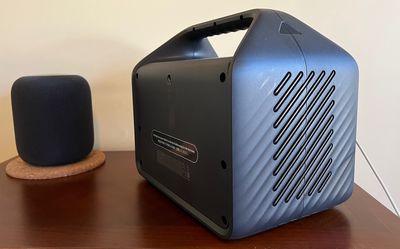
anker 535 rear
The Anker 535 Portable Power Station is priced at $499.99, but the company has several other options available at a range of price points. The 521 model at 256 watt-hours has half the capacity of the 535, but it also comes at half the price, checking in at $249.99. It does also sacrifice some ports, checking in with two AC outlets instead of four, and two USB-A ports instead of three.

There's also an even smaller 511 model at 97-watt hours, normally priced at $219.99 and featuring a single 100-watt AC outlet, a 45-watt USB-C port, and two USB-A ports.

Finally, there's a pair of older models, the 389 watt-hour 533 model priced at $459.99 and the highest-capacity 545 model with 778 watt-hours of energy and priced at $699.99.

Note: Anker provided MacRumors with the 535 Portable Power Station for the purpose of this review. No other compensation was received. MacRumors is an affiliate partner with Anker. When you click a link and make a purchase, we may receive a small payment, which helps us keep the site running.


Tag: Anker

Top Rated Comments

61 months ago
Maybe an idea for Anker to sponsor some for Ukraine. They can use this greatly with all the power outages.

Score: 3 Votes (Like | Disagree)
61 months ago
So cheap

Attachment Image
Score: 3 Votes (Like | Disagree)
61 months ago

Can you explain why?
It is a different chemistry than the batteries you find in phones/laptops and much safer. You don't have to worry about this thing burning down your house because someone dropped it like you would with a regular lithium battery.
Score: 2 Votes (Like | Disagree)
61 months ago
Quite bulky and heavy but can prove to be useful in certain conditions.
Score: 2 Votes (Like | Disagree)
VCTGomes Avatar
61 months ago
Excellent for iPhone Mini's users.
Score: 2 Votes (Like | Disagree)
Moakesy Avatar
58 months ago

Is the output pure or simulated sine wave?
Pure. According to Anker
Score: 1 Votes (Like | Disagree)

Popular Stories

Apple MacBook Pro with PROLED XDR Display family lineup feature

Apple Announces OLED MacBook Pro With Touch Display

Wednesday October 28, 2026 10:11 am PDT by
Apple today announced a new high-end MacBook Pro, which is available in 14-inch and 16-inch sizes. The new device has a PROLED XDR display that supports touch gestures, and a glowing rear Apple logo. Pricing on the MacBook Pro starts at $2,899 for the 14-inch model and $3,399 for the 16-inch model. Apple says the MacBook Pro has the "world's best display in a pro laptop." The PROLED...
Apple MacBook Pro 14 in with M6 hero

Apple Announces New 14-Inch MacBook Pro With M6 Chip

Tuesday October 27, 2026 6:01 am PDT by
Apple today announced a refreshed 14-inch MacBook Pro featuring the M6 chip, upgraded connectivity specifications, and more. The M6 chip in the MacBook Pro features a 12-core CPU with 2 super cores, 4 performance cores, and 6 efficiency cores, paired with a 12-core GPU. This is up from the M5 chip with a 10-core CPU with 4 super cores and 6 efficiency cores, paired with a 10-core GPU. M6...
iPad mini OLED feature 1

Apple Executive Comments on New iPad Mini Lacking 120Hz Display

Thursday October 29, 2026 1:47 pm PDT by
While the new iPad mini has an OLED display, the device does not support ProMotion, meaning the display's refresh rate is limited to 60Hz instead of 120Hz. ProMotion support would have allowed for the iPad mini's refresh rate to automatically adjust from 10Hz to 120Hz depending on the content being displayed, but evidently Apple has kept the feature exclusive to the iPad Pro among iPad...
Latest Stories
Russia Places Apple on State Surveillance Registry
1 hour ago
Halloween Weekend Brings Discounts on Apple Accessories and Pre-Orders
2 hours ago
Apple Has Released More Than 25 New Products in the Past Two Months
2 hours ago
Local Code Launches as Free, Private AI Assistant Tool for Mac
3 hours ago
Apple Acquires Ascend.io
3 hours ago
HomePod Mini 2 Launches Today: All the New Features
4 hours ago
AirTag 2 4-Pack Drops to New Low Price of $69.99
4 hours ago
Rian Johnson's iPhone Camera App Goes Viral
4 hours ago
Where Did All the iPhone Duos Go? Mostly to Apple's Stores
6 hours ago
Apple's Touchscreen MacBook Pro Could Ship 1.5M Units in 2027
7 hours ago
New Apple TV 4K and iPad Mini: RAM Amounts Revealed
16 hours ago
Apple Executive Comments on New iPad Mini Lacking 120Hz Display
20 hours ago
Here's a Hands-On Look at HomePod Mini 2's New Two-Tone Colors
20 hours ago
Apple Lowers App Store Fees in Taiwan Starting October 31
21 hours ago
HomeView Pre-Order Returns to $289.99 on Amazon
21 hours ago
Apple Avoids Showing Pinched Fingers on iPad Mini Page in South Korea
22 hours ago
Old 'Popcorn Time' App Left Hundreds of Thousands of Macs at Risk
23 hours ago
You Can Turn Off the New MacBook Pro's Touchscreen Functionality
23 hours ago
MacBook Pro Mini-LED vs. OLED Buyer's Guide: Every Difference
1 day ago
Where to Pre-Order Apple's New MacBooks, iPad Mini, and iMac
1 day ago
Apple Releasing HomePod Mini 2 Tomorrow With These New Features
1 day ago
How macOS Adapts Its Controls for Touch on the New MacBook Pro
1 day ago
Just Got an iPhone Duo? Try These Features First
1 day ago
Apple Announced Scott Forstall's Departure 14 Years Ago Today
1 day ago
Best Buy Opens Pre-Orders for PROLED XDR MacBook Pro With $100 Bonus Gift Cards
2 days ago
Here's Everything Apple Announced This Week
2 days ago
Here's a Real-World Look at the New MacBook Pro's Glowing Apple Logo
2 days ago
How Accurate Were Rumors About Apple's OLED Touchscreen MacBook Pro?
2 days ago
Apple Has 8 New Products Available for Pre-Order
2 days ago
iPhone Duo: Turn the Hinge Into an App Launcher
2 days ago









































