In iOS 15, Apple has added a much-requested feature to the Notes app in the form of tags. This means you can now include hashtags in your notes which can help you organize your notes and find stored notes more easily. Let's take a look at how they work.

- Launch the Notes app and create a new note or select an existing one.
- Add a tag anywhere in the note by using the hash (#) symbol and including a word or phrase that identifies it for organizational purposes. Some examples are #cooking, #plants, #work, or #shopping, but it can be literally anything you want.
- Repeat the above steps for other new notes or stored notes – the tags will be highlighted automatically to show they are recognized as such.
- Now return to the main Folders overview screen, and under the new "Tags" section, tap a tag that you created to see all the notes which contain that tag.
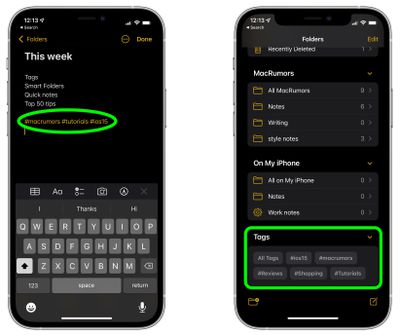
Tags can be a powerful method of organizing your notes, because there's no limit to how many you can have, and a single note can include multiple tags, so the same note can show up in different tagged categories that you've created. Also, when you add a hash symbol to a note, iOS will conveniently suggest existing notes for you to pick above the virtual keyboard.
In iOS 15, Apple has also added a new Smart Folders option that you can use to create a folder to house tags. Simply tap the folder icon in the bottom left corner of the Notes overview screen, then tap New Smart Folder.
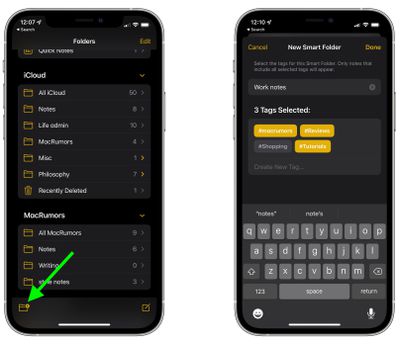
Give the folder a name, then select the tags that you want it to include. You can choose tags you've already created, or add new tags that will be used in future notes by tapping Create New Tag.... Note that only notes that include all selected tags will appear in your Smart Folder.