In iOS 16, Apple Maps has received an update that brings multi-stop routing to the navigation app. Keep reading to learn how to use it.
iOS 16 Maps Guide Feature Warm
With iOS 16, the Maps app allows you to plan a route that has multiple stops instead of just a single destination. While Google Maps has had this feature for some time, this is the first version of Apple's Maps app to include support for it.

When entering a destination, ‌Apple Maps‌ allows you to add up to 15 locations to stop at en route, and the app will navigate you to each stop in turn. Here's how it works.

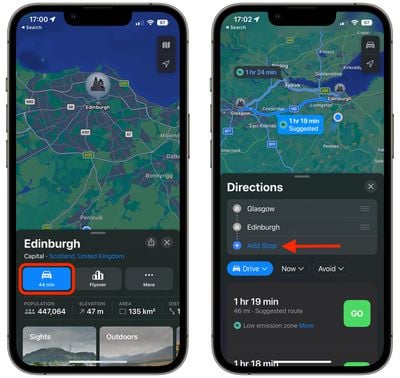
  1. In ‌Apple Maps‌, enter your destination and then tap the Directions button for your chosen mode of transport.
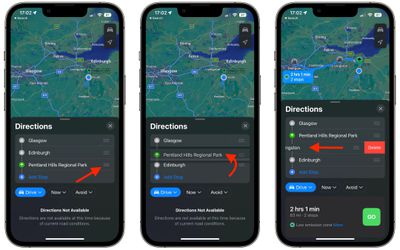
  2. In the Directions panel, tap Add Stop to search for and include a stop en route to your destination. Repeat this step up to 15 times to add multiple stops to your journey.
    maps

  3. Use the hamburger icons (the three lines) beside each location name to drag your stops so that they are in the desired order.
  4. To remove a stop from your journey, simply swipe left on the stop and tap the Delete button that appears.
  5. When you're happy with your journey plan, choose a directions option below and tap the Go button to get started.
    maps

Note that the Maps app does not optimize the route, so you'll need to do that manually when you type in stops.

Tip: If you're already on the road and want to insert a stop into your route, you can use Siri voice commands to do so.


Popular Stories

Apple Creator Studio

Apple Introduces New 'Creator Studio' Bundle of Apps for $129 Per Year

Tuesday January 13, 2026 6:11 am PST by
Apple today introduced a new Apple Creator Studio bundle that offers access to six creative apps, as well as exclusive AI features and content, as part of a single subscription. In the U.S., pricing is set at $12.99 per month or $129 per year. Here are the six apps included with an Apple Creator Studio subscription:Final Cut Pro on the Mac and iPad Logic Pro on the Mac and iPad Pixelmator...
Verizon New

Verizon is Down: iPhones Show 'SOS' Mode Due to Network Outage [Resolved]

Wednesday January 14, 2026 10:18 am PST by
Verizon is experiencing a major outage across the U.S. today, with hundreds of thousands of customers reporting issues with the network on the website Downdetector. There are also complaints across Reddit and other social media platforms. iPhone users and others with Verizon service are generally unable to make phone calls, send text messages, or use data over 5G or LTE due to the outage....
iPhone Top Left Hole Punch Face ID Feature Purple

New Leak Reveals iPhone 18 Pro Display Sizes, Under-Screen Face ID, and More

Wednesday January 14, 2026 7:09 am PST by
While the iPhone 18 Pro models are still around eight months away, a leaker has shared some alleged details about the devices. In a post on Chinese social media platform Weibo this week, the account Digital Chat Station said the iPhone 18 Pro and iPhone 18 Pro Max will have the same 6.3-inch and 6.9-inch display sizes as the iPhone 17 Pro and iPhone 17 Pro Max. Consistent with previous...
iOS 26

Here's What's New in iOS 26.3 So Far

Monday January 12, 2026 1:15 pm PST by
Apple today seeded the second beta of iOS 26.3, nearly a month after the first beta. So far, the update includes a couple of new features for iPhones. iOS 15.3 through iOS 18.3 were all released in late January over the years, so it is thereby likely that iOS 26.3 will be released towards the end of this month as well. The update is compatible with the iPhone 11 series and newer. Below,...
airpods pro 3 design

Apple Releases New AirPods Pro 3 Firmware Update

Tuesday January 13, 2026 11:29 am PST by
Apple today released a firmware update for the AirPods Pro 3. The latest firmware has a version number of 8B34, up from the previous version 8B30. Apple has a support document for AirPods firmware updates, and it indicates that the 8B34 update contains unspecified "bug fixes and other improvements." No other AirPods models received firmware updates today. How to install AirPods Pro...