Skip to Content

How to Use Audio Sharing on iPhone and iPad

by

Apple's Audio Sharing feature on iPhone and iPad lets you share your device's Bluetooth audio with a second pair of wireless headphones, allowing two of you to listen to the same music together while running, or enjoy a movie on a plane without disturbing those around you, for example.
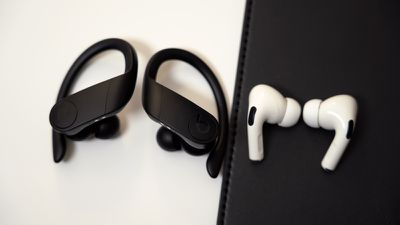
powerbeatsproairpodsdesignbothearbuds

Compatibility Check

To get started with Audio Sharing, first make sure that the headphones and iOS device that you plan to use are compatible with the feature. According to Apple, Audio Sharing is supported by the following models:

  • AirPods (first, second, and third-generation)
  • AirPods Pro
  • AirPods Max
  • Powerbeats Pro
  • Powerbeats 3
  • Beats Solo Pro
  • Beats Solo 3 Wireless
  • Beats Studio 3 Wireless
  • BeatsX
  • Beats Flex
  • Beats Fit Pro
  • ‌iPhone‌ 8 and later
  • iPad Pro (12.9-inch) 2nd gen and later
  • ‌iPad Pro‌ (11-inch)
  • ‌iPad Pro‌ (10.5-inch)
  • ‌iPad‌ (5th gen and later)
  • iPad Air (3rd gen)
  • iPad mini (5th gen and later)
  • iPod touch (7th gen)

Next, check that the iOS device that will be hosting the audio is running iOS 13.1 or later. You can check that your device is up-to-date by launching the Settings app and going to General -> Software Update. Once you've done that, you're ready to start audio sharing. Here's how it works.

How to Use Audio Sharing in iOS
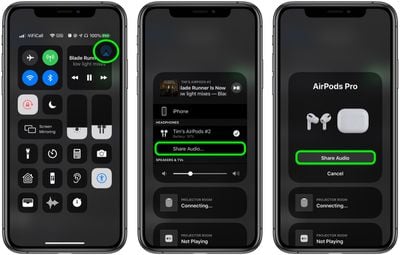
control center

  1. With your AirPods on, start playing audio on your ‌iPhone‌ or ‌iPad‌.
  2. Launch Control Center by swiping down from the top-right corner of the screen.
  3. In Control Center's audio playback controls, tap the icon with the triangle and three circles.
  4. Now, bring your friend's AirPods, inside their case, close to your device, and flip the lid open.
  5. You should see a prompt on your device's screen offering to Share Audio with the second pair of AirPods.

When you've successfully connected, the ‌iPhone‌ or ‌iPad‌ hosting the audio controls the volume level on both pairs of headphones, but both people listening can also use any headphone controls they may have to change volume independently.


Related Roundups: AirPods 4, AirPods Pro 3
Related Forum: AirPods

Popular Stories

Multicolored Low Cost A18 Pro MacBook Feature

Apple Accidentally Leaks 'MacBook Neo'

Tuesday March 3, 2026 7:00 am PST by
Apple appears to have prematurely revealed the name of its rumored lower-cost MacBook model, which is expected to be announced this Wednesday. A regulatory document for a "MacBook Neo" (Model A3404) has appeared on Apple's website. Unfortunately, there are no further details or images available yet. While the PDF file does not contain the "MacBook Neo" name, it briefly appeared in a link...
imac video apple feature

Apple Unveils Two New Products

Monday March 2, 2026 7:49 am PST by
Apple today introduced two new devices, including the iPhone 17e and an updated iPad Air. iPhone 17e features the same overall design as the iPhone 16e, but it gains Apple's A19 chip, MagSafe for magnetic wireless charging and magnetic accessories, Apple's second-generation C1X modem for faster 5G, and a doubled 256GB of base storage. In the U.S., the iPhone 17e starts at $599, just like the ...
MacBook Neo Feature Pastel 1

Apple Announces $599 'MacBook Neo' With A18 Pro Chip

Wednesday March 4, 2026 6:15 am PST by
Apple today announced the "MacBook Neo," an all-new kind of low-cost Mac featuring the A18 Pro chip for $599. The MacBook Neo is the first Mac to be powered by an iPhone chip; the A18 Pro debuted in 2024's iPhone 16 Pro models. Apple says it is up to 50% faster for everyday tasks than the bestselling PC with the latest shipping Intel Core Ultra 5, up to 3x faster for on-device AI workloads,...