Apple released HomePod software version 16.3 in January 2023 and added a number of new features to its HomePod lineup, including the ability to add a selection of remastered ambient sounds to scenes. This article explains how it's done.
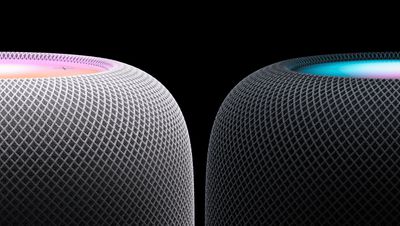
The arrival of Apple's HomePod software version 16.3 adds a number of new features to new and existing HomePods that are well worth checking out.
The update activates temperature and humidity sensing for both the second-generation HomePod and the HomePod mini, adds the ability to set up recurring automations using Siri, and brings ambient sounds that can be added to automations, alarms, and scenes.
Apple says the new ambient sounds have been remastered to sound more immersive, so it's worth giving them a listen. The available ambient sounds include Fireplace, Forest, Night, Ocean, Rain, Stream, and White Noise.
Let's look at how the new ambient sounds work with scenes. Once you've made sure your HomePod software is up-to-date, you can set up a scene on your HomePod to use one of the new, more immersive ambient sounds in the following way.
How to Use HomePod Ambient Sounds in Scenes
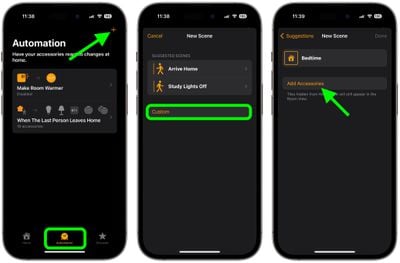
- In the Home app on your iPhone or iPad, select the Automations tab at the bottom of the interface.
- Tap the + icon in the top-right corner of the screen and choose Add Scene.
- Select on of the suggested scenes, or tap Custom.
- In the next screen, give your scene a name, then tap Add Accessories.

- Tap the accessories that you want to include in the scene (make sure one of them is a HomePod), then tap Done.
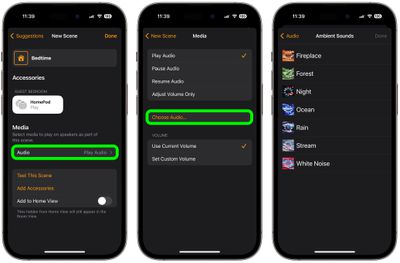
- Back in the "New Scene" menu, under "Media," tap Audio.
- Choose Play Audio, then tap Choose Audio....
- Tap Ambient Sounds and select which one you want to use, then tap Done.
- Tap back to the "New Scene" menu, then tap Done.
Now that your scene is set up, you can activate it by saying "Hey Siri, [name of scene]" when you're within earshot of your HomePod or another Apple device.