 Since macOS Monterey was released, Apple has included a tool to check the quality of your Mac's internet connection without having to rely on benchmarks from third-party websites.
After you've joined the Wi-Fi network that you want to test, the tool is accessed via the command line, so you'll need to open the Terminal console (found in Applications/Utilities) and type in the following at the command prompt:
networkQuality
Press Enter, and the tool will begin to output the results of the test after about 15 seconds. When the test is completed, you'll see a summary of these results, which include the more nebulous upload/download flows, and more usefully, a real-time measurement of your internet connection's upload and download speed in Mbps.
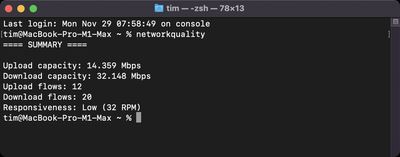
At the end of the summary, the responsiveness of your network is defined as Low, Medium, or High. This takes into account the number of sequential round-trips per minute (RPM), or how many transactions your network can complete in one minute.
Apple has a support document that helpfully explains what these classifications mean:
- Low: If any device on the same network is, for example, downloading a movie or backing up photos to iCloud, the connection in some apps or services might be unreliable, like during FaceTime video calls or gaming.
- Medium: When multiple devices or apps are sharing the network, you might see momentary pauses or freezes, like during FaceTime audio or video calls.
- High: Regardless of the number of devices and apps sharing the network, apps and services should maintain good connection.
If you're trying to troubleshoot a poor internet connect, this tool can be especially useful as a repeatable test when experimenting with different configuration settings and comparing the effects.