Stop Videos From Looping in the Photos App - MacRumors
Skip to Content

Stop Videos From Looping in the Photos App

by

Have you noticed your iPhone videos keep playing on repeat in the Photos app? In iOS 18.2 and later, the stock Photos app automatically replays videos until you manually pause them – a feature that might be fine at first but can quickly become annoying, especially with longer clips.
icloud photos
The auto-loop feature can be fun for short clips or when showing someone a quick video, but it forces you to take action to stop each video rather than letting it end naturally. It can be disruptive when you're browsing through multiple short clips in your library, and proves particularly annoying when viewing longer content where you likely don't want to see the same three-minute video play twice in a row.

Fortunately, Apple provides a simple toggle to disable the behavior:

  1. Open the Settings app on your iPhone or iPad.
  2. Scroll down and tap through to Apps ➝ Photos.
  3. Scroll until you find the Loop Videos option.
  4. Toggle the switch to the OFF position.
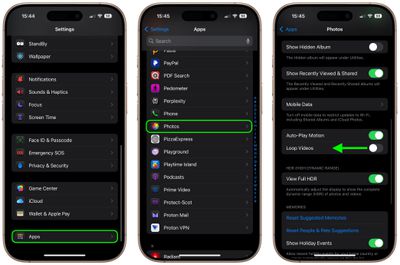
stop auto looping videos photos app

That's all you need to do. Videos in your Photos app will now play once and then stop automatically. No more endless replays.

If you prefer videos not to play automatically at all when you open them, there's a related setting you can adjust. In the same Settings menu, toggle off the Auto-Play Motion option, and videos will stay still until you manually press the play button.


Top Rated Comments

17 months ago
Oh, thank Kier. I hated that auto repeat.
Score: 5 Votes (Like | Disagree)
Veinticinco Avatar
17 months ago
Add this to the growing iOS list of "things that really should be default/opt-in as opposed to opt-out".
Score: 3 Votes (Like | Disagree)
mansplains Avatar
17 months ago
Really wish all app settings would be in-app. Third parties do this, while Apple crams most options in the settings app. Is it really too much to add a gear icon? Why do we need to jump around apps to tweak one thing?
Score: 2 Votes (Like | Disagree)
17 months ago
I love that auto loop!
Score: 2 Votes (Like | Disagree)
17 months ago
This will be off by default in the next update.
Score: 2 Votes (Like | Disagree)
17 months ago
I’ve always thought that Apple doing this every iOS update, you know, slowly modifying the photos app slightly worse and calling it revolutionary is a prime example of how the customer never truly owns the device and how Apple doesn’t actually care for the consumer as much as they care about profits. And I mean that because they have to compete against other smartphone rivals and changing it makes it seem new, although we all know that the prime photos app was at its most wonderful numerous iOS iterations ago.
Score: 2 Votes (Like | Disagree)

Popular Stories

meta ai

Meta's New AI Image Tool Can Use Your Public Instagram Photos by Default

Wednesday July 8, 2026 1:52 pm PDT by
Meta is rolling out a new feature that lets people use public Instagram posts and reels to generate AI content, and it's turned on by default. If you have an Instagram account that's not set to private, there is a setting allowing anyone to generate content on Meta AI using your images and videos. The option was added to support Meta's new image generation model, Muse Image. Muse Image is...
apple back to school sans airpods 2

Apple's 2026 Back to School Offer is Coming Soon

Sunday July 12, 2026 7:29 am PDT by
Apple's stores will be rolling out Back to School marketing materials this week, according to Bloomberg's Mark Gurman. This suggests that the offer will begin in the U.S. in the next few days. Last year, college students and educational staff could receive a free accessory like AirPods 4 or an Apple Pencil Pro with the purchase of a qualifying Mac or iPad model. The Back to School offer is in...


Waze logo

5 New Waze Features Rolling Out Now: Here Are All the Details

Monday July 13, 2026 3:42 am PDT by
Google today announced that Waze is getting a handful of new features, including some Gemini-powered personalization enhancements for Conversational Reporting. Conversational Reporting already uses Gemini when users report traffic incidents like slowdowns, but now you can use it to suggest map updates like road closures or outdated addresses. Saying something like "The road is closed here"...