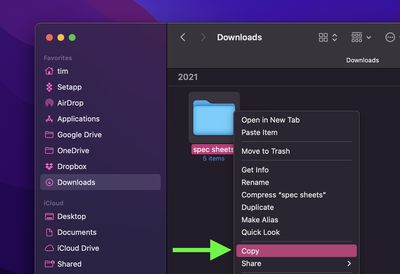
In macOS, you can copy a file or folder to another location in Finder with ease. Simply right-click (or Ctrl-click) the item and select Copy from the shortcut menu, then navigate to the location where you want to copy it, right-click in the Finder window and select Paste Item from the shortcut menu.
finder
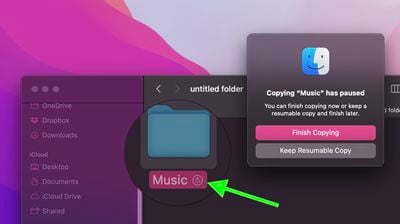
In macOS Monterey, a pie chart progress indicator next to the copying item's name shows you how long the copy will take to complete. If it looks like it's going to take longer than you'd like, you can always pause the copy and resume it later. Here's how it works.

If you cancel a copy midway through, a ghosted version of the file or folder will remain in the destination location. Just click it and you'll be given the option to Finish Copying it, or you can Keep the Resumable Copy and finish the transfer at another time that's more convenient.
finder
Did you know that Finder can quickly convert images for you? Check out our dedicated how-to article to learn how.


Related Forum: macOS Monterey

Popular Stories

iOS 26

iOS 26.3 and iOS 26.4 Will Add These New Features to Your iPhone

Tuesday February 3, 2026 7:47 am PST by
While the iOS 26.3 Release Candidate is now available ahead of a public release, the first iOS 26.4 beta is likely still at least a week away. Following beta testing, iOS 26.4 will likely be released to the general public in March or April. Below, we have recapped known or rumored iOS 26.3 and iOS 26.4 features so far. iOS 26.3 iPhone to Android Transfer Tool iOS 26.3 makes it easier...
imac video apple feature

Apple Makes Its Second-Biggest Acquisition Ever

Tuesday February 3, 2026 12:45 pm PST by
Apple recently acquired Israeli startup Q.ai for close to $2 billion, according to Financial Times sources. That would make this Apple's second-biggest acquisition ever, after it paid $3 billion for the popular headphone maker Beats in 2014. This is also the largest known Apple acquisition since the company purchased Intel's smartphone modem business and patents for $1 billion in 2019....
iOS 26 Home Feature

Apple Gives Final Warning to Home App Users

Tuesday February 3, 2026 8:55 am PST by
In 2022, Apple introduced a new Apple Home architecture that is "more reliable and efficient," and the deadline to upgrade and avoid issues is fast approaching. In an email this week, Apple gave customers a final reminder to upgrade their Home app by February 10, 2026. Apple says users who do not upgrade may experience issues with accessories and automations, or lose access to their smart...
maxresdefault

M5 Pro and M5 Max MacBook Pro Launch Imminent as Reseller Stock Dwindles

Tuesday February 3, 2026 12:12 pm PST by
New M5 Pro and M5 Max MacBook Pro models are slated to launch in the near future, according to information shared with MacRumors by an Apple Premium Reseller. Subscribe to the MacRumors YouTube channel for more videos. The third-party Apple retailer said that MacBook Pro stock is very low currently because there is an imminent new product introduction. Apple typically coordinates supply with...
Apple Logo Black

Apple's Next Launch is 'Imminent'

Sunday February 1, 2026 12:31 pm PST by
The calendar has turned to February, and a new report indicates that Apple's next product launch is "imminent," in the form of new MacBook Pro models. "All signs point to an imminent launch of next-generation MacBook Pros that retain the current form factor but deliver faster chips," Bloomberg's Mark Gurman said on Sunday. "I'm told the new models — code-named J714 and J716 — are slated...