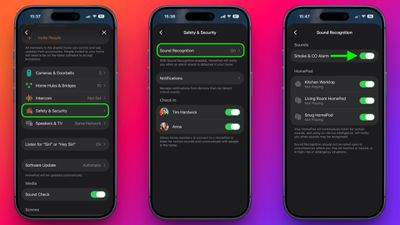
Make HomePod Alert You to Smoke Alarms - MacRumors
Skip to Content

Make HomePod Alert You to Smoke Alarms

by

Thanks to Apple's Sound Recognition feature, the HomePod mini and second-generation HomePod can send you notifications when they recognize smoke or carbon monoxide alarm sounds. Keep reading to learn how it works.
HomePod 2 and Mini feature 1
With Sound Recognition, HomePod can detect the sound of a smoke or carbon monoxide alarm in your home, and alert you by sending a notification to your iPhone, iPad or Apple Watch.

It's a neat addition if you don't own a smart detector, although Apple warns that the feature should not be relied upon "in circumstances where users may be harmed or injured," or in "high-risk or emergency situations."

The Sound Recognition feature is accessible in the Home app. If your Home system is connected to a smart camera, it will also display live video of your home, so you can see what's happening in real time.

Here's how to enable the feature. Note that Sound Recognition on HomePods requires Apple's updated Home app architecture that was introduced in 2022 as part of iOS 16.4 and iPadOS 16.4.

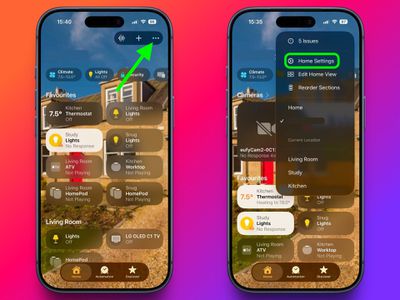
  1. In the Home app, tap the ellipsis button (three dots) in the top-right corner of the screen.
  2. Tap Home Settings.
    home

  3. Tap Safety & Security ➝ Sound Recognition.
  4. Under "Sounds," make sure the Smoke & CO Alarm toggle is in the green ON position.
  5. Toggle on the switches next to the HomePod devices that you want to enable Sound Recognition for.
    home

That's all there is to it. Note that you can also access the Sound Recognition menu via the Home app's menu cards for individual HomePods.

Sound Recognition was first introduced on the iPhone in 2020 and can detect a wide variety of sounds on that device, including a doorbell, running water, a baby crying, a car horn, a door knock, a cat meowing or dog barking, and more.


Top Rated Comments

TFrank2 Avatar
7 weeks ago

FWIW, for the people that are saying they tested it and it hasn't worked, I think the alarm has to be sounding for a bit (30 seconds.... a minute??) before it will alert you. I don't think just hitting the "test" button on a smoke alarm will trigger it.

Yes, it detected the alarm going off on my UPS a few months ago.

How long are you running the alarm for? In my testing, the alarm needs to be going for at least 30 seconds before my HomePod mini alerts me.
Finally got it to work. Turned it off/on, ran a test on YouTube and at about 45 seconds it shot me an alert. Success!
Score: 3 Votes (Like | Disagree)
7 weeks ago
Will it alert us when the new HomePod mini 2 is released?
Score: 3 Votes (Like | Disagree)
7 weeks ago

I’ve had this enabled for ages and tried to test it a few times to no avail. Anyone here have any luck with it?
Yes, my family was out of town for a weekend about a month ago and we had this alert come in. I was able to check our HomeKit camera to verify the alarm was going off, so we called the fire department. They came to our house and inspected things. They were able to verify it was a false alarm because of some dust in an old alarm that I've now replaced. I was glad it ended up being a false alarm, but it made me thankful for the feature in the event of a real emergency.
Score: 3 Votes (Like | Disagree)
TFrank2 Avatar
7 weeks ago
I’ve had this enabled for ages and tried to test it a few times to no avail. Anyone here have any luck with it?
Score: 3 Votes (Like | Disagree)
7 weeks ago

I’ve had this enabled for ages and tried to test it a few times to no avail. Anyone here have any luck with it?
It literally kept my house from burning down (with my dog inside!!!!) last year. We got an alert and were able to call 911 and a friend to come over and get our pup
Score: 2 Votes (Like | Disagree)
7 weeks ago

My smoke alarms are so loud, I don't really need any addl notification ;)
Well, if you’re not home, you might change your mind
Score: 2 Votes (Like | Disagree)

Popular Stories

Apple Event Logo

Apple to Launch These 15+ New Products Later This Year

Friday March 27, 2026 2:03 pm PDT by
March has been an incredibly busy month for Apple, with the company unveiling more than 10 new products and accessories. We said hello to the MacBook Neo at the start of the month, and we bid farewell to the Mac Pro at the end of it. Nevertheless, there is still a lot more to come this year. Beyond the usual annual updates to iPhones and Apple Watches, Apple's all-new smart home hub is...
iOS 26

iOS 26.4 Adds Two New Features to CarPlay

Tuesday March 24, 2026 1:55 pm PDT by
iOS 26.4 was released today, and it includes a couple of new features for CarPlay: an Ambient Music widget and support for voice-based chatbot apps. To update your iPhone 11 or newer to iOS 26.4, open the Settings app and tap on General → Software Update. CarPlay will automatically offer the new features so long as the iPhone connected to your vehicle is running iOS 26.4 or later....
Mac Pro Feature Teal

Apple Confirms Mac Pro Is Dead, No Future Models Planned

Thursday March 26, 2026 2:04 pm PDT by
Apple has discontinued the Mac Pro and has removed the machine from its website, reports 9to5Mac. Apple said it does not plan to design a new version of the Mac Pro, and no new model will be coming in the future. The Mac Pro was last updated in 2023, which was when Apple added an M2 Ultra Apple silicon chip, but the chassis has not been refreshed since 2019. Apple redesigned the Mac Pro to...