

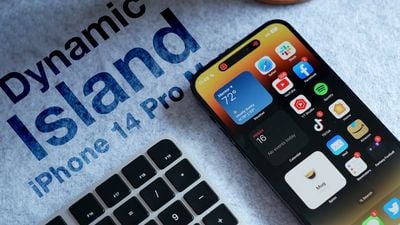
When Apple unveiled its latest iPhone 14 Pro models, many people were surprised by its innovative integration of software functions with the pill-shaped cutout at the top of the screen, which Apple calls the "Dynamic Island."
Dynamic Island Thumb Alt
Display pixels around the ‌Dynamic Island‌ merge it into one pill-shaped area that changes size and shape to accommodate various types of alerts, notifications, and interactions, turning it into a kind of front-and-center information hub.

But what if you find content that appears in ‌Dynamic Island‌ distracting, especially when you're trying to focus on something else on your ‌iPhone‌'s screen?

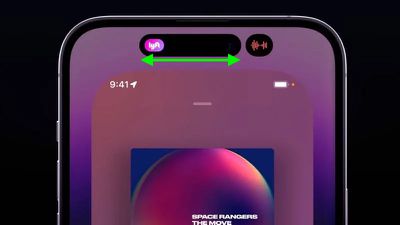
Unfortunately, there's currently no way to outright disable ‌Dynamic Island‌ content, as its behavior is baked into iOS 16. However, if you're distracted by its animations you can dismiss them by swiping left or right across the Dynamic Island, without affecting any related background activity.

For example, if an album in Apple Music is playing and you dismiss the audio waveform and artwork in the ‌Dynamic Island‌, the music will continue to play in the background. The same goes for when you dismiss a timer – it will still count down in the background even though it is no longer visible on the screen.
dynamic island dismiss content
If the ‌Dynamic Island‌ is split into two background activities and you want to get rid of one or both, use the same swipe gesture on the larger segment to make it disappear. Then, in the same way, swipe across the remaining activity that extends across the pill.

If you dismiss all activity in ‌Dynamic Island‌, it will return the pill-shape to its previous inert status, leaving you to focus entirely on what else is on the screen.

Related Forum: iPhone

Top Rated Comments

redcarlsen Avatar
44 months ago
the amount of praise for this nonsense is unreal.
Score: 23 Votes (Like | Disagree)
maktaba Avatar
44 months ago
Dynamic Island is a good example of “putting lipstick on a pig”.
Score: 21 Votes (Like | Disagree)
sehns Avatar
44 months ago
Am i the only person who gives absolutely no f***s about dynamic island?
Score: 20 Votes (Like | Disagree)
deuxani Avatar
44 months ago
I think the content of this article perfectly describes the current state of Apple’s OS’s. It’s getting so complex with no logical cues, manuals or explanations for users, that we have to read articles online to figure out basic functionality like this.

The amount of time it takes to explain some (older) people that left swipe from the top brings the Notification Center and right swipe brings Control Center or TouchID is not pressing the button but laying your finger on it…
Score: 16 Votes (Like | Disagree)
scrm Avatar
44 months ago
Phase 1: “A seamless fusion of hardware and software, birthing an iconic new interaction method that’s fun as well as functional? Take my money!”

Phase 2: “Looks cool and my friends think so too but… is there a way to disable it?”

Phase 3: “The results are in: this was a design mistake. It wasn’t broken before, what was Apple thinking? At least the next version won’t have it!”

Case in point: MBP Touch Bar.

Dynamic island is now approaching phase 2.

IPadOS Stage Manager: about to land in phase 1. ?
Score: 14 Votes (Like | Disagree)
Royksöpp Avatar
44 months ago
Why would you turn it off? Isn't that the whole point of buying this phone?
Score: 11 Votes (Like | Disagree)

Popular Stories

Second Generation AirTag Feature

Apple Unveils New AirTag With Longer Range, Louder Speaker, and More

Monday January 26, 2026 6:07 am PST by
Apple today introduced the second-generation AirTag, with key features including longer range for tracking items and a louder speaker. For those who are not familiar, the AirTag is a small accessory that you can attach to your backpack, keys, or other items. Then, you can track the location of those items in the Find My app on the iPhone, iPad, Mac, Apple Watch, and iCloud.com. The new...
M5 MacBook Pro

Apple Reportedly Aiming to Upgrade the MacBook Pro Twice This Year

Sunday January 25, 2026 11:46 am PST by
Apple plans to release new MacBook Pro, MacBook Air, Mac Studio, and Studio Display models in the first half of this year, according to Bloomberg's Mark Gurman. In his Power On newsletter today, Gurman added that redesigned MacBook Pro models with an OLED touch screen "should be hitting toward the end of 2026," meaning that the MacBook Pro line would be upgraded twice this year. First up...
Apple Logo Spotlight

Apple to Launch These 20+ Products This Year

Sunday January 25, 2026 6:02 pm PST by
2026 promises to be yet another busy year for Apple, with the company rumored to be planning more than 20 product announcements over the coming months. Beyond the usual updates to iPhones, iPads, Macs, and Apple Watches, Apple is expected to release its all-new smart home hub, which was reportedly delayed until the more personalized version of Siri is ready. Other unique products rumored for ...
iOS 26

What to Expect From iOS 26.4

Friday January 23, 2026 12:31 pm PST by
iOS 26.3 is shaping up to be a relatively minor update, with only a couple of notable new features, but iOS 26.4 is expected to be much more significant. We are still waiting for the iOS 26.3 Release Candidate to come out, so the first iOS 26.4 beta is likely still at least a few weeks away. Following beta testing, iOS 26.4 will likely be released to the general public at some point in March ...
top stories 2026 01 24

Top Stories: iPhone 18 Pro Leaks, Siri Chatbot, Apple AI Pin, and More

Saturday January 24, 2026 6:00 am PST by
Apple rumors are starting to pick up now that we're a few weeks into 2026, and this week saw some potential clarity around conflicting iPhone 18 Pro rumors, plus some new word on Apple's plans for Siri. This week also saw a report that Apple is working on some sort of AI pin while also making progress toward a major MacBook Pro revamp, so read on below for all the details! Top Stories iPh...














