iOS 17: How to Enable Sensitive Content Warnings - MacRumors
Skip to Content

iOS 17: How to Enable Sensitive Content Warnings

by

In iOS 17 and iPadOS 17, Apple has introduced Sensitive Content Warnings to prevent unsolicited nude photos and similar content coming through to your iPhone or iPad. Here's how to enable the feature.
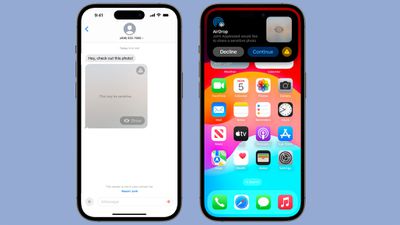
nude photo block ios 17
With Sensitive Content Warnings enabled in iOS 17, incoming files, videos, and images are scanned on-device and blocked if they contain nudity. The opt-in blurring can be applied to images in Messages, AirDrop, Contact Posters for the Phone app, FaceTime messages, and third-party apps.

Note that this is separate from the Communication Safety features the Apple has implemented for children, and is designed for people of all ages. Sensitive Content Warnings can be enabled by following the steps below.

  1. Open up the Settings app.
  2. Tap Privacy & Security.
  3. Scroll down and tap Sensitive Content Warning.
  4. Tap the switch next to Sensitive Content Warning to enable the feature.
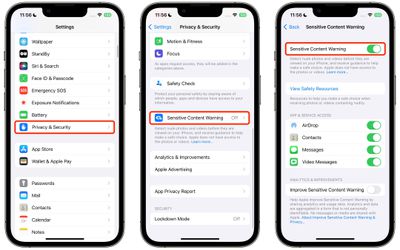
settings

With the feature turned on, you'll see additional options that allow you to turn enable Sensitive Content Warnings for specific services, including AirDrop, Contacts, Messages, and Video Messages.

Note that all nudity is blocked by Apple's operating system by default when the feature is enabled, but individual media can always be viewed by tapping on the "Show" button.

Popular Stories

iPhone 18 Pro Deep Red Feature

iPhone 18 Pro Launching Next Month With These 12 New Features

Thursday August 6, 2026 7:03 am PDT by
It is now August, and that means the iPhone 18 Pro and iPhone 18 Pro Max are just a month away. The devices are expected to look similar to the iPhone 17 Pro and iPhone 17 Pro Max, but there will still be many year-over-year changes, with rumored features including a smaller Dynamic Island, 5G via satellite, and more. Apple is expected to unveil the iPhone 18 Pro, iPhone 18 Pro Max, and a...
iPhone 18 Pro Deep Red Feature

iPhone 18 Pro Launching Next Month With These 12 New Features

Sunday August 9, 2026 1:45 pm PDT by
It is now August, and that means the iPhone 18 Pro and iPhone 18 Pro Max are just a month away. The devices are expected to look similar to the iPhone 17 Pro and iPhone 17 Pro Max, but there will still be many year-over-year changes, with rumored features including a smaller Dynamic Island, 5G via satellite, and more. Apple is expected to unveil the iPhone 18 Pro, iPhone 18 Pro Max, and a...
iOS 27 Feature Cool

Everything New in iOS 27 Beta 5

Monday August 10, 2026 3:02 pm PDT by
We're a little over a month away from the launch of iOS 27, and Apple is continuing to make changes. The fifth beta of iOS 27 changes the look of some app icons and adjusts Liquid Glass, plus it adds some smaller features that make the iPhone just a little nicer to use. App Icons There are updated Liquid Glass icons for Safari, Siri, Settings, Remote, App Store, and Preview. Some of the...