Skip to Content

iOS 18: Arrange Icons Around Your iPhone Wallpaper

by

With iOS 18, Apple overhauled the Home Screen, introducing design changes that allow for more customization and personalization. One of the changes is the freedom to arrange icons and widgets with space between them, opening up a variety of new layout options.
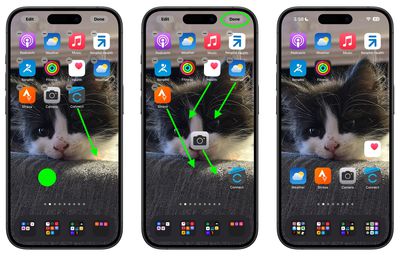
ios 18 home screen icons
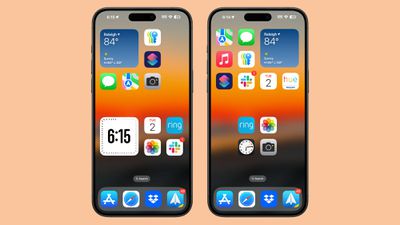
In iOS 17, new apps added to the ‌Home Screen‌ automatically occupy the next available spot, and there is no way to space out icons on the same page. But with iOS 18, you have more flexibility in arranging your ‌Home Screen‌.

You can now choose the exact location for new apps, allowing for app icon-sized gaps between apps, entire empty rows, or entire empty columns. However, due to the invisible grid system, icons and widgets cannot be placed with uneven spacing, so this should be considered when arranging your ‌Home Screen‌.

This design enables a variety of layouts: For example, you can place a single app in the center of a page, create a row of apps at the top and bottom, form a column of apps, and more. Apple's goal here is to let you organize apps and widgets around wallpapers and create more functional and visually appealing layouts.

Here's how to place your icons where you want in iOS 18.

  1. Long press an empty space on the ‌Home Screen‌ to enter jiggle mode.
  2. Move your app icons into the desired positions within the invisible grid.
  3. Tap Done.

arrange home screen icons 1
In iOS 18, you can also make your icons bigger by removing the app names from them. Click the link to learn how it's done. iOS 18 is currently in public beta and will see a general release in the fall.


Top Rated Comments

iMac The Knife Avatar
21 months ago
Wow, it's 2024 and you now have the freedom to arrange icons and widgets with space between them. Brilliant.
Score: 15 Votes (Like | Disagree)
coffeemilktea Avatar
21 months ago
I've been planning to remove all the icons so I can see my cat wallpaper with zero distractions. 😻
Score: 8 Votes (Like | Disagree)
klky Avatar
21 months ago
It's insane that it's taken this long. Who did they hire that finally figured out this wizardry?
Score: 8 Votes (Like | Disagree)
klky Avatar
21 months ago
I'm praying there's a way to disable or at least hide the stupid App Library page at the end. I hated it from day one and it's an absolute eye sore. Also it just seems completely unnecessary.

We've been able to arrange apps into folders for some time now. Soon we'll be able to place apps and folders wherever we want on the home screen. If they still force the App Library page at the end of all that, it would actually be hilarious. Basically, "Arrange things however you want, but we're still gonna do it our way and force you to see it".
Score: 5 Votes (Like | Disagree)
Dr McKay Avatar
21 months ago

Wow, it's 2024 and you now have the freedom to arrange icons and widgets with space between them. Brilliant.
I wonder if the people I saw saying to others “If you want to have your icons anywhere, buy an android” will make use of this feature 🤔
Score: 5 Votes (Like | Disagree)
21 months ago

I'm praying there's a way to disable or at least hide the stupid App Library page at the end. I hated it from day one and it's an absolute eye sore. Also it just seems completely unnecessary.
Really? I love the App Library. I've deleted all of my pages of apps except the home page, and put my most used apps there. Everything else is in the App Library on the 2nd page. The apps are organized by type, with my most used ones front and center of each grouping. If there's an app I don't see, simply start typing in the search bar. I think it's one of the better features they've rolled out.
Score: 3 Votes (Like | Disagree)

Popular Stories

Apple Event Logo

Apple Released Seven New Products Today

Wednesday March 11, 2026 7:05 am PDT by
Starting today, the seven new Apple products that were announced last week are available at Apple Stores and beginning to arrive to customers. The colorful MacBook Neo and all of the other new products are on display at most Apple Store locations around the world starting today. Apple Stores have inventory of the new products for both walk-in customers and Apple Store pickup, but...
Apple 50 Years of Thinking Different

Apple Announces 50th Anniversary Plans

Thursday March 12, 2026 6:10 am PDT by
Apple today announced that it will celebrate the company's 50th anniversary over the coming weeks, but it has yet to reveal any specific plans. Apple was founded on April 1, 1976, so the company will turn 50 on April 1, 2026. "While Apple is known for looking forward, this milestone offers a special moment to reflect on the journey that has brought the company here, to celebrate the...
iphone fold text

iPhone Fold to Feature iPad-Style Multitasking and Layouts

Wednesday March 11, 2026 1:31 pm PDT by
The upcoming foldable iPhone that Apple plans to debut this September will operate like a cross between an iPhone and an iPad, reports Bloomberg. When the device is opened up, the UI will have an iPad-like layout that supports multitasking with two apps side-by-side. No iPhone to date has supported running multiple apps on the display at the same time, beyond simple picture-in-picture mode...