

With the introduction of iOS 17 and iPadOS 17, Apple turned on Communication Safety, an opt-in feature that warns children when sending or receiving photos that contain nudity. It is enabled by default for children under the age of 13 who are signed in with an Apple ID and part of a Family Sharing group, but parents can also enable it for older teens as well.
Communication Safety first launched in the U.S. with iOS 15.2 in December 2021, and has since expanded to Australia, Belgium, Brazil, Canada, France, Germany, Italy, Japan, the Netherlands, New Zealand, South Korea, Spain, Sweden, and the U.K. With iOS 17 and iPadOS 17, Apple has made the feature available globally.
Communication Safety was initially designed to warn children when receiving or sending photos that contain nudity in the Messages app, but it has also been expanded in iOS 17 to cover video and AirDrop content, FaceTime video messages, and Contact Posters in the Phone app.
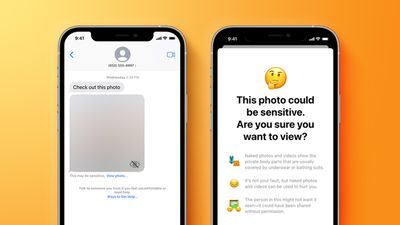
When the feature is enabled, photos and videos containing nudity are automatically blurred in supported apps, and the child will be warned about viewing sensitive content. The warning also provides children with ways to get help. It uses on-device processing to detect photos and videos containing nudity, ensuring that Apple and third parties cannot access the content, and that end-to-end encryption is preserved in the Messages app.
You can control Communication safety at any time in Screen Time settings for your child's account. To enable or disable the feature manually, follow these steps on devices running iOS 17 or iPadOS 17 and later.
- Open the Settings app on iPhone or iPad.
- Select Screen Time.
- If you are managing a child's device, tap the name of a child in your family group.
- Under "Communication," tap Communication Safety.
- Toggle the switch on or off next to Communication Safety.
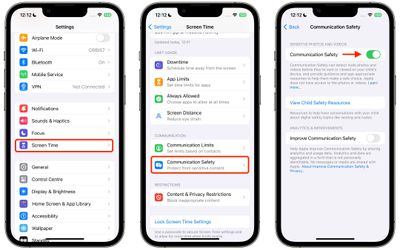
Note that you can also use this menu to view Child Safety Resources, which offer advice on helping children stay safe online and how to get emotional and mental health support.





































![Apple Watch Ultra 3 Hits New Low Price With Amazon's $299 Discount [Updated]](https://images.macrumors.com/t/BXKI27vT0hWfumJQpYzf41rH3Mw=/112x112/article-new/2026/10/apple-watch-ultra-3-milanese.jpeg)









