Skip to Content

iOS 15: How to Drag and Drop Screenshots

by

In iOS 15, Apple has expanded support for drag and drop functionality across apps on iPhone, allowing you to move files, images, and selected chunks of text from place to place.
ios 15 home screen icons yellow
Cross-app drag and drop has actually been available on the iPad since 2017, but now Apple has extended the feature to the ‌iPhone‌ with iOS 15. In addition to apps, the multi-finger action also works with screenshots. The following steps show you how it works.

  1. Take a screenshot in the usual way, by pressing the Side button and the Volume Up button at the same time.
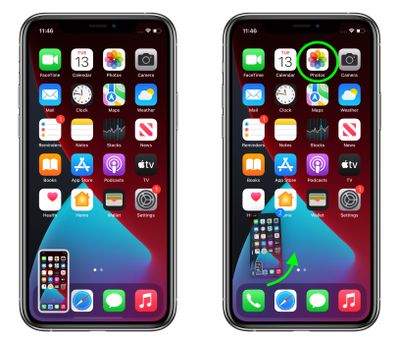
  2. Press and hold on the screenshot thumbnail in the bottom-left corner of the screen, and wait a moment for the white frame around it to disappear.
  3. With another finger, tap the app that you want to use the screenshot in. We're opening the Photos app in our example, but you could open Files, Messages, Mail, Notes, or something else.
    screenshots

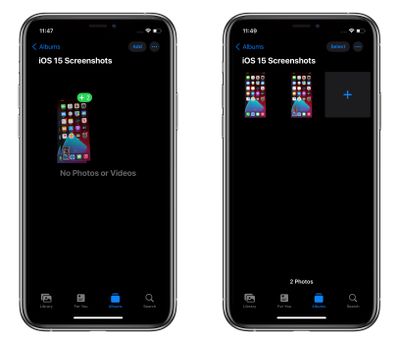
  4. Navigate to where you want to use the screenshot. We're selecting a specific album we created, called "iOS 15 screenshots."
  5. Move the screenshot into the area you want it, then let go with your finger to drop it in place. In our example, the screenshots are instantly saved in the specified location.
    screenshots

You may have noticed that we've dragged two screenshots in our example – that's just a "meta" result of capturing screenshots of the screenshot-taking process (the thumbnail of the earlier screenshot remains in the next). However, it also serves to highlight that drag and drop supports the selection of multiple items by tapping them with another finger.

It's worth noting that drag and drop results in duplication rather than movement of content, so the screenshot still gets automatically saved in your camera roll. But in iOS 15 you have the ability to immediately pick up a copy of the image and do something more specific with it, like save it to a newly created album, which is useful if your workflow involves lots of screenshots.

The first public beta of iOS 15 is available now, and the official release should come to all compatible iPhones in September.


Related Forum: iOS 15

Top Rated Comments

Mac Fly (film) Avatar
61 months ago
Dragging the screenshot to a messaging app may have been a better example, considering screenshots are already automatically saved to a folder called screenshots in photos.
Score: 9 Votes (Like | Disagree)
contacos Avatar
61 months ago
wow like ... how is anyone supposed to figure this out on their own O.o "it just works"
Score: 8 Votes (Like | Disagree)
61 months ago

wow like ... how is anyone supposed to figure this out on their own o_O "it just works"
The Konami code was easier to figure out.
Score: 3 Votes (Like | Disagree)
IIGS User Avatar
61 months ago

The Konami code was easier to figure out.
Or the Da Vinci code. Or the Enigma Code, or the Drogan's decoder wheel code.

I used it to decode a static-filled triple-scrambled microwave transmission between two soldiers talking in Mandarin Chinese.

It was easy since they were only using a simple polyphonetically-grouped twenty-square-digit key transposed from boustrophedonic form with multiple nulls.

The message said "BE SURE TO DRINK YOUR OVALTINE"....
Score: 3 Votes (Like | Disagree)
MacFan782040 Avatar
61 months ago
I feel like they could’ve made this way easier.
Score: 2 Votes (Like | Disagree)
mattopotamus Avatar
61 months ago
much easier to just take the screenshot and then open your photos be it in messenger, mail, etc.
Score: 2 Votes (Like | Disagree)

Popular Stories

imac video apple feature

Apple Unveils Seven New Products

Friday March 6, 2026 11:48 am PST by
Apple this week unveiled seven products, including an iPhone 17e, an iPad Air with the M4 chip, updated MacBook Air and MacBook Pro models, a new Studio Display, a higher-end Studio Display XDR, and an all-new MacBook Neo that starts at just $599. iPhone 17e features the same overall design as the iPhone 16e, but it gains Apple's A19 chip, MagSafe for magnetic wireless charging and magnetic...
Apple MacBook Pro M4 hero

Apple Planning 'MacBook Ultra' With Touchscreen and Higher Price

Sunday March 8, 2026 8:05 am PDT by
Apple is planning to launch an all-new "MacBook Ultra" model this year, featuring an OLED display, touchscreen, and a higher price point, Bloomberg's Mark Gurman reports. Gurman revealed the information in his latest "Power On" newsletter. While Apple has been widely expected to launch new M6-series MacBook Pro models with OLED displays, touchscreen functionality, and a new, thinner design...
MacBook Neo Feature Pastel 1

First MacBook Neo Benchmarks Are In: Here's How It Compares to the M1 MacBook Air

Thursday March 5, 2026 4:07 pm PST by
Benchmarks for the new MacBook Neo surfaced today, and unsurprisingly, CPU performance is almost identical to the iPhone 16 Pro. The MacBook Neo uses the same 6-core A18 Pro chip that was first introduced in the iPhone 16 Pro, but it has one fewer GPU core. The MacBook Neo earned a single-core score of 3461 and a multi-core score of 8668, along with a Metal score of 31286. Here's how the...