Skip to Content

macOS: How to Use Live Text to Copy and Share Text in Video

by

In macOS Ventura, Apple has expanded the reach of its Live Text feature, which can recognize text in not just photos, but also videos now, too. Keep reading to learn how to use it.
photos
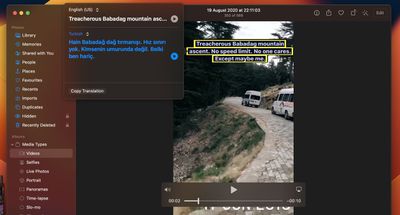
In macOS Monterey, Apple introduced a feature called Live Text that can automatically recognize text when it appears in an image in Safari, Photos, Preview, Quick Look, and elsewhere, allowing you to easily copy or share it. In macOS Ventura, this ability now extends to videos as well.

Rather than just being able to select text in photos, you can now pause a video and interact with the text like you would in an image. Text in any paused video frame can be copied and pasted or translated, plus it works with Apple's Look Up feature.

Live Text works in macOS in ‌Photos‌, Quick Look, Safari, and other apps that support video. The feature is available in German (Germany), English (Australia, Canada, India, Singapore, UK, US), Spanish (Spain), French (France) and Japanese (Japan). Here's how to get it working on video.

  1. Pause the video at the frame that has text showing.
  2. Highlight the text that you want to copy by clicking and dragging a selection with your mouse cursor.
  3. Next, right-click (or Ctrl-click) the highlighted text to see a menu of contextual options including Translate, Copy, and Share.

If you opt to translate the text, the translation will appear on the screen automatically. If you chose to copy the text, switch to an app that supports text input, right-click where the cursor is located, then select Paste from the popup menu or press the Command-V shortcut.


Popular Stories

Apple MacBook Pro M4 hero

Apple Planning 'MacBook Ultra' With Touchscreen and Higher Price

Sunday March 8, 2026 8:05 am PDT by
Apple is planning to launch an all-new "MacBook Ultra" model this year, featuring an OLED display, touchscreen, and a higher price point, Bloomberg's Mark Gurman reports. Gurman revealed the information in his latest "Power On" newsletter. While Apple has been widely expected to launch new M6-series MacBook Pro models with OLED displays, touchscreen functionality, and a new, thinner design...
imac video apple feature

Apple Unveils Seven New Products

Friday March 6, 2026 11:48 am PST by
Apple this week unveiled seven products, including an iPhone 17e, an iPad Air with the M4 chip, updated MacBook Air and MacBook Pro models, a new Studio Display, a higher-end Studio Display XDR, and an all-new MacBook Neo that starts at just $599. iPhone 17e features the same overall design as the iPhone 16e, but it gains Apple's A19 chip, MagSafe for magnetic wireless charging and magnetic...
ios 26 4 yellow

Everything New in iOS 26.4 Beta 4

Monday March 9, 2026 3:50 pm PDT by
Apple is continuing to test the iOS 26.4 beta, and the latest update is now available for developers and public beta testers. As testing goes on, there are fewer new features in each beta, but today’s release adds new emoji characters and a few other changes. New Emoji Apple added new emoji characters, including trombone, treasure chest, distorted face, hairy creature, fight cloud, orca,...