How to Change Reminder Priority in the Reminders App for iOS - MacRumors
Skip to Content

How to Change Reminder Priority in the Reminders App for iOS

by

In iOS 13, Apple's stock Reminders app can be used to create a reminder for just about anything. You can add notes and websites to provide a reminder for more context, and you can even prioritize your reminders to see at a glance how important they are relative to each other. Keep reading to learn how.
how to add notes and URLs to reminders in iOS 2
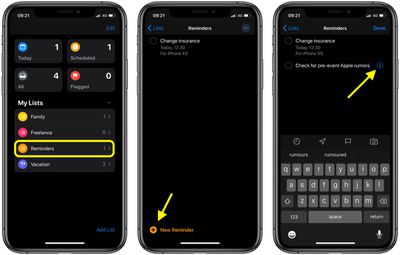
Adding a reminder to a list can be done by tapping into a list and then tapping New Reminder, or by tapping into the Today, Scheduled, All, or Flagged categories at the top of the app and then choosing New Reminder or tapping the plus button.

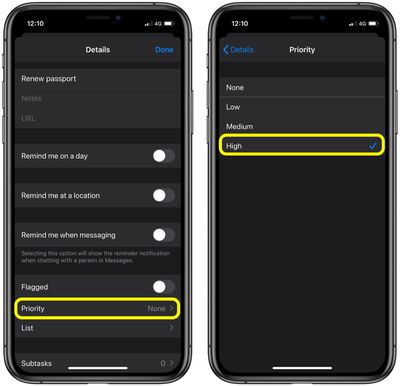
Once you've given your reminder a name, tap the info ("i") button next to it to open the Details screen. Further down the screen you'll find the Priority option – tap it, then select Low, Medium, or High, depending on the reminder's importance. Tap back to the details screen and then select Done to confirm.
reminders
Note that flagging a reminder makes it appear in the default Flagged list and helps to highlight it in your own custom list, but making a reminder a priority adds exclamation marks to it and re-locates it higher up the list based on its priority level.

Popular Stories

Waze logo

5 New Waze Features Rolling Out Now: Here Are All the Details

Monday July 13, 2026 3:42 am PDT by
Google today announced that Waze is getting a handful of new features, including some Gemini-powered personalization enhancements for Conversational Reporting. Conversational Reporting already uses Gemini when users report traffic incidents like slowdowns, but now you can use it to suggest map updates like road closures or outdated addresses. Saying something like "The road is closed here"...
Apple 2026 Back to School Graphic

Apple's 2026 Back to School Offer Just Went Live in Select Countries

Wednesday July 15, 2026 11:48 am PDT by
Apple's annual Back to School promotion is now live in select countries in Asia, including China, India, Malaysia, the Philippines, Singapore, Taiwan, Thailand, and Vietnam. The offer provides college students and educational staff with a free item with the purchase of an eligible Mac or iPad model. The exact offer varies by country, with options including a pack of four AirTags, AirPods 4,...
iphone 17 cyber

Apple Closes Unlocked iPhone Loophole for T-Mobile and Verizon Financing

Wednesday July 15, 2026 3:20 pm PDT by
Carrier-financed iPhones purchased from Apple will soon be locked to the carrier, ending a workaround customers used to purchase an unlocked iPhone on a payment plan. Until the rule change, buying an iPhone from Apple and opting for financing through Verizon or T-Mobile meant you would get an iPhone not locked to either carrier's network. That's no longer the case, and now iPhones financed...