How to Add Notes and URLs to Reminders in iOS - MacRumors
Skip to Content

How to Add Notes and URLs to Reminders in iOS

by

In iOS 13, Apple's stock Reminders app can be used to create a reminder for just about anything. You can add notes to provide a reminder with more context, and if your reminder is related to something you need to do online you can even attach a website link to it for convenience.
how to add notes and URLs to reminders in iOS 2
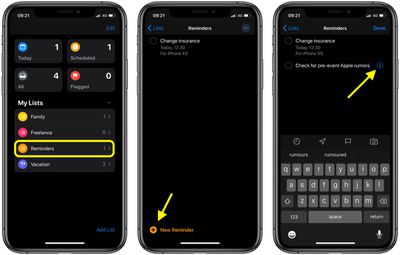
Adding a reminder to a list can be done by tapping into a list and then tapping on the New Reminder plus button, or by tapping into the Today, Scheduled, or Flagged categories at the top of the app and then choosing New Reminder.

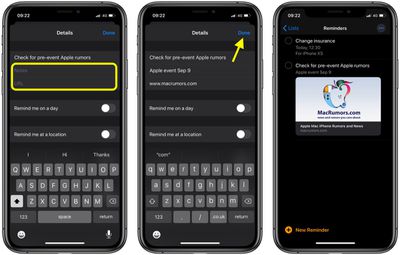
Once you've given your reminder a name, tap the info ("i") button next to it to open the Details screen. Immediately below the name of your new reminder you'll see Notes and URL fields that you can fill in, either by typing or pasting text copied from elsewhere.
reminders
When you've filled in the info and selected any other options on the Details screen, tap Done. Note that the Reminders app helpfully displays a small preview image in the list of the URL you added.

Create a Website-Related Reminder From Safari

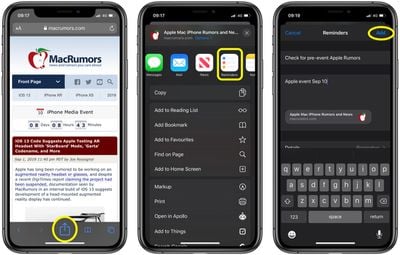
If you come across a website while browsing that you'd like to create a reminder for, you can do that too. Simply tap the Share button at the bottom of Safari's interface, then tap the Reminders icon in the Share Sheet.
how to add notes and URLs to reminders in iOS 3
Give your reminder a name and add any notes for it in the second field. You can access the Details screen at the bottom to select additional options. Tap Done when you've finished to generate the reminder and return to Safari.


Popular Stories

Four iPhone 18 Pro Colors Mock Feature

iPhone 18 Pro Launching in September With These 10 New Features

Monday April 20, 2026 7:13 am PDT by
While the iPhone 18 Pro and iPhone 18 Pro Max are not launching until September, there are already plenty of rumors about the devices. It was initially reported that the iPhone 18 Pro models would have fully under-screen Face ID, with only a front camera visible in the top-left corner of the screen. However, the latest rumors indicate that only one Face ID component will be moved under the...
Tim Cook Rainbow

Apple CEO Tim Cook Stepping Down, John Ternus Taking Over

Monday April 20, 2026 1:33 pm PDT by
Apple CEO Tim Cook is stepping down as Apple's chief executive officer, and hardware engineering chief John Ternus is set to take over, Apple announced today. Cook will continue on as Apple CEO through the summer, with Ternus set to join Apple's Board of Directors and take over as CEO on September 1, 2026. Cook is going to transition to executive chairman, and he will "assist with certain...
iphone 17 ceramic shield

Leaker: Apple Downgrading iPhone 18 to Cut Costs

Monday April 20, 2026 9:12 am PDT by
Apple is downgrading the planned specifications of the standard iPhone 18 to cut costs, a leaker claims. In a new post on Weibo, the user known as "Fixed Focus Digital" said that the iPhone 18 features "certain manufacturing downgrades" that bring it more into line with the low-cost iPhone 18e model. The decision is said to be "a cost-cutting measure." Apple has apparently chosen to...