Apple's new MacBook Pro with PROLED XDR Display features tandem OLED technology, touchscreen input, the Dynamic Island, and a thinner, lighter design. It joins the existing Liquid Retina XDR models introduced in March 2026, with both versions offering the same M5 Pro and M5 Max chips.
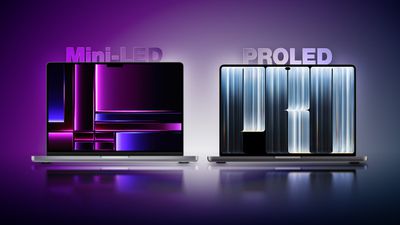
The PROLED models carry a $400 starting-price premium across equivalent sizes and chip tiers. The 14-inch M5 Pro starts at $2,499 with Liquid Retina XDR or $2,899 with PROLED XDR, while the corresponding 16-inch models start at $2,999 and $3,399. With chip options, memory capacities, and battery life unchanged, the decision largely centers on how much you value the new display, touch interaction, and slightly improved portability.
Here are all of the differences between the Liquid Retina XDR and PROLED XDR MacBook Pro models:
Display
| Liquid Retina XDR MacBook Pro | PROLED XDR MacBook Pro |
|---|---|
| Mini-LED-backlit LCD with local dimming | Tandem OLED with two self-illuminating pixel layers |
| Zone-based backlighting | Individual pixel illumination |
| Dedicated display engine, compensating for content, temperature, environment, and individual pixel usage over time | |
| 1,000,000:1 contrast ratio | 10,000,000:1 contrast ratio |
| Up to 1,600 nits peak HDR brightness | Up to 2,000 nits peak HDR brightness |
| Up to 1,000 nits outdoor SDR brightness | Up to 1,000 nits sustained full-screen SDR brightness and 2,000 nits peak outdoor SDR brightness |
| P3 wide color gamut | P3 and Adobe RGB wide color gamuts |
| 14-inch: 14.2-inch display, 3024 × 1964 resolution | 14-inch: 14.2-inch display, 3024 × 1986 resolution |
| 16-inch: 16.2-inch display, 3456 × 2234 resolution | 16-inch: 16.3-inch display, 3472 × 2266 resolution |
| Wider display borders and camera notch | Slimmer display borders and smaller camera cutout with Dynamic Island |
| Rounded top display corners and square bottom corners | Rounded display corners at all four corners |
| Standard display or optional nano-texture display | Antireflective coating, fingerprint-resistant oleophobic coating, and optional nano-texture cover glass |
| Multi-Touch sensor integrated directly into the display panel, rather than layered on top, to reduce latency and bulk |
Both versions deliver up to 1,000 nits of sustained full-screen HDR brightness, so PROLED's 2,000-nit peak does not necessarily mean the display is twice as bright across every task. Both retain a 1-nit minimum brightness, True Tone, support for one billion colors, and a 254-pixel-per-inch density.
Reference Modes and Color Workflows
Apple's Liquid Retina XDR and PROLED XDR specification sheets list the following reference-mode differences:
| Liquid Retina XDR MacBook Pro | PROLED XDR MacBook Pro |
|---|---|
| Apple XDR Display (P3-1600 nits) | Apple XDR Display (P3-2000 nits) |
| Apple XDR Display (P3 + Adobe RGB-2000 nits) | |
| Design and Print (P3-D50) | Design and Print (P3-D50) and Design and Print (Adobe RGB-D50) |
| Photography (P3-D65) | Photography (P3-D65) and Photography (Adobe RGB-D65) |
| HDR Photography (P3-D65) | |
| Medical Imaging (DICOM-350 nits), for nondiagnostic review, research, and education | |
| Medical Imaging (DICOM-600 nits), for nondiagnostic review, research, and education | |
| Apple Color Matching Function (CMF) 2026 for visual consistency with iPhone 18 Pro and Studio Display XDR |
Both versions retain reference modes for HDR video, broadcast television, digital cinema, and sRGB workflows, and both support Pro Display Calibrator.
Design and Dimensions
The weight reduction is more substantial than the change in thickness with the latest models. The measurements below cover both chip tiers in each size:
| Liquid Retina XDR | PROLED XDR | Reduction | |
|---|---|---|---|
| 14-inch height | 1.55 cm | 1.50 cm | 3.2% |
| 14-inch width | 31.26 cm | 31.08 cm | 0.6% |
| 14-inch depth | 22.12 cm | 21.63 cm | 2.2% |
| 14-inch M5 Pro weight | 1.60 kg | 1.38 kg | 13.8% |
| 14-inch M5 Max weight | 1.62 kg | 1.40 kg | 13.6% |
| 16-inch height | 1.68 cm | 1.60 cm | 4.8% |
| 16-inch width | 35.57 cm | 35.55 cm | 0.1% |
| 16-inch depth | 24.81 cm | 24.42 cm | 1.6% |
| 16-inch M5 Pro weight | 2.14 kg | 1.82 kg | 15.0% |
| 16-inch M5 Max weight | 2.15 kg | 1.84 kg | 14.4% |
The redesign also changes the hinge, cooling system, and rear Apple logo:
| Liquid Retina XDR MacBook Pro | PROLED XDR MacBook Pro |
|---|---|
| Previous standard hinge design | Redesigned hinge for greater stability during touchscreen use |
| Previous standard thermal architecture | Redesigned thermal architecture redirects warm air away from the display; Apple says sustained M5 Pro and M5 Max performance is maintained |
| Non-illuminated rear Apple logo | Illuminated rear Apple logo |
Audio and Camera
The upgraded audio system brings improvements for both portable and desktop use:
| Liquid Retina XDR MacBook Pro | PROLED XDR MacBook Pro |
|---|---|
| Previous force-cancelling woofer design | Redesigned woofers deliver 50% deeper bass |
| Previous tweeter design | Redesigned tweeters shape sound dispersion to improve clarity |
| Dedicated audio tuning for closed-lid use with an external display | |
| 12MP Center Stage camera with computational video | 12MP Center Stage camera with computational video and advanced video stabilization to reduce camera-feed shake during touchscreen use |
Camera resolution, Center Stage, Desk View, and 1080p recording remain unchanged, as do the six-speaker count, Spatial Audio support, and three-microphone array.
Storage, External Displays, and Power
| Liquid Retina XDR MacBook Pro | PROLED XDR MacBook Pro |
|---|---|
| M5 Max storage: 2TB, 4TB, or 8TB | M5 Max storage: 2TB, 4TB, 8TB, or 16TB |
| M5 Pro: three external 4K displays at up to 144Hz | M5 Pro: three external 4K displays at up to 165Hz |
| M5 Max: four external 4K displays at up to 144Hz | M5 Max: four external 4K displays at up to 165Hz |
| Genlock synchronizes display refresh with camera capture | |
| 14-inch battery capacity: 72.4Wh | 14-inch battery capacity: 72.6Wh |
| 16-inch M5 Max: 70W minimum recommended charging | 16-inch M5 Max: 94W minimum recommended charging |
M5 Pro storage remains limited to 1TB, 2TB, or 4TB. The external-display refresh-rate increases apply to the specific arrangements listed above, rather than every resolution and monitor combination. It is also worth noting that the slightly larger 14-inch battery seemingly does not increase endurance.
Touch and Dynamic Island
| Liquid Retina XDR MacBook Pro | PROLED XDR MacBook Pro |
|---|---|
| Keyboard, trackpad, and pointer input | Keyboard, trackpad, pointer, and direct onscreen Multi-Touch input |
| Scrolling, zooming, and dragging through the trackpad or other input devices | Additional direct onscreen swiping, pinch-to-zoom, and drag-and-drop gestures |
| Window controls operated through the keyboard, trackpad, or pointer | Additional touch gestures, including double-tapping a window to fill the screen and flicking to tile it |
| macOS translates onscreen touches into clicks for existing applications | |
| Touch-specific interactions through updated gesture APIs | |
| Camera "notch" | Dynamic Island for Live Activities and controls, including music playback, phone calls, AirDrop requests, and more |
| Spotlight | Spotlight moves into Dynamic Island when Siri AI is available and enabled |
| Accessibility controls | Additional listed AssistiveTouch and Touch Accommodations features |
Environmental Differences
| Liquid Retina XDR MacBook Pro | PROLED XDR MacBook Pro |
|---|---|
| 45% recycled content | 55% recycled content |
| 50% renewable manufacturing electricity | 45% renewable manufacturing electricity |
| 100% recycled tantalum in multiple capacitors, a first for Apple |
Pricing and Availability
Current U.S. starting prices put PROLED $400 above each corresponding Liquid Retina XDR model:
| Liquid Retina XDR | PROLED XDR | |
|---|---|---|
| 14-inch M5 Pro | $2,499 | $2,899 |
| 16-inch M5 Pro | $2,999 | $3,399 |
| 14-inch M5 Max | $4,099 | $4,499 |
| 16-inch M5 Max | $4,399 | $4,799 |
| Launch date | March 11, 2026 | November 6, 2026 |
The Liquid Retina XDR models remain in Apple's lineup. Their current prices reflect increases since their March introduction, so comparing original launch prices exaggerates the present starting-price premium for PROLED.
Is It Worth Upgrading?
For most existing M5 Pro and M5 Max MacBook Pro owners, there is little reason to upgrade. Both versions use the same chips, so equivalent configurations should deliver essentially the same processing performance. Neither the maximum memory capacity nor battery life has increased.
The strongest exceptions are professionals who need the OLED display's advanced capabilities, genlock, or more than 8TB of internal storage. Adobe RGB coverage and additional reference modes may address specific requirements for photographers, designers, and other professionals, while the 16TB option accommodates projects that exceed the older model's storage ceiling. These are essentially reasons to upgrade for a particular workflow, rather than for better everyday performance.
The touchscreen is a welcome addition for some users, but it is highly unlikely to justify replacing a recent MacBook Pro by itself. The reduced weight may matter more to frequent travelers, especially those carrying a 16-inch model daily, although it remains a secondary consideration for most owners since the changes are relatively minor.
The upgrade case is stronger for users coming from an M1-, M2-, or M3-generation MacBook Pro, particularly when their current machine is struggling with demanding work or has insufficient memory or storage. The existing configuration and the work it needs to perform matter more than its age alone.
Owners whose current machine remains capable should also consider waiting. M7 Pro and M7 Max models are reportedly planned for late 2027, potentially offering a major chip upgrade alongside this new display and design.
Which Should You Buy?
For buyers who need a new MacBook Pro now, the PROLED model is the stronger choice when the $400 starting-price premium is affordable and the built-in display will be used frequently. Its OLED panel is the main reason to pay more, while touch input, reduced weight, and improved speakers make the overall package more appealing. Users who need its advanced display and production capabilities have the clearest reason to choose it.
The Liquid Retina XDR model remains a sensible option when discounts create a substantial saving, particularly for users who work primarily with an external monitor, but it is important to remember that it uses a five-year-old design. It is still the better purchase when the saving allows you to afford the memory or chip configuration your work requires.