

Apple made several battery-related changes in iOS 26, introducing features that make it easier to tell which apps are draining battery and new ways to extend battery life.

Battery Design Changes
Apple updated the Battery section of the Settings app in iOS 26, and the new design provides a more in-depth look at how iPhone usage impacts battery and how much battery apps are draining.
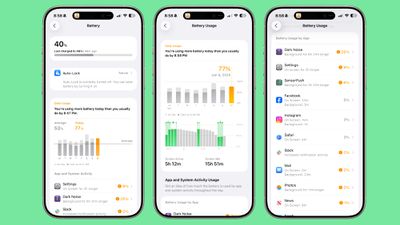
The top of the Battery interface features an overview of your current battery and the time that you last charged. If your iPhone is charging, it also lets you know how much time you have left until the battery is full.
Rather than showing battery usage over 24 hours and 10 days, Apple now displays a weekly view of average battery use along with a comparison of how much battery you're currently using compared to your typical average.
The new comparison feature lets you know if you're using more, the same, or less battery life than you do on most days. It shows which apps used more battery and by how much, which makes it easier to tell what's draining your battery. You can opt in to notifications that will let you know if your usage is above normal.
The App battery section includes specific details on what caused battery drain, letting you know if an app ran in the background longer, was on your screen longer, or sent more notifications than normal. Apps that are draining a lot of battery are shown in orange so they stand out.
You can tap back through the previous 7 days to see how much battery you used on a given day, with a breakdown for active use and screen idle use. It also shows when you charged and for how long.
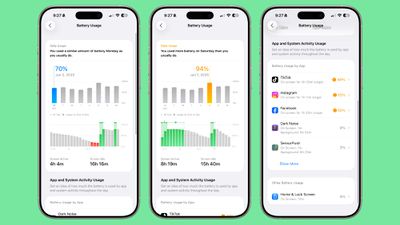
There's still a Battery Health section where you can see charge cycles and maximum capacity and a Charge Limit section where you can limit charging to 80 percent. Apple also added a new Power Mode option where you can toggle on Low Power Mode or the new Adaptive Power Mode.
Adaptive Power Mode
Adaptive Power Mode is a new setting that joins Low Power Mode for power management. It is designed to make small performance adjustments that will improve your battery life when your usage is higher than normal.
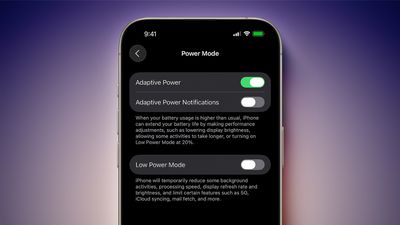
On days when you need your iPhone to last longer, you can turn on Adaptive Power. Apple says that it will intelligently make tweaks like lowering display brightness, allowing some activities to take longer, or by automatically turning on Low Power Mode at 20 percent.
Adaptive Power is an opt-in feature that can be found in the Battery section of the Settings app. If you turn it on, it will work automatically when your iPhone detects that you're using an abnormal amount of battery life.
Because Adaptive Power uses Apple Intelligence, it requires an iPhone 15 Pro or newer.
Adaptive Power Notifications
There is an option to turn on Adaptive Power Notifications, so you can be alerted when your iPhone detects higher usage and enables the Adaptive Power features. If you don't turn on notifications, Adaptive Power works quietly behind the scenes without letting you know.
Charging Time
When your iPhone is connected to a charger, you can now tap the display to wake it up and it will provide a readout of how much time you need to wait until your device is fully charged or charged to the limit that you've set.
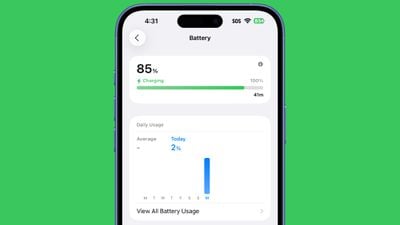
To get it to work, plug your iPhone in (or put it on a wireless charger). With the display off, tap to wake the iPhone and the time remaining will show up above the clock.
You can also open up the Settings app and go to the Battery section to see the time remaining until a full charge.
Low Power Mode Popup
When your battery level dips to 20 percent, you'll see a low battery warning in the Dynamic Island. If you tap it, you can turn on Low Power Mode.

More Descriptive Icons
If charging is on hold because of optimized charging settings or temperature reasons, the battery icon at the top right of the iPhone will be gray instead of green.
Read More
There are a lot of other new features in iOS 26, and we've got a dedicated iOS 26 roundup that lists them all.




/https://forums.macrumors.com/attachments/2543786/)











































